Business buyers apply for a trade account with company details, VAT number and documents. Check the VAT number with VIES, review every application in one queue and approve it into your wholesale customer group.
Tested on Magento 2.4.8Version 1.0.0Compatible with Magento Open Source 2.4.8 (tested on 2.4.8-p5, PHP 8.3) No core file edits
Built forMagento
B2B Registration & Approval for Magento 2: apply, check the VAT number, approve into your wholesale group.1 of 7
What it does
Business buyers apply for a trade account with company details, VAT number and documents. Check the VAT number with VIES, review every application in one queue and approve it into your wholesale customer group.
Magento Open Source has no B2B registration. The standard sign-up asks for a name and an e-mail, creates the account at once and knows nothing about companies, documents or approval. B2B Registration & Approval adds a real trade account application: company, registration and VAT number, business type, address, expected volume, your own questions and documents such as a business licence. Visitors apply and create their account in one step.
Features
Check before you trust
An outage of VIES never blocks an application; optionally refuse numbers VIES calls invalid
Documents with types, size and count limits, content checks and protected storage
Decide in one queue
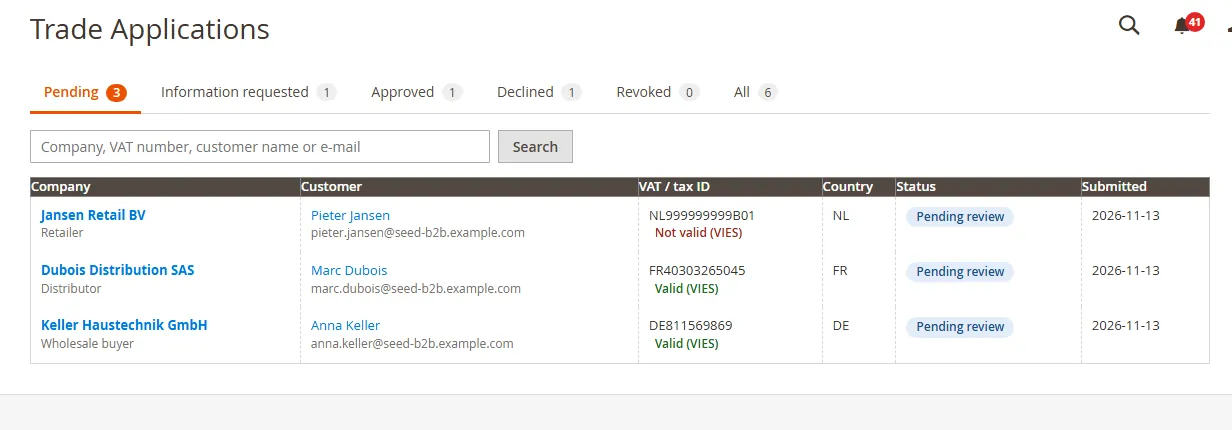
Customers > Trade Applications: tabs for pending, information requested, approved, declined and revoked, with search and counts
Approve into the customer group that carries your trade prices and tax class; the old group is restored if you revoke
Full audit history of every step
Clear for the buyer
A form with every field hidden, optional or required, plus up to 12 questions of your own
My Account > Trade account shows the status, your request and the documents
E-mails to the applicant and to the people you name (switch in the settings)
What you get
Download & installThe module .zip for Magento Open Source 2.4.8, extracted into app/code/KavioLabs (it is also a Composer package). Download it from My licenses right after payment.
12 months of updates & supportNew versions and help for 12 months (24 or 36 months at checkout). After that the module keeps working; renew anytime at 50%.
License for your storeOne production domain with all its subdomains; staging and local development hosts are free. How licensing works
30-day refundFull refund within 30 days of your first purchase, no reason needed. Refund policy
Tested buildsMagento Open Source 2.4.8 (tested on 2.4.8-p5, PHP 8.3). Tested on Magento 2.4.8.
Documentation & supportFull guide (Installation, Configuration, Usage, FAQ) on this page. Tickets from your account, same-day reply on weekdays (Mon-Fri 09:00-18:00 UTC+3).
Compatibility
B2B Registration & Approval for Magento 2 works with Magento Open Source 2.4.8 (tested on 2.4.8-p5, PHP 8.3).
We list the builds we install and test on. “Tested” means the test plan ran on that build; “Supported” means the build is inside the supported range.
Compatibility
Version
Range
Runs on
Status
Magento 2.4.8
Open Source 2.4.8-p5
PHP 8.3
Tested on 2.4.8-p5
Editions
Magento Open Source
app/code (zip) or Composer
Self-hosted
1.0.0
Latest
Trade account application form for visitors (account created in the same step) and signed-in customers: built-in fields hidden, optional or required, up to 12 own questions, documents per type.
EU VAT check with VIES (live, on submit, from the admin) with the registered company name; outages never block.
Review queue (Customers > Trade Applications): tabs, search, documents, notes, audit history; approve into a customer group, request information, decline, revoke (previous group restored).
My Account > Trade account with status and answer form; e-mails to applicant and chosen recipients; admin inbox notices.
Privacy: documents deleted with the customer, optional deletion of declined applications.
Approval pins the customer to the chosen group ("Disable Automatic Group Change Based on VAT ID"), so Magento's VAT based group assignment cannot undo it; revoke restores the earlier setting.
Spam protection for the public form: hidden trap field, per-network limits for applications, new accounts and live VAT checks; visitors are sent to sign in when Magento registration is closed.
How do I install the module?
Install the module. Unzip into app/code/KavioLabs/ModuleName/ (the folder that holds registration.php; the module name is on the Installation page). The zip is also a Composer package.
Enable and upgrade. bin/magento: module:enable, then setup:upgrade (and di:compile in production mode).
Enter the license key. Stores > Configuration > Kavio Labs: paste the key from My licenses. Staging and local stores are included.
Magento Open Source 2.4.8 (tested on 2.4.8-p5, PHP 8.3). Tested on Magento 2.4.8. The Compatibility tab lists every version range.
Can I buy a Magento module today?
Yes. Every Magento module on this site is on sale: one-time price per production store, staging and development domains included, 12 months of updates and support.
Do the modules work with Hyva?
Each product page says what was tested. Admin-only modules do not depend on the storefront theme; modules that change the storefront name the tested theme (Luma) on their Compatibility tab.
How does licensing work?
One license per production store domain, with staging and development domains included. 12 months of updates and support; after that the module keeps working.
Do you already sell modules for other platforms?
Yes. Kavio Labs sells add-ons and plugins for CS-Cart, OpenCart, WooCommerce, PrestaShop and Shopware, with the same license portal and support desk.
What does the license cover?
One production store domain with every subdomain (www, shop., staging.), plus local development hosts such as localhost, *.local and *.test. A store on another domain needs its own license; a second-store license is 40% off. You have 14 days after installing to enter the key. 12 months of updates and support are included; after that the module keeps working and renewals are 50% off. How licensing works
Can I get a refund?
Yes. Ask for a full refund within 30 days of your first purchase, no reason needed: open a ticket or write to [email protected] with your order number. The money goes back to the card or bank account you paid with within 5 business days of approval. Refund policy
How do I get help?
Open a ticket from your account, so your license details are attached. We answer with a same-day reply on weekdays (Mon-Fri 09:00-18:00 UTC+3). Support policy. Not a customer yet? Ask a pre-sales question.
Business buyers apply for a trade account with company details, VAT number and documents. You review every application in one queue and approve it into the customer group that carries your wholesale prices and tax class. The old group comes back if you revoke.
Tested on Magento Open Source 2.4.8-p5 with PHP 8.3, self-hosted. Not for SaaS editions that cannot run PHP modules.
What it does
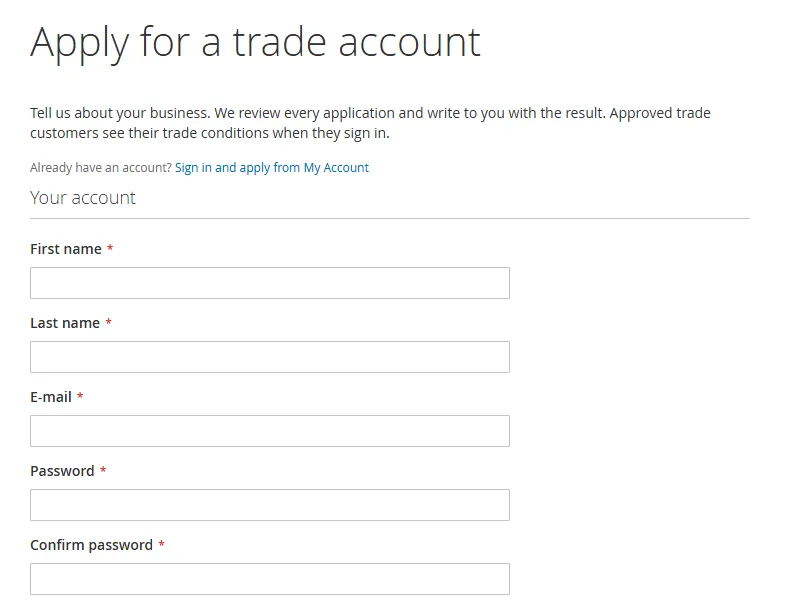
Visitors and customers apply on one page: company, registration number, VAT / tax ID, business type, website, address, phone, expected volume, a message, your own questions and documents. A visitor creates the customer account in the same step.
EU VAT numbers are checked with VIES while the applicant types, on submit and again from the admin. Your reviewer sees the registered company name. A VIES outage never blocks an application.
You decide in Customers > Trade Applications: approve into a customer group, ask for more information, decline with a reason, revoke, add internal notes. Every step is in the audit history.
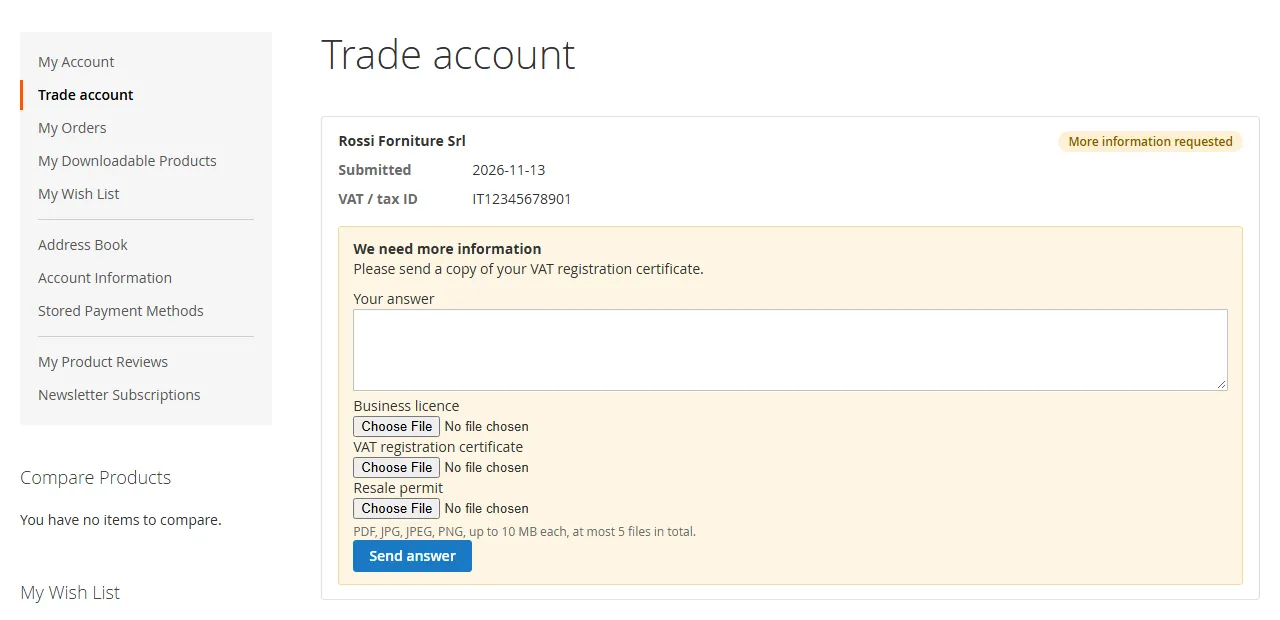
The applicant follows the status in My Account > Trade account and answers a request for information there. E-mails go to the applicant and to the people you name.
What it does not do
It adds no Adobe Commerce B2B features: no company accounts with sub-users, shared catalogs or quotes.
A customer has one group in Magento, so an approval assigns one group. Tax treatment comes from that group's tax class (Stores > Tax Rules).
It does not hide prices from visitors.
Installation
Composer (recommended)
Add the Kavio Labs repository and your licence credentials (see your Kavio Labs account).
Run composer require kaviolabs/module-b2b-registration.
Run bin/magento module:enable KavioLabs_B2bRegistration, bin/magento setup:upgrade and, in production mode, bin/magento setup:di:compile and bin/magento setup:static-content:deploy.
Zip upload
Download the zip from your Kavio Labs account.
Extract it into app/code/KavioLabs/B2bRegistration/ (the folder holds registration.php).
Run the same bin/magento commands as above.
Uninstall
Keep the data: bin/magento module:disable KavioLabs_B2bRegistration (then delete the folder or composer remove the package and run setup:upgrade).
Remove everything (tables, settings, licence state): Composer install bin/magento module:uninstall KavioLabs_B2bRegistration --remove-data; zip install bin/magento module:uninstall KavioLabs_B2bRegistration --non-composer, then module:disable, delete the folder and run setup:upgrade.
Configuration
Stores > Configuration > Kavio Labs > B2B Registration & Approval. Settings are in the default scope.
General
The general settings
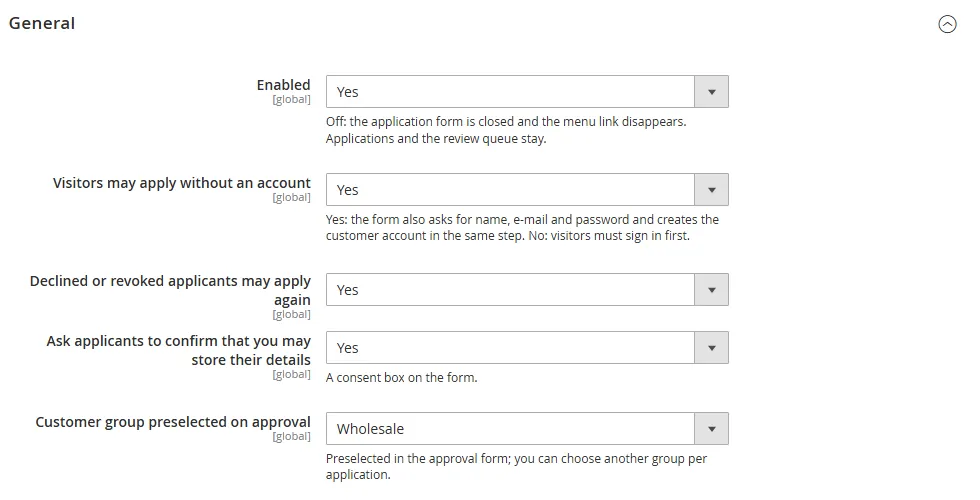
Enabled: off closes the form and removes the My Account link; applications stay.
Visitors may apply without an account: the form also asks for name, e-mail and password and creates the account (Magento's password rules and e-mail confirmation setting apply).
Declined or revoked applicants may apply again, consent box.
Customer groups for approval: the groups the approval form offers (empty = all except NOT LOGGED IN). Preselected group is the default choice.
Copy company data on approval: sets the VAT number on the customer and creates a default billing address when the customer has none. A failure never stops the approval.
Application form
Every built-in field is hidden, optional or required. Business types and monthly volume ranges are one per line. Your own questions (up to 12): text, text area, select box (comma separated choices) or check box, required or not.
Documents
Hidden, optional or required (at least one file). One upload field per document type (one per line). Allowed types pdf, jpg, jpeg, png, webp, tif, tiff (script and web types are never accepted), largest file 1 to 20 MB, 1 to 10 files per application. PHP's upload_max_filesize and post_max_size apply as well.
EU VAT check
Off, check and show the result (never blocks), or also refuse numbers VIES calls invalid. Timeout 2 to 15 seconds. VIES is the free service of the European Commission; non-EU numbers are not checked.
Privacy
Delete declined applications and their documents after N days (0 = keep). Documents and applications are deleted with the customer.
E-mails
Applicant mails on/off; recipients of the new-application mail (comma separated; empty = no mail, only the admin inbox notice); sender identity. If a mail cannot be sent it is logged and the decision still goes through.
Permissions
System > Permissions > User Roles: Trade Applications (view) and Approve, decline, revoke and delete applications (decide).
Usage
The applicant
The application formMy Account shows the status and the answer form
A visitor opens the application page (the "Apply for a trade account" link on the create-account page, or /trade-account/apply). A signed-in customer applies from My Account > Trade account.
After submitting, a visitor is signed in (unless Magento requires e-mail confirmation first) and lands on the Trade account page.
The page shows the status, the reason of a decline, the documents, and an answer form while you have asked for more information.
The reviewer
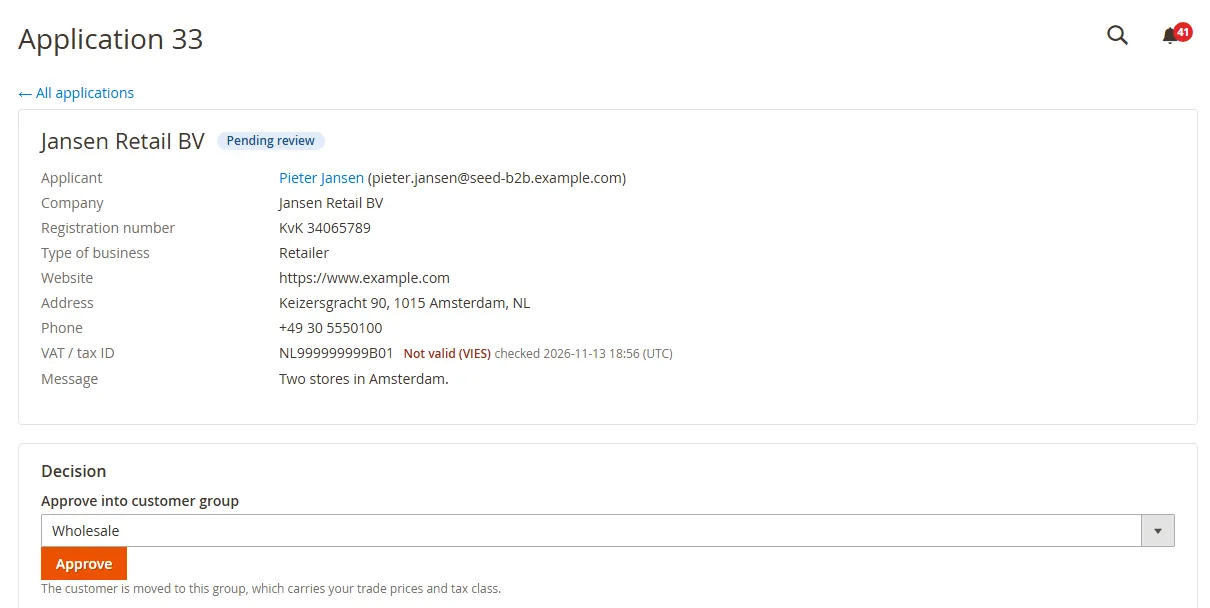
The queue under Customers > Trade ApplicationsOne application with the VAT check and the decision
Customers > Trade Applications. The Pending tab is the work list; search by company, VAT number, name or e-mail.
Open an application: company data, VIES result with the registered company name, answers to your questions, documents, notes and history.
Approve into a customer group, ask for information (the applicant is mailed and answers in My Account), or decline with a reason.
Revoke an approved application: the customer returns to the group they had before, unless you moved them to another group meanwhile. Approval also turns on the customer's "Disable Automatic Group Change Based on VAT ID" (so Magento's VAT group assignment keeps them in the approved group); revoke restores the earlier value.
Check VAT number again repeats the VIES check. Delete documents keeps the record; Delete application keeps only the audit log.
FAQ
Does it replace Magento's own VAT validation?
No. Magento's setting under Customers > Customer Configuration validates the VAT number of the account address through VIES and can assign a group automatically. This module is an application with documents, review and audit; it uses the VIES REST service for the check and the company name. Both can run: when you approve an application, the module turns on "Disable Automatic Group Change Based on VAT ID" for that customer, so Magento's automatic assignment cannot move an approved trade customer out of the group you chose on the next address save. Revoking gives the setting back the value it had before the approval.
Does it work with Hyva?
Not tested. The form and My Account pages are server-rendered, but the live VAT check uses a small RequireJS module and the module has only been run on the Luma storefront.
Can the customer be exempt from tax?
Through the group: pick or create a customer group whose tax class has no tax rule for the destination, then approve into it. The module itself changes no tax.
What happens when I delete a customer?
Their applications and documents (files) are deleted. The audit log keeps the action but no personal data.
How is the public form protected against spam?
A hidden trap field catches form-filling bots, and each network (IPv4 address or IPv6 /64) may send 30 applications, create 5 new accounts and run 60 live VAT checks per hour. When Magento may not create accounts (registration closed by another extension) or the setting Visitors may apply without an account is off, visitors are sent to sign in. The form does not show a CAPTCHA.
Where are the documents?
In var/kv_b2b_registration/, outside the public folder, under random names without extension. They are served only through the module's controllers: an applicant gets their own, an admin needs the permission. Uploads are checked for type, size, real file content and embedded code.
Does it work with multiple websites?
Applications belong to the customer account; the settings are in the default scope.
What if VIES is down?
The application is accepted and the VAT status says "VIES not available"; you can check again from the admin. Only the setting "refuse numbers VIES calls invalid" stops an application, and only for a number VIES answers as invalid.
What if the licence lapses?
The form closes and the My Account link disappears. Applications, documents and settings stay available.
XRechnung (UBL and CII) and Peppol BIS Billing 3.0 from Magento invoices and credit memos: Leitweg-ID, buyer VAT ID, EU VAT categories, validated before you send.
Sell by the metre, square metre, kilogram or litre: customers enter 2.35 m, the line total is rounded once and the unit shows in cart, orders and e-mails.