XRechnung (UBL and CII) and Peppol BIS Billing 3.0 from Magento invoices and credit memos: Leitweg-ID, buyer VAT ID, EU VAT categories, validated before you send.
Tested on Magento 2.4.8Updated Nov 13, 2026Version 1.0.0Compatible with Magento Open Source 2.4.8 (tested on 2.4.8-p5, PHP 8.3) No core file edits
Built forMagento
EU E-Invoicing for Magento 2: XRechnung and Peppol BIS from your Magento invoices and credit memos.1 of 6
What it does
XRechnung (UBL and CII) and Peppol BIS Billing 3.0 from Magento invoices and credit memos: Leitweg-ID, buyer VAT ID, EU VAT categories, validated before you send.
The e-invoicing part Magento does not do. Magento creates PDF invoices. German public buyers ask for XRechnung with their Leitweg-ID, Peppol receivers want Peppol BIS Billing 3.0, and from 2025 to 2028 German businesses move to e-invoices between each other. EU E-Invoicing creates those files from the invoices and credit memos you already make, adds the data Magento does not keep and checks every file before you send it.
Features
Three formats from your Magento documents
XRechnung 3.0 UBL and XRechnung 3.0 CII for German public buyers
Peppol BIS Billing 3.0 UBL for Peppol receivers
Invoices (380) and credit memos as credit notes (381) that refer to their invoice; the same document numbers
Buyer data done right
Leitweg-ID (BT-10), purchase order number and buyer Peppol ID on an E-Invoice tab of every order, checked by format and check digits
Buyer VAT ID from the billing address or the customer, checked per EU country (offline)
0 % lines as intra-community supply (K) or reverse charge (AE), export (G), zero rated (Z) or exempt (E), with the exemption reason code
Checked before you send
Built-in EN 16931 and XRechnung rules with messages that name the Magento screen to fix the data
Made for Magento
Sales > E-Invoices: list with search and filters, downloads and a ZIP export with a report
Created automatically when an invoice or credit memo is saved (business buyers or all), or by hand on the order
Declarative schema, observers and Admin pages only; no core overrides, no storefront changes, no outside service in the invoice flow (only the licence check)
Clean uninstall: keep your data, or remove it completely
What you get
Download & installThe module .zip for Magento Open Source 2.4.8, extracted into app/code/KavioLabs (it is also a Composer package). Download it from My licenses right after payment.
12 months of updates & supportNew versions and help for 12 months (24 or 36 months at checkout). After that the module keeps working; renew anytime at 50%.
License for your storeOne production domain with all its subdomains; staging and local development hosts are free. How licensing works
30-day refundFull refund within 30 days of your first purchase, no reason needed. Refund policy
Tested buildsMagento Open Source 2.4.8 (tested on 2.4.8-p5, PHP 8.3). Tested on Magento 2.4.8.
Documentation & supportFull guide (Installation, Configuration, Usage, FAQ) on this page. Tickets from your account, same-day reply on weekdays (Mon-Fri 09:00-18:00 UTC+3).
Compatibility
EU E-Invoicing for Magento works with Magento Open Source 2.4.8 (tested on 2.4.8-p5, PHP 8.3).
We list the builds we install and test on. “Tested” means the test plan ran on that build; “Supported” means the build is inside the supported range.
Compatibility
Version
Range
Runs on
Status
Magento 2.4.8
Open Source 2.4.8-p5
PHP 8.3
Tested on 2.4.8-p5
Editions
Magento Open Source
app/code (zip) or Composer
Self-hosted
1.0.0
Nov 13, 2026
Latest
First release: XRechnung 3.0 UBL and CII and Peppol BIS Billing 3.0 UBL from Magento invoices and credit memos (credit notes 381 with invoice reference); Leitweg-ID, purchase order number, buyer Peppol ID and VAT ID per order (E-Invoice tab) with format and check digit checks; EU VAT categories for 0 % lines (K, AE, G, Z, E) with exemption reason codes; built-in EN 16931 / XRechnung / Peppol checks (incl. quantity x price = line amount, due date of unpaid invoices, delivery date of intra-community supplies); dates in store time; Magento's own unit prices; bank transfer, purchase order, check and cash on delivery invoices written as payable with a due date (only money collected online counts as prepaid); Sales > E-Invoices list with filters, downloads and ZIP export with report; automatic creation on invoice / credit memo save; clean uninstall with or without data.
How do I install the module?
Install the module. Unzip into app/code/KavioLabs (the zip is also a Composer package).
Enable and upgrade. bin/magento: module:enable, then setup:upgrade (and di:compile in production mode).
Enter the license key. Stores > Configuration > Kavio Labs: paste the key from My licenses. Staging and local stores are included.
Magento Open Source 2.4.8 (tested on 2.4.8-p5, PHP 8.3). Tested on Magento 2.4.8. The Compatibility tab lists every version range.
Can I buy a Magento module today?
Yes. EU E-Invoicing for Magento 2 is on sale: one-time price per production store, staging and development domains included, 12 months of updates and support.
Do the modules work with Hyva?
EU E-Invoicing changes the Magento Admin only, not the storefront, so Luma, Hyva and headless storefronts are not affected. Each product page says what was tested.
How does licensing work?
One license per production store domain, with staging and development domains included. 12 months of updates and support; after that the module keeps working.
Do you already sell modules for other platforms?
Yes. Kavio Labs sells add-ons and plugins for CS-Cart, OpenCart, WooCommerce, PrestaShop and Shopware, with the same license portal and support desk.
What does the license cover?
One production store domain with every subdomain (www, shop., staging.), plus local development hosts such as localhost, *.local and *.test. A store on another domain needs its own license; a second-store license is 40% off. You have 14 days after installing to enter the key. 12 months of updates and support are included; after that the module keeps working and renewals are 50% off. How licensing works
Can I get a refund?
Yes. Ask for a full refund within 30 days of your first purchase, no reason needed: open a ticket or write to [email protected] with your order number. The money goes back to the card or bank account you paid with within 5 business days of approval. Refund policy
How do I get help?
Open a ticket from your account, so your license details are attached. We answer with a same-day reply on weekdays (Mon-Fri 09:00-18:00 UTC+3). Support policy. Not a customer yet? Ask a pre-sales question.
EU E-Invoicing turns your Magento invoices and credit memos into structured e-invoices: XRechnung 3.0 (UBL and CII) for German public buyers and Peppol BIS Billing 3.0 for Peppol receivers. It adds the data Magento does not keep (Leitweg-ID, purchase order number, buyer Peppol ID), writes the right EU VAT category for every 0 % line and checks every file against the EN 16931 and XRechnung rules before you send it.
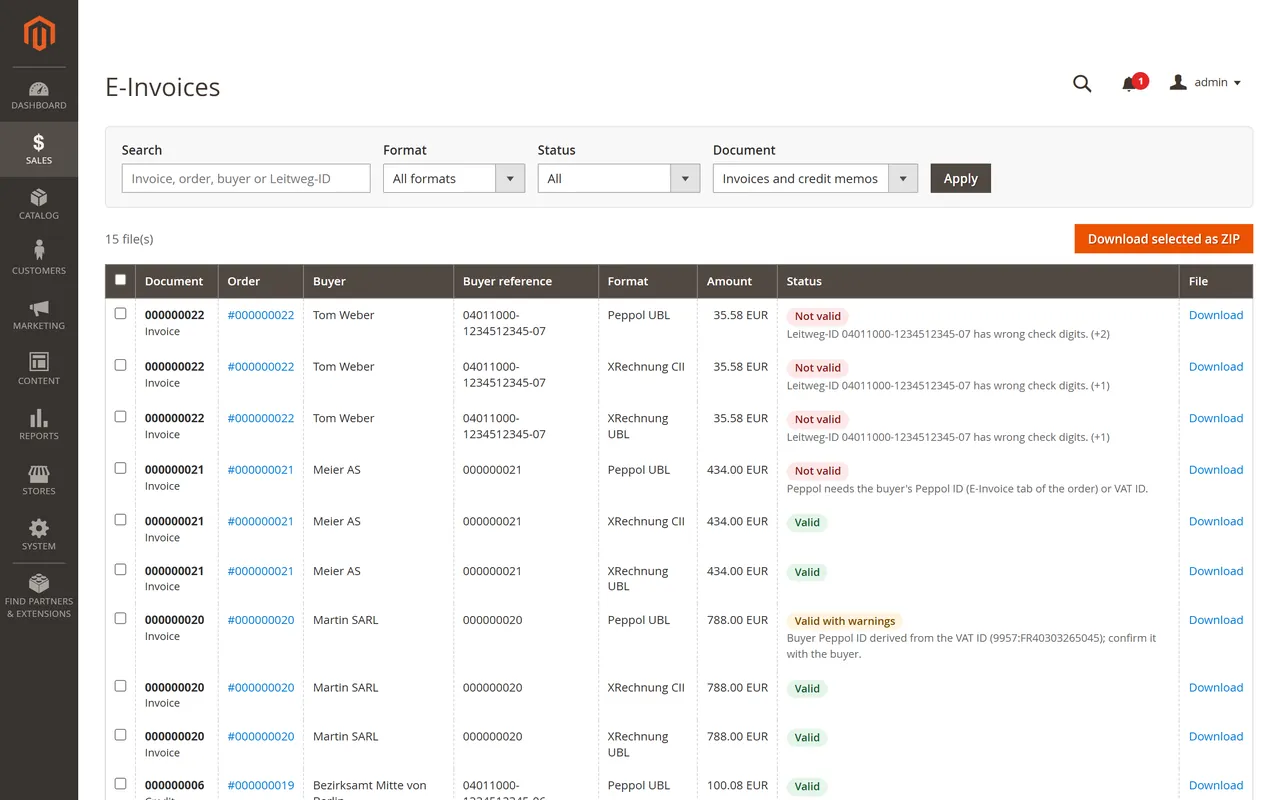
The e-invoice list under Sales > E-Invoices
What it does
Creates XRechnung 3.0 UBL, XRechnung 3.0 CII and Peppol BIS Billing 3.0 UBL files when an invoice or credit memo is saved, or by hand on the order.
Leitweg-ID (buyer reference, BT-10), purchase order number and buyer Peppol ID per order, with check digit and format checks.
Buyer VAT ID from the billing address, the customer's Tax/VAT number or the order, checked by format and check digits per EU country (offline).
VAT categories for 0 % lines: intra-community supply (K) or reverse charge (AE), export (G), zero rated (Z) or exempt (E), with the exemption reason code.
Credit memos become credit notes (381) that refer to their invoice.
Built-in EN 16931 and XRechnung checks with messages that name the Magento screen where you fix the data.
Sales > E-Invoices: list with search and filters, download per file and a ZIP export with a report.
Requirements
Magento Open Source 2.4.8 with PHP 8.3 (tested on 2.4.8-p5). Magento 2.4.7, Adobe Commerce and other PHP versions are not tested yet.
No external service: the files are created in your store. Only the licence check contacts our server.
The module creates and checks the files. Sending them to a public buyer's portal or through a Peppol access point is done with your usual channel. This is a tool, not legal or tax advice.
Installation
Download the zip from your Kavio Labs account (My licences > Downloads).
Extract it into app/code/KavioLabs/EuEinvoicing/ (the folder then contains registration.php and etc/).
Run:
bin/magento module:enable KavioLabs_EuEinvoicing
bin/magento setup:upgrade
in production mode also bin/magento setup:di:compile and bin/magento setup:static-content:deploy
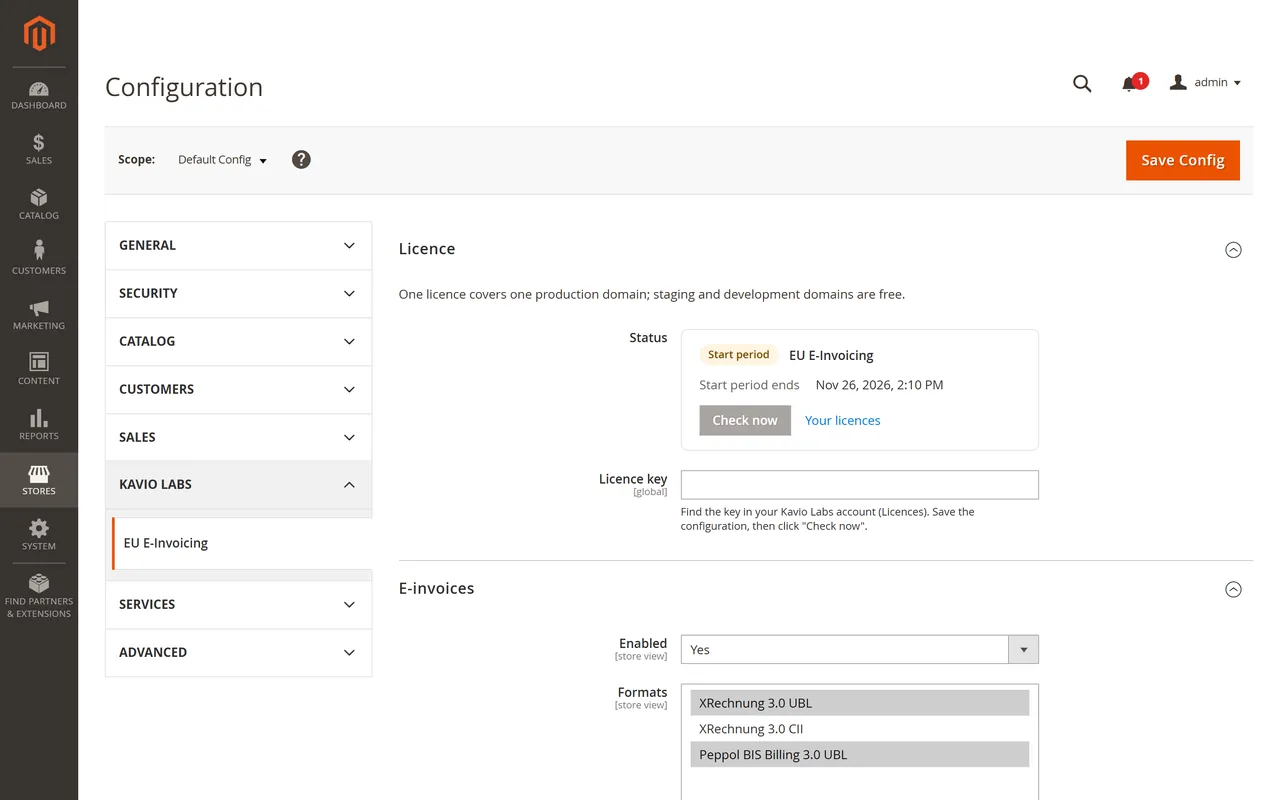
Open Stores > Configuration > Kavio Labs > EU E-Invoicing and enter your licence key.
The zip is also a Composer package (it has its composer.json at the root, name kaviolabs/module-eu-einvoicing), so a Composer artifact repository can install it as well.
Update
Replace the folder with the new version and run bin/magento setup:upgrade (plus setup:di:compile and setup:static-content:deploy in production mode). Your e-invoice files, buyer data and settings stay.
Uninstall
Keep your data: bin/magento module:disable KavioLabs_EuEinvoicing, delete the folder and run bin/magento setup:upgrade. The e-invoice files, the buyer data and the settings stay in the database for a later reinstall.
Remove everything (e-invoice files, buyer data, settings, licence state): bin/magento module:uninstall KavioLabs_EuEinvoicing --non-composer first, then bin/magento module:disable KavioLabs_EuEinvoicing, delete the folder and run bin/magento setup:upgrade. For a Composer install use bin/magento module:uninstall KavioLabs_EuEinvoicing --remove-data.
Your invoices, credit memos and orders are never changed or removed by the module.
Configuration
Open Stores > Configuration > Kavio Labs > EU E-Invoicing. Settings can differ per website and store view (for example the formats or the payment details).
Settings
Licence
Enter your licence key and click Save Config: the key is verified at once. The licence card shows the status, the licensed domain and the date until which updates are included. Check now verifies again. A new installation works for 14 days before a key is needed.
E-invoices
Setting
What it does
Enabled
Switches the module on or off for the scope.
Formats
XRechnung 3.0 UBL, XRechnung 3.0 CII, Peppol BIS Billing 3.0 UBL. Every selected format is created for each invoice and credit memo.
Create when an invoice / credit memo is saved
Creates the files automatically after the document is saved.
Only for business buyers
Automatic files only when the billing address has a company or VAT number, or the order has buyer data.
Buyer reference when none is set
XRechnung needs a buyer reference (BT-10). Leave empty (the file is marked "Not valid" until you add the Leitweg-ID) or use the order number.
Unit of measure
UN/ECE unit code of product lines (H87 piece, C62 unit, EA each).
Seller
Legal name, VAT ID, tax number, company registration ID, additional legal information, Peppol ID and contact. Empty fields fall back to General > Store Information (name, phone, address, VAT number) and the store's general contact e-mail. XRechnung needs a seller phone number and e-mail.
Payment
IBAN, BIC, account holder: written for credit transfer payments (payment means 58).
Credit transfer payment methods and Cash payment methods: payment method codes, comma separated (for example banktransfer,purchaseorder).
Payment means of all other methods: usually "Online payment service" (68) for cards and payment providers.
Payment due after (days) and Payment terms text for unpaid invoices: every unpaid invoice gets a due date (0 days = due on the invoice date). Invoices paid online (card, PayPal and other online methods) are written as prepaid with 0.00 payable. Bank transfer, purchase order, check and cash on delivery invoices show the full amount as payable with a due date, even though Magento marks them paid.
VAT categories of 0 % lines
Taxed lines are written as standard rate (S). A line with 0 % tax is classified by the buyer: same country or no buyer VAT ID (zero rated or exempt), another EU country with a buyer VAT ID (intra-community supply or reverse charge), outside the EU (export, G).
Usage
Buyer data on the order
Open an order and select the E-Invoice tab.
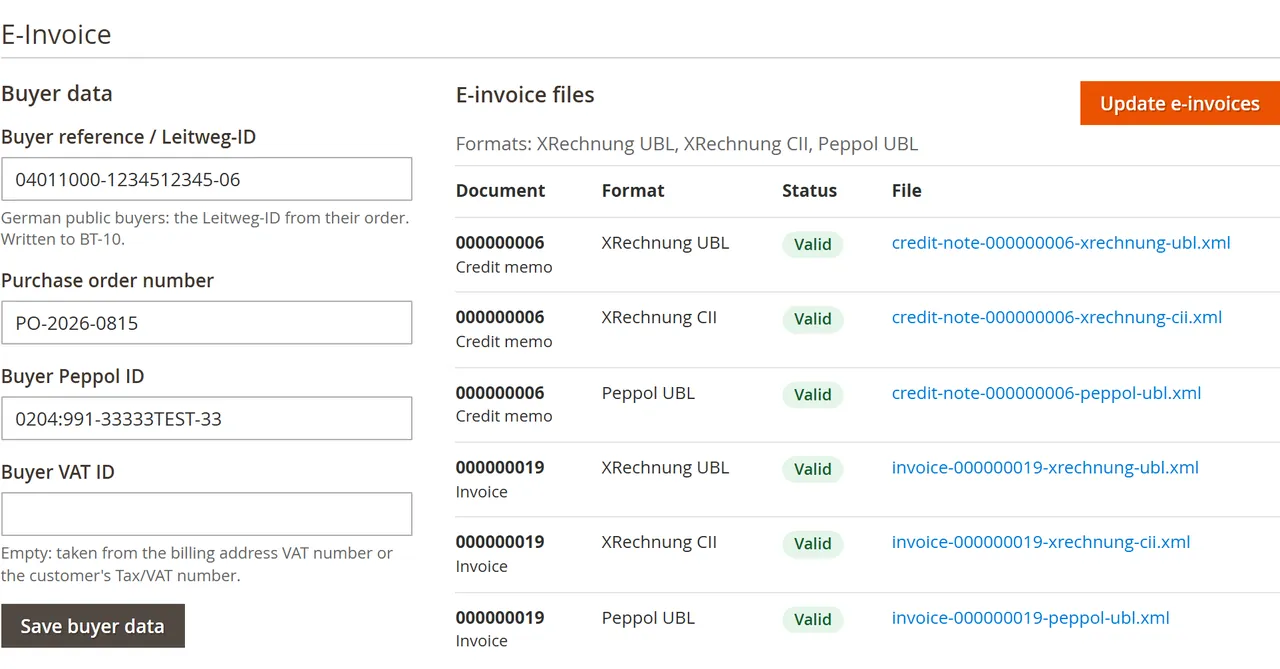
E-Invoice tab of an order
Buyer reference / Leitweg-ID: German public buyers send you their Leitweg-ID (for example 04011000-1234512345-06) with their order. It is checked by format and check digits and written to BT-10.
Purchase order number: written as the order reference (BT-13).
Buyer Peppol ID: scheme:id, for example 0204:991-33333TEST-33. Without it the Peppol file uses an ID derived from the buyer VAT ID and shows a warning to confirm it.
Buyer VAT ID: leave empty to use the billing address VAT number or the customer's Tax/VAT number.
Click Save buyer data. Existing e-invoice files of the order are updated at once.
Creating e-invoices
Automatically when an invoice or credit memo is saved (see the settings), for business buyers or for every order.
By hand: Create e-invoices (or Update e-invoices) on the E-Invoice tab creates the files of every invoice and credit memo of the order. Run it again after you change data; the files are replaced.
Every file shows its status:
Valid: all built-in EN 16931 and format rules pass.
Valid with warnings: the file can be sent; check the message (for example a Peppol ID derived from the VAT ID).
Not valid: data is missing or wrong; the message names the place to fix it. Fix it and update the e-invoices.
The e-invoice list
Sales > Operations > E-Invoices lists every file with document, order, buyer, buyer reference, format, amount and status. Search by invoice, order, buyer or Leitweg-ID and filter by format, status and document type. Download single files, or select files and click Download selected as ZIP (with a report.csv of status and messages).
The e-invoice list
Admin permissions
Two roles under Sales > E-Invoices in System > User Roles: viewing and downloading the files, and creating e-invoices and editing buyer data.
FAQ
Does it send the e-invoices to the buyer?
No. The module creates and checks the files and keeps them on the order. Upload them to the public buyer's portal, attach them to your invoice e-mail or send them through your Peppol access point.
Which formats are tested?
Files of every format were checked with the official KoSIT validator (XRechnung 3.0.2 configuration) and the Peppol BIS Billing 3.0 rules (UBL 2.1 schema, EN 16931 and Peppol schematron 3.0.20) on Magento 2.4.8: invoices and credit notes, German 19 %, intra-community supply and export.
Does it create ZUGFeRD / Factur-X PDFs?
Not in this version. It creates XRechnung (UBL and CII) and Peppol BIS Billing 3.0 XML files.
Does it change my Magento invoices?
No. Invoice PDFs, invoice e-mails, numbers and totals stay as they are. The e-invoice uses the same document number.
Does it work with Hyva and headless storefronts?
Yes. The module works in the Admin only and adds nothing to the storefront.
Does it work on Adobe Commerce, cloud or SaaS?
It is tested on Magento Open Source 2.4.8-p5 with PHP 8.3. Adobe Commerce and Adobe Commerce cloud are not tested yet. It needs a store that runs PHP modules, so it is not for SaaS editions that cannot run them.
What happens when I delete an order?
Its e-invoice files and its buyer data (Leitweg-ID, PO number, Peppol ID) are deleted with it.
Why does every unpaid invoice have a due date?
Peppol and EN 16931 need a due date or payment terms when an amount is still to be paid. The due date is the invoice date plus "Payment due after (days)" (0 = due on the invoice date). Invoices paid online (card, PayPal and other online methods) are written as prepaid with 0.00 payable. Bank transfer, purchase order, check and cash on delivery invoices show the full amount as payable with a due date, even though Magento marks them paid.
Is this legal or tax advice?
No. It is a tool that follows the published standards. Check your VAT treatment with your tax advisor.
Sell by the metre, square metre, kilogram or litre: customers enter 2.35 m, the line total is rounded once and the unit shows in cart, orders and e-mails.
Customers upload resale and exemption certificates, you approve them for chosen countries or states and dates, and Magento stops charging them tax until the certificate expires.