Upload one CSV or XLSX file with the day's tracking numbers: check the plan, then Magento creates every shipment. No e-mail unless you allow it.
Tested on Magento 2.4.8Updated Nov 13, 2026Version 1.0.0Compatible with Magento Open Source 2.4.8 (tested on 2.4.8-p5, PHP 8.3) No core file edits
Built forMagento
Bulk Tracking Import for Magento 2: one file with the day's tracking numbers, every shipment created after a dry run.1 of 7
What it does
Upload one CSV or XLSX file with the day's tracking numbers: check the plan, then Magento creates every shipment. No e-mail unless you allow it.
Stop typing tracking numbers into orders one by one. Your warehouse, 3PL or carrier portal already exports a list of parcels. Bulk Tracking Import reads that list, shows you what will happen to each order, and creates the Magento shipments with their tracking numbers in one click. Made a mistake? Undo the import.
Features
Check first, then import
CSV, TSV, XLSX or rows pasted from a spreadsheet; common column names are recognised
Every import starts as a dry run: new shipment, add to the existing shipment, skip or error, with the reason, per row
Safe to upload twice: tracking numbers already on the order are skipped
Real Magento shipments
Created with Magento's own shipping service, as with "Ship" in the order page: order state, invoices and stock as usual
Multi-Source Inventory: deducted from your source like a manual shipment
Several parcels per order (SKU and quantity per row), or the whole order in one row
UPS, USPS, FedEx and DHL stored with Magento's carrier codes (by name, your aliases, or UPS numbers); other carriers as custom carriers
Safe
No customer e-mail by default; when you allow it, Magento's own shipment e-mail, only if enabled in Sales Emails
Undo: removes the tracking numbers and shipments the import created, puts back shipped quantities, order state and stock; shipments changed since are kept
Continue an interrupted import; Admin permissions for import and undo; REST API for your 3PL or ERP
What you get
Download & installThe module .zip for Magento Open Source 2.4.8, extracted into app/code/KavioLabs (it is also a Composer package). Download it from My licenses right after payment.
12 months of updates & supportNew versions and help for 12 months (24 or 36 months at checkout). After that the module keeps working; renew anytime at 50%.
License for your storeOne production domain with all its subdomains; staging and local development hosts are free. How licensing works
30-day refundFull refund within 30 days of your first purchase, no reason needed. Refund policy
Tested buildsMagento Open Source 2.4.8 (tested on 2.4.8-p5, PHP 8.3). Tested on Magento 2.4.8.
Documentation & supportFull guide (Installation, Configuration, Usage, FAQ) on this page. Tickets from your account, same-day reply on weekdays (Mon-Fri 09:00-18:00 UTC+3).
Compatibility
Bulk Tracking Import & Notify for Magento works with Magento Open Source 2.4.8 (tested on 2.4.8-p5, PHP 8.3).
We list the builds we install and test on. “Tested” means the test plan ran on that build; “Supported” means the build is inside the supported range.
Compatibility
Version
Range
Runs on
Status
Magento 2.4.8
Open Source 2.4.8-p5
PHP 8.3
Tested on 2.4.8-p5
Editions
Magento Open Source
app/code (zip) or Composer
Self-hosted
1.0.0
Nov 13, 2026
Latest
First release: tracking numbers from CSV, TSV, XLSX or pasted rows; dry run; Magento shipments through the ShipOrder service (Multi-Source Inventory aware); add to the latest shipment; duplicate skip; UPS / USPS / FedEx / DHL carrier codes and custom carriers; undo with guards; continue an interrupted import; shipment e-mail off by default; Admin permissions for import and undo; REST API.
Before release (Opus audit): rows are claimed by one request (no double shipments on double click / parallel requests), tracking number re-checked at import time, shipment id stored at once; undo puts back the exact quantity changes (configurable, bundles shipped separately), refuses orders with a credit memo, sets processing when the order became complete; MSI undo reservation keyed by order id + number like core; REST body limit 10 MB; order numbers used in several stores refused.
How do I install the module?
Install the module. Unzip into app/code/KavioLabs (the zip is also a Composer package).
Enable and upgrade. bin/magento: module:enable, then setup:upgrade (and di:compile in production mode).
Enter the license key. Stores > Configuration > Kavio Labs: paste the key from My licenses. Staging and local stores are included.
Magento Open Source 2.4.8 (tested on 2.4.8-p5, PHP 8.3). Tested on Magento 2.4.8. The Compatibility tab lists every version range.
Can I buy a Magento module today?
Yes. Every Magento module on this site is on sale: one-time price per production store, staging and development domains included, 12 months of updates and support.
Do the modules work with Hyva?
Each product page says what was tested. Admin-only modules do not depend on the storefront theme; modules that change the storefront name the tested theme (Luma) on their Compatibility tab.
How does licensing work?
One license per production store domain, with staging and development domains included. 12 months of updates and support; after that the module keeps working.
Do you already sell modules for other platforms?
Yes. Kavio Labs sells add-ons and plugins for CS-Cart, OpenCart, WooCommerce, PrestaShop and Shopware, with the same license portal and support desk.
What does the license cover?
One production store domain with every subdomain (www, shop., staging.), plus local development hosts such as localhost, *.local and *.test. A store on another domain needs its own license; a second-store license is 40% off. You have 14 days after installing to enter the key. 12 months of updates and support are included; after that the module keeps working and renewals are 50% off. How licensing works
Can I get a refund?
Yes. Ask for a full refund within 30 days of your first purchase, no reason needed: open a ticket or write to [email protected] with your order number. The money goes back to the card or bank account you paid with within 5 business days of approval. Refund policy
How do I get help?
Open a ticket from your account, so your license details are attached. We answer with a same-day reply on weekdays (Mon-Fri 09:00-18:00 UTC+3). Support policy. Not a customer yet? Ask a pre-sales question.
Import the tracking numbers of a whole day's parcels in one go. Upload the CSV, TSV or XLSX file your warehouse, 3PL or carrier portal exports (or paste the rows from a spreadsheet), check the plan, and the module creates the Magento shipments with their tracking numbers. No e-mail is sent unless you switch it on.
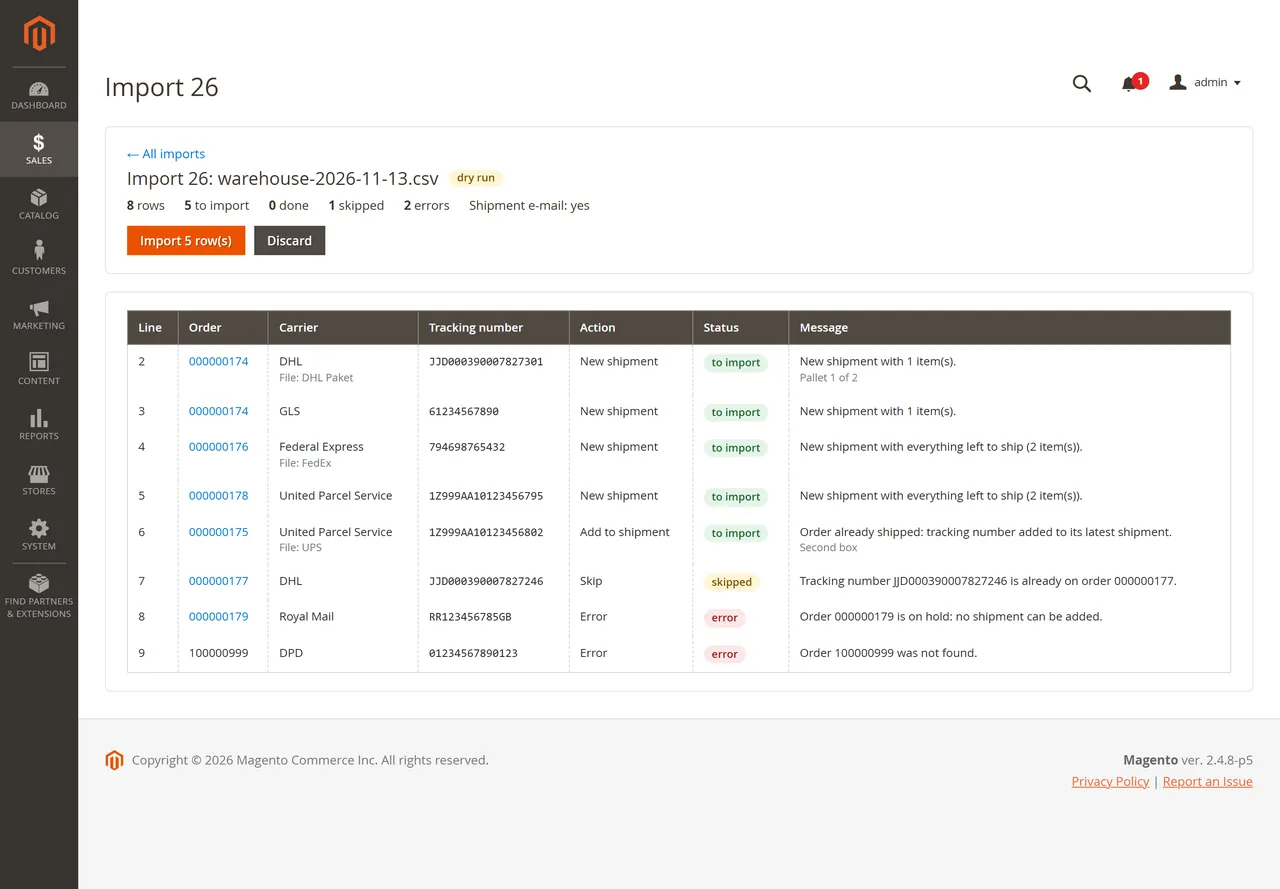
The plan of an import before anything is created
What it does
Reads CSV (comma, semicolon, pipe), TSV, pasted spreadsheet cells and XLSX files (up to 10 MB). Common column names are recognised: order number, carrier, tracking number, SKU, quantity, items, comment.
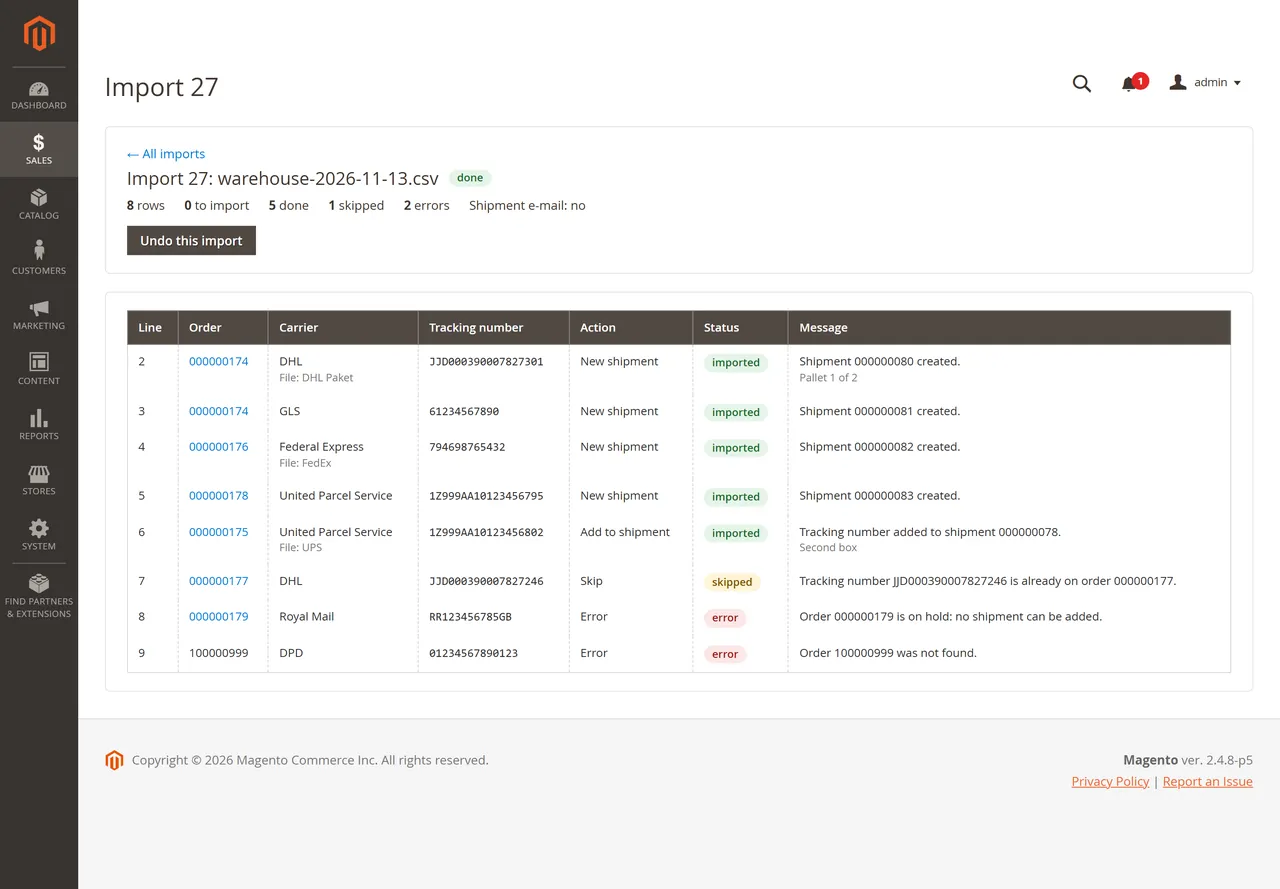
Every import starts as a dry run: each row shows what will happen (new shipment, add to the existing shipment, skip, error and why). Nothing changes in your orders until you click Import.
Creates the shipment through Magento's own shipping service (the same as Ship in the order page): shipped quantities, order state, invoices and stock work as usual, with Multi-Source Inventory deducting from your source.
One parcel or several: a row without items ships everything left; rows with SKU and quantity create partial shipments.
A second tracking number for an order that is already fully shipped is added to its latest shipment (can be switched off).
Safe to upload twice: tracking numbers already on the order are skipped.
Carriers: UPS, USPS, FedEx and DHL are matched by name, by your own aliases, or from the tracking number (UPS 1Z...); every other carrier is stored as a custom carrier with the name from the file.
Undo an import: removes the tracking numbers it added and the shipments it created (when nobody changed them since), puts back the shipped quantities and the order state, and returns the stock to the source.
Continue an import that was interrupted.
No customer e-mail by default. When allowed in the configuration, the import form offers Magento's own shipment e-mail.
REST API for your 3PL or ERP, with its own Admin permissions (import, undo).
Requirements
Magento Open Source 2.4.8 with PHP 8.3 (tested on 2.4.8-p5, with and without Multi-Source Inventory on the default source). Magento 2.4.7, Adobe Commerce and other PHP versions are not tested yet.
Stores with several inventory sources: rows that would create a shipment are reported as errors (the import cannot choose the source); adding tracking numbers to existing shipments works.
Installation
Composer (recommended)
Add the Kavio Labs repository and your licence credentials (see your Kavio Labs account).
Run composer require kaviolabs/module-bulk-tracking-import.
Run bin/magento module:enable KavioLabs_BulkTrackingImport, bin/magento setup:upgrade and, in production mode, bin/magento setup:di:compile and bin/magento setup:static-content:deploy.
Zip upload
Download the zip from your Kavio Labs account.
Extract it into app/code/KavioLabs/BulkTrackingImport/ (the folder holds registration.php).
Run the same bin/magento commands as above.
Uninstall
Keep the data: bin/magento module:disable KavioLabs_BulkTrackingImport (then delete the folder or composer remove the package and run setup:upgrade).
Remove everything (tables, settings, licence state): Composer install bin/magento module:uninstall KavioLabs_BulkTrackingImport --remove-data; zip install bin/magento module:uninstall KavioLabs_BulkTrackingImport --non-composer, then module:disable, delete the folder and run setup:upgrade.
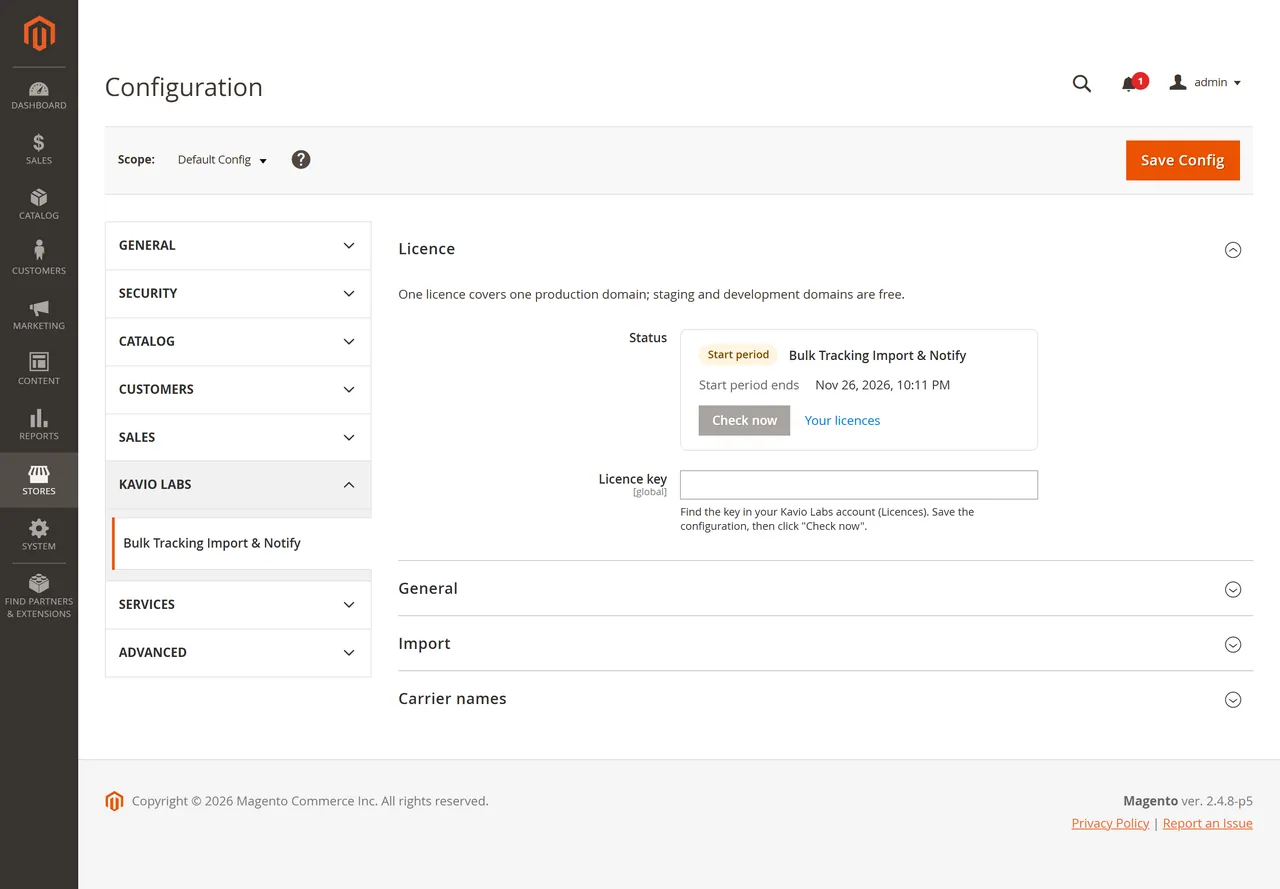
Enter your licence key in Licence > Licence key and click Save Config. The licence card shows the status, the licensed domain and the date until which updates are included; Check now verifies again. One licence covers one production domain; staging and development domains are free.
General
Enabled: Yes (default). No refuses new imports (the import list, undo and the REST GET stay available).
Import
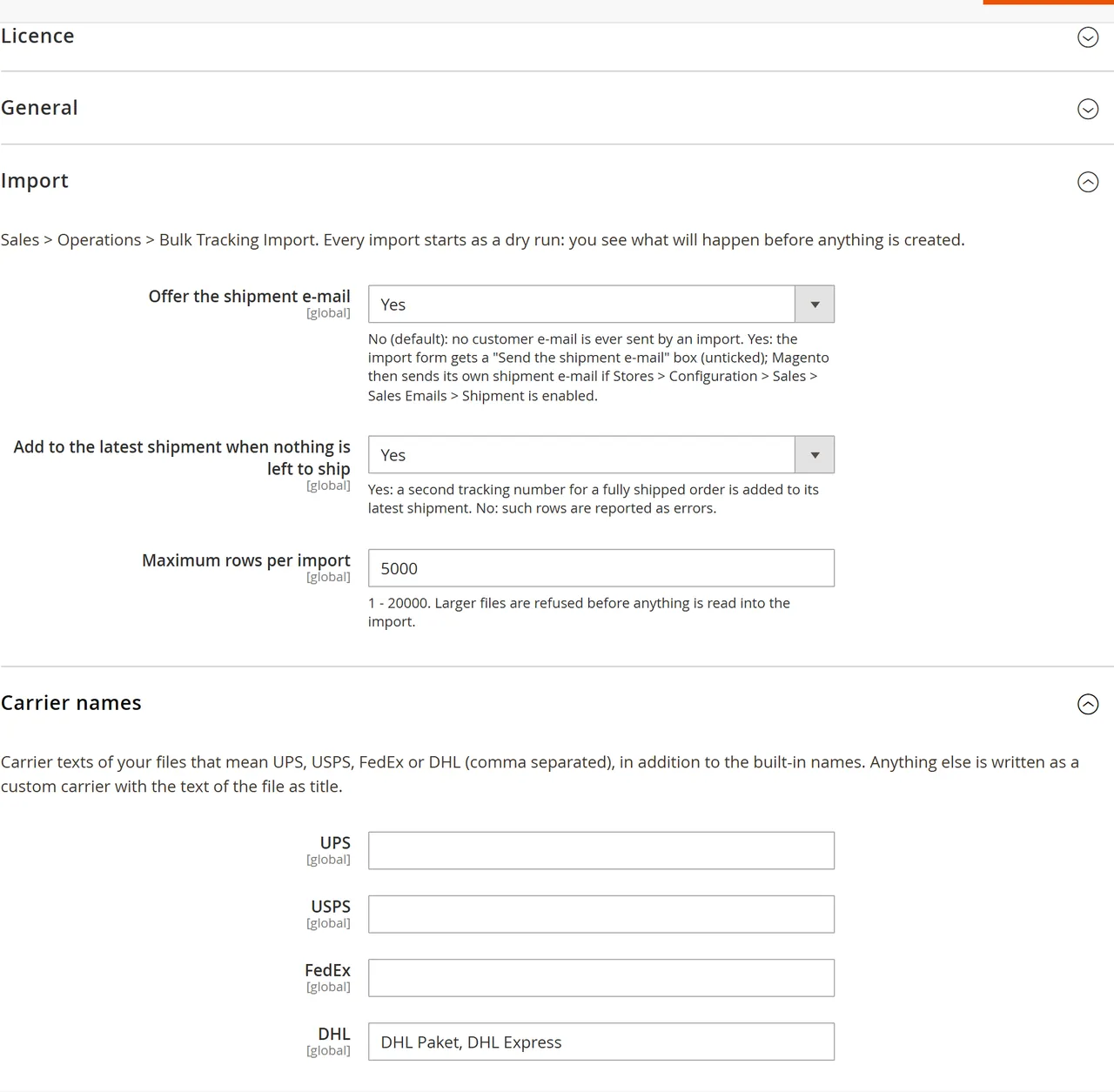
Offer the shipment e-mail: No (default) means an import never sends a customer e-mail. Yes adds a Send the shipment e-mail box (unticked) to the import form. When it is ticked, Magento sends its own shipment e-mail, and only if Stores > Configuration > Sales > Sales Emails > Shipment is enabled.
Add to the latest shipment when nothing is left to ship: Yes (default) adds a further tracking number of a fully shipped order to its latest shipment. No reports such rows as errors.
Maximum rows per import: 5000 by default (1 to 20000). Larger files are refused before they are read into an import.
Carrier names
Magento has tracking codes for UPS, USPS, FedEx and DHL. The module recognises their names (and the titles of these carriers in your store) on its own. Enter further texts that your files use for them, comma separated, for example Paketdienst Nord, DHL Express for DHL. Any other carrier (GLS, DPD, Royal Mail, your courier) is stored as a custom carrier with the name from the file as title.
Permissions
System > Permissions > User Roles > Role Resources > Sales > Operations > Bulk Tracking Import:
Bulk Tracking Import: open the page, run dry runs and imports (Admin and REST).
Undo imports: undo an import (Admin and REST).
Usage
The file
One row per parcel, with a header row if you like:
Order: the order number (increment ID) as shown in the Admin; a leading # is fine.
Tracking: the tracking number. Format the column as text in your spreadsheet so long numbers keep their leading zeros.
Carrier (optional): see Configuration > Carrier names. Empty: UPS numbers (1Z...) are recognised, others get a custom carrier "Tracking".
SKU and Qty (optional): leave empty when the parcel holds everything that is left to ship. Rows of the same order and tracking number are one parcel (above: one shipment with a lamp and a desk). A SKU without quantity means all that is left of it. An Items column such as KV-LAMP-03:1; KV-DESK-01 works too.
Comment (optional): shown under the row in the plan and the result (not written to the shipment, so undo stays possible).
Without a header row the columns are read as order, carrier, tracking.
Step 1: upload or paste
Import page
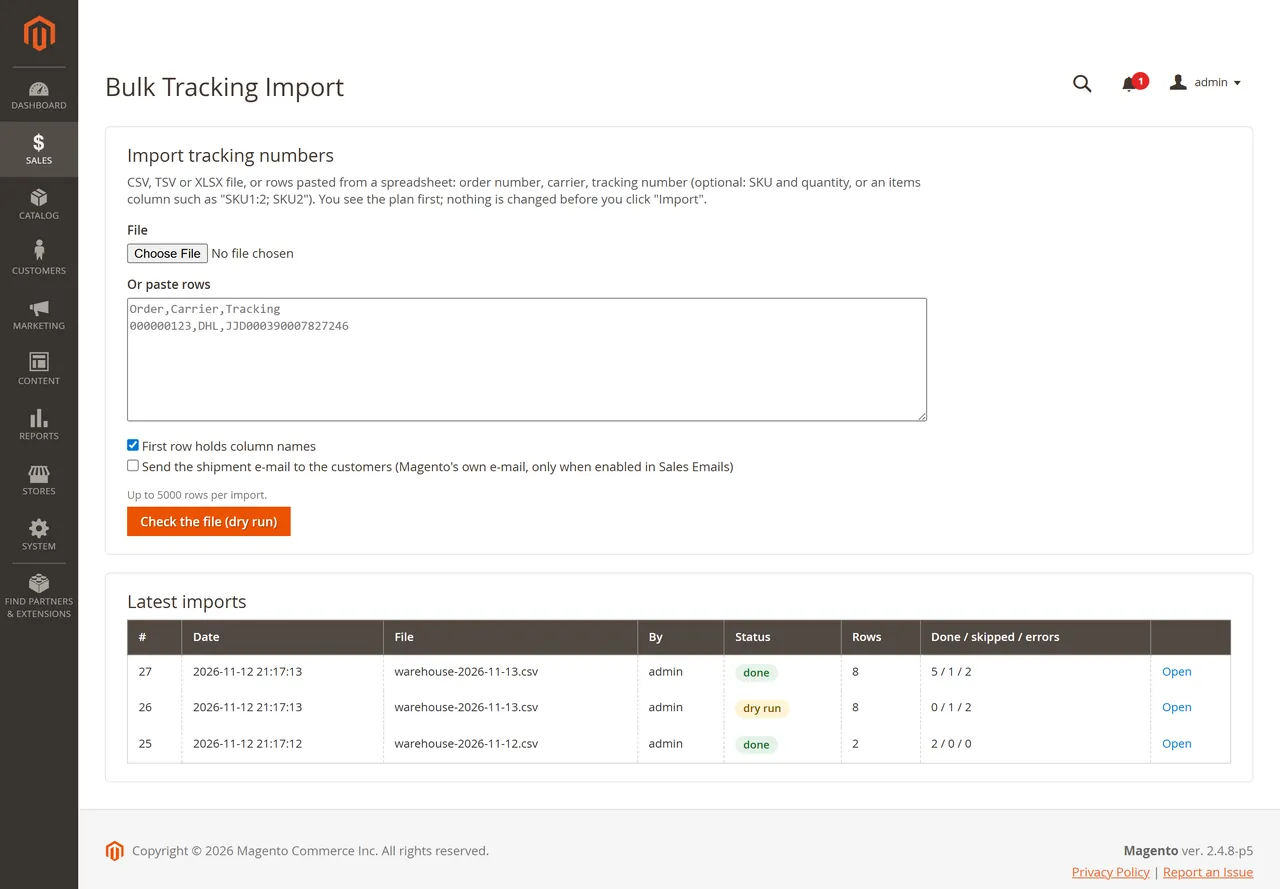
Open Sales > Operations > Bulk Tracking Import. Choose a file (CSV, TSV, TXT or XLSX, up to 10 MB) or paste the cells copied from Excel or Google Sheets, then click Check the file (dry run). The list below shows the latest imports.
Step 2: check the plan
Dry run
Every row shows its action and message:
Action
When
New shipment
Items are left to ship: a shipment with the listed items (or everything left) and the tracking number.
Add to shipment
The order is fully shipped: the number is added to its latest shipment.
Skip
The tracking number is already on the order (the same file can be uploaded twice), or the row repeats a row above.
Error
Order not found; an order number that exists in several stores (ship it in the Admin); order canceled, closed, on hold or in payment review; a SKU that is not on the order or more than is left to ship; nothing left to ship (with "Add to the latest shipment" off).
Rows of one file are planned together: a second row for the same order is planned against what the rows above will ship. Discard drops a plan you do not want.
Step 3: import
Import N row(s) creates the shipments and tracking numbers of the planned rows. Each row is done on its own: a row that fails (for example because the order was changed since the dry run) is marked as an error with the reason, the others go on. Right before a row is imported its tracking number is checked again: if it reached the order since the dry run (another import, a shipment made by hand), the row is skipped. Every row is taken by one request only, so a double click, a second browser tab or the same import started over REST at the same time cannot create a shipment twice.
Result
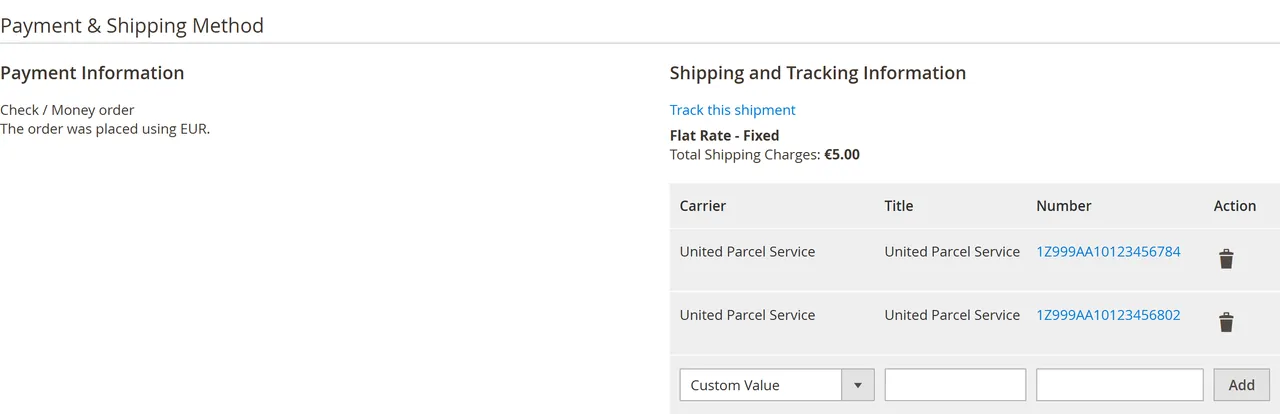
The shipment is a normal Magento shipment: it appears on the order, in Sales > Shipments, and in the customer's account with its tracking number. The order becomes Processing or Complete as with a shipment made by hand.
Shipment in the order
If the page was closed or the connection dropped during an import, the import shows the button Continue the import (N row(s) left): it imports the remaining rows only.
Undo
Undo this import (needs the "Undo imports" permission) goes through the import's rows newest first:
a tracking number added to an existing shipment is removed;
a shipment created by the import is deleted, the shipped quantities of the order items are put back, the order state and status are put back when nobody changed them since, a comment is added to the order history, and with Multi-Source Inventory the quantity goes back to the source it was shipped from.
Shipped quantities are put back exactly as the shipment changed them (also for configurable products and bundles shipped separately). When the order was changed since the import, for example invoiced and therefore complete, it goes back to processing because it has items to ship again.
Not undone (the row says why):
a shipment that was changed after the import (another tracking number, a comment, any other change);
an order with a credit memo since the import, or an order closed or canceled since (the stock may already have been returned).
If the stock cannot be returned to the source (for example the source was removed), the shipment is still removed and the row says "stock NOT put back" with the reason: correct the source quantity by hand.
Undo sends no e-mail; a customer who already got a shipment e-mail keeps it. Invoices are not touched.
REST API
For a 3PL, an ERP or your own script. Create an integration (System > Extensions > Integrations) or an admin user whose role has Bulk Tracking Import (and Undo imports for undo), then call the endpoints with its token.
content: the file text, or for XLSX the file encoded in base64 with "base64": true (at most 10 MB).
notify: ask for Magento's shipment e-mail (only honoured when "Offer the shipment e-mail" is Yes).
The answer (a JSON string) holds run_id, the counters and every row with action, status and message.
Then:
POST /rest/V1/kv-bulk-tracking/imports/{runId}/execute: import the planned rows (also continues an interrupted import).
GET /rest/V1/kv-bulk-tracking/imports/{runId}: the import with its rows.
POST /rest/V1/kv-bulk-tracking/imports/{runId}/undo: undo (needs the undo permission).
Without a token, or when the role lacks the permission, the API answers 401 (Magento's answer to both).
FAQ
Does the module send e-mails?
Not by default. An import sends the customer an e-mail only when you set Offer the shipment e-mail to Yes, tick the box in the import form, and Magento's shipment e-mail is enabled in Sales Emails > Shipment. The e-mail is Magento's own shipment e-mail with the tracking numbers.
What happens when I upload the same file twice?
Rows whose tracking number is already on the order are skipped. Nothing is added twice.
Can one order have several parcels?
Yes: one tracking number per parcel. Rows with SKU and quantity create partial shipments; a row without items ships the rest. A further number for a fully shipped order is added to its latest shipment.
Does it create invoices or change payments?
No. It creates shipments and tracking numbers only. The order state changes as with a shipment made by hand (for example to Complete when the order is invoiced and fully shipped).
Does it work with Multi-Source Inventory?
Yes, with one source: the shipment is deducted from it as with a manual shipment, and undo returns the quantity. With several sources the import cannot choose one; ship such orders in the Admin (adding tracking numbers to existing shipments still works).
Which carriers are supported?
UPS, USPS, FedEx and DHL are stored with Magento's carrier codes, so their tracking links work. Every other carrier is stored as a custom carrier with its name. The module does not buy labels or contact carriers.
Can I undo an old import?
Yes, any import, as long as its shipments were not changed since and the order has no credit memo since. Those are kept and listed with the reason.
Does it work with Hyva?
The module adds Admin pages only and changes nothing in the storefront theme. Customers see the tracking numbers where Magento shows them.
Does the licence check slow down my store?
No. The store reads the stored result; the server is asked only from the Admin or once a day by cron after a key was entered.
XRechnung (UBL and CII) and Peppol BIS Billing 3.0 from Magento invoices and credit memos: Leitweg-ID, buyer VAT ID, EU VAT categories, validated before you send.
Sell by the metre, square metre, kilogram or litre: customers enter 2.35 m, the line total is rounded once and the unit shows in cart, orders and e-mails.
Customers upload resale and exemption certificates, you approve them for chosen countries or states and dates, and Magento stops charging them tax until the certificate expires.