Shows the lowest price of the last 30 days next to every reduced price, worked out from a price history Magento records for you, as the EU Omnibus rule asks.
Tested on Magento 2.4.8Updated Nov 13, 2026Version 1.0.0Compatible with Magento Open Source 2.4.8 (tested on 2.4.8-p5, PHP 8.3) No core file edits
Built forMagento
EU Omnibus Lowest Price for Magento 2: the lowest price of the last 30 days, shown next to every reduced price.1 of 7
What it does
Shows the lowest price of the last 30 days next to every reduced price, worked out from a price history Magento records for you, as the EU Omnibus rule asks.
Every price reduction in the EU needs the prior price, and Magento keeps no price history. The Omnibus Directive asks you to show the lowest price of the 30 days before a reduction. Magento stores today's price, a special price and its dates, but nothing that remembers what the price was last month. EU Omnibus Lowest Price records every change and shows the right value next to the old price.
Features
Recorded automatically
The price of every product, website and customer group as Magento's price index computes it: special price with its dates, catalog price rules, group prices for quantity 1
Admin saves, imports, API calls and scheduled special prices at once; a daily full check completes the rest
The starting point on installation: the current prices of the whole catalog
Shown next to the price
"Lowest price in the last 30 days: $100.00" under a reduced price on product pages, lists, search results and widgets
On the same basis as the price: customer group, website, display currency, tax display (including, excluding or both)
Configurable products: the option that gives the listed price in lists, the selected option on the product page
Plain server-side markup added after the price box: no theme changes, plain markup inside the price box (tested on Luma), no extra page cache variation
The same legal rule everywhere
A reduction starts when the old price first shows; a price lowered quietly and announced weeks later is never compared with an older, higher price
A change of only the old price during a running reduction is not a new reduction
30 days or your own period; "before the reduction" or rolling
Made for Magento 2
Magento Open Source 2.4.8 (tested on 2.4.8-p5), PHP 8.3
Declarative schema, plugins on the price indexer and the price box only, no core overrides
Runs in your store; only the licence check contacts our server
What you get
Download & installThe module .zip for Magento Open Source 2.4.8, extracted into app/code/KavioLabs (it is also a Composer package). Download it from My licenses right after payment.
12 months of updates & supportNew versions and help for 12 months (24 or 36 months at checkout). After that the module keeps working; renew anytime at 50%.
License for your storeOne production domain with all its subdomains; staging and local development hosts are free. How licensing works
30-day refundFull refund within 30 days of your first purchase, no reason needed. Refund policy
Tested buildsMagento Open Source 2.4.8 (tested on 2.4.8-p5, PHP 8.3). Tested on Magento 2.4.8.
Documentation & supportFull guide (Installation, Configuration, Usage, FAQ) on this page. Tickets from your account, same-day reply on weekdays (Mon-Fri 09:00-18:00 UTC+3).
Compatibility
EU Omnibus Lowest Price for Magento works with Magento Open Source 2.4.8 (tested on 2.4.8-p5, PHP 8.3).
We list the builds we install and test on. “Tested” means the test plan ran on that build; “Supported” means the build is inside the supported range.
Compatibility
Version
Range
Runs on
Status
Magento 2.4.8
Open Source 2.4.8-p5
PHP 8.3
Tested on 2.4.8-p5
Editions
Magento Open Source
app/code (zip) or Composer
Self-hosted
1.0.0
Nov 13, 2026
Latest
First release: price history recorded from Magento's price index (admin save, import, API, scheduled special prices, catalog price rules, group prices for quantity 1) per product, website and customer group; daily full check; "Lowest price in the last 30 days: X" next to a reduced price on product pages, lists, search results and widgets (simple, virtual, downloadable and configurable options); same tax display, display currency and customer group as the price; the EU rule with a reduction that starts when the old price first shows (a reduction announced later is not compared with an older price; 24 hours of tolerance for a two-step edit; an old-price-only change is not a new reduction); history page with filters and formula-safe CSV export, history section and exclusion switch on every product, settings, status card, ACL; clean uninstall.
How do I install the module?
Install the module. Unzip into app/code/KavioLabs (the zip is also a Composer package).
Enable and upgrade. bin/magento: module:enable, then setup:upgrade (and di:compile in production mode).
Enter the license key. Stores > Configuration > Kavio Labs: paste the key from My licenses. Staging and local stores are included.
Magento Open Source 2.4.8 (tested on 2.4.8-p5, PHP 8.3). Tested on Magento 2.4.8. The Compatibility tab lists every version range.
Can I buy a Magento module today?
Yes. Every Magento module on this site is on sale: one-time price per production store, staging and development domains included, 12 months of updates and support.
Do the modules work with Hyva?
Each product page says what was tested. Admin-only modules do not depend on the storefront theme; modules that change the storefront name the tested theme (Luma) on their Compatibility tab.
How does licensing work?
One license per production store domain, with staging and development domains included. 12 months of updates and support; after that the module keeps working.
Do you already sell modules for other platforms?
Yes. Kavio Labs sells add-ons and plugins for CS-Cart, OpenCart, WooCommerce, PrestaShop and Shopware, with the same license portal and support desk.
What does the license cover?
One production store domain with every subdomain (www, shop., staging.), plus local development hosts such as localhost, *.local and *.test. A store on another domain needs its own license; a second-store license is 40% off. You have 14 days after installing to enter the key. 12 months of updates and support are included; after that the module keeps working and renewals are 50% off. How licensing works
Can I get a refund?
Yes. Ask for a full refund within 30 days of your first purchase, no reason needed: open a ticket or write to [email protected] with your order number. The money goes back to the card or bank account you paid with within 5 business days of approval. Refund policy
How do I get help?
Open a ticket from your account, so your license details are attached. We answer with a same-day reply on weekdays (Mon-Fri 09:00-18:00 UTC+3). Support policy. Not a customer yet? Ask a pre-sales question.
Shows "Lowest price in the last 30 days: X" next to every reduced price, worked out from a price history that Magento records for you, as the EU Omnibus rule (Article 6a of Directive 98/6/EC) asks. You no longer type prior prices by hand, and the rule is applied the same way for every product, customer group and website.
Tested on Magento Open Source 2.4.8-p5 with PHP 8.3, self-hosted. Compatibility with other versions is listed only after it has been tested. Magento Open Source only (Adobe Commerce is not supported in 1.0.0). Not for SaaS editions that cannot run PHP modules.
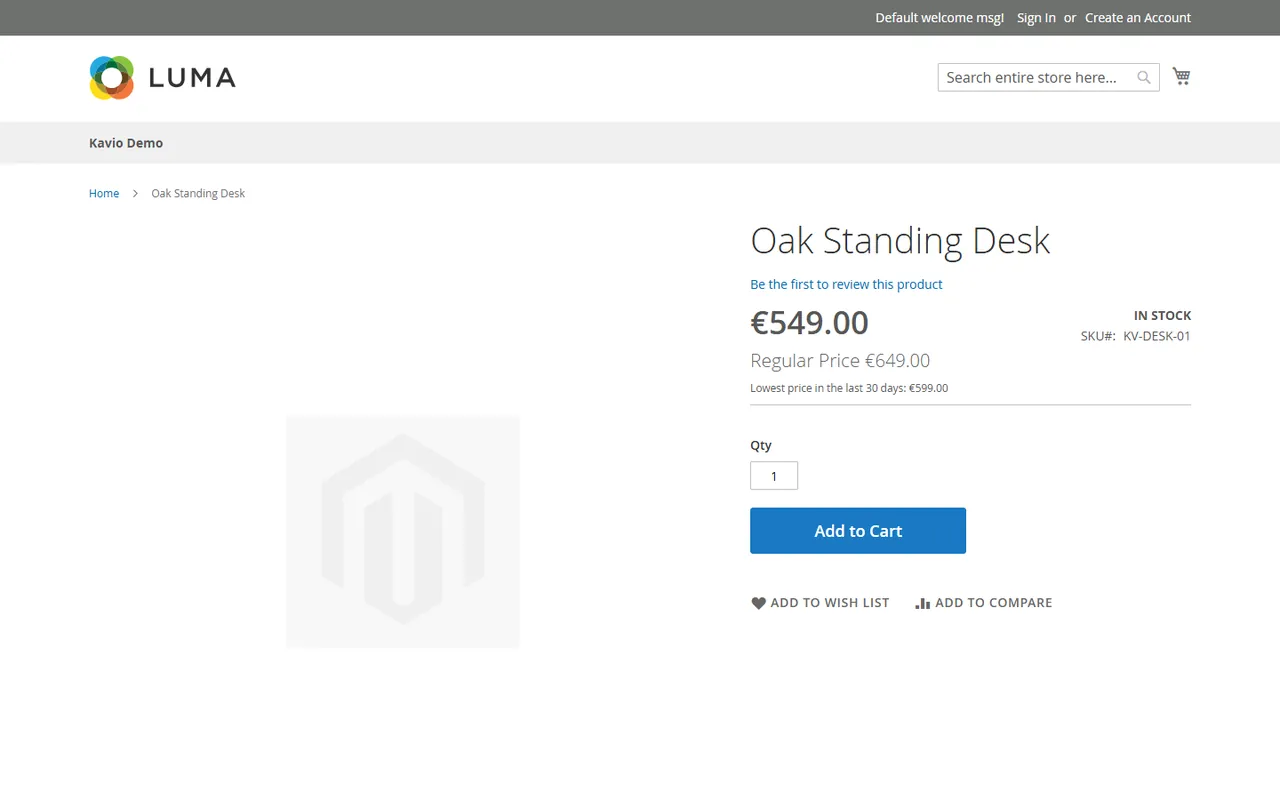
The lowest price next to a reduced price
What it does
Records every price. Whenever Magento updates its price index (admin save, import, API, scheduled special prices, catalog price rules, group prices for quantity 1), the module compares the result with its history and writes a row when a price or its old price changed. A daily full check catches the rest.
Shows the lowest price of the 30 days before the reduction next to a price that is shown reduced (an old price above the price). On the product page, in product lists, search results and widgets, for simple, virtual and downloadable products and for the options of configurable products.
Never shows a made-up saving. A reduction starts when the old (struck-through) price first appears. A price lowered quietly and announced weeks later is compared with the price of the 30 days before the announcement, not with an older price nobody paid. A change of only the old price during a running reduction is not a new reduction.
Follows what the shopper sees: website, customer group, display currency and tax display (including tax, excluding tax, both).
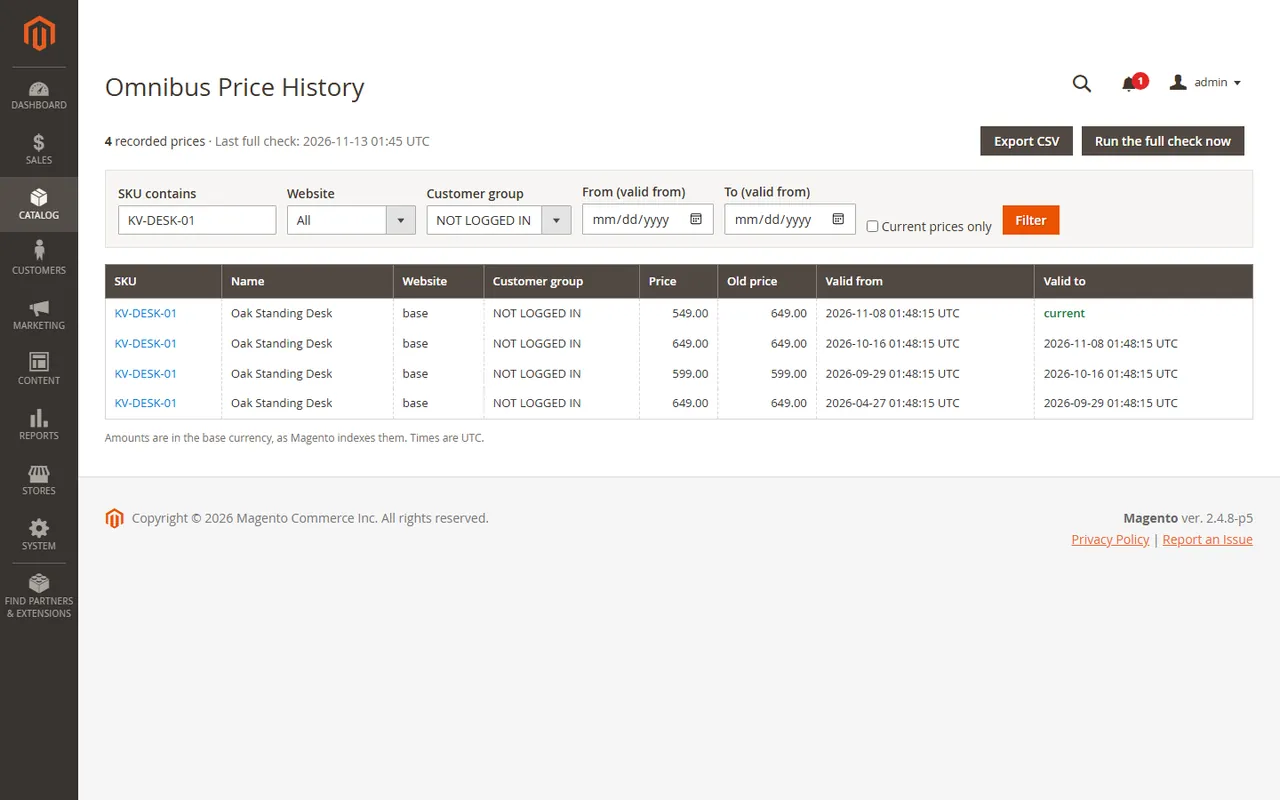
Admin: a history page (Catalog > Omnibus Price History) with filters and CSV export, a history section on every product, an exclusion switch per product, settings and a status card.
Price history in the Admin
What it does not do
It is not legal advice. It records and shows the lowest price according to your settings; which announcements need a prior price is for you and your adviser to decide.
It cannot know prices from before the installation. Reductions that were already running when it was installed show the current price as the lowest price (or nothing, if you choose so) until an earlier price has been recorded.
It does not change your prices and does not hide Magento's old price. Tier prices (volume discounts for quantities above 1), bundle and grouped products get no label in this version.
Installation
Composer (recommended)
Add the Kavio Labs repository and your licence credentials (see your Kavio Labs account).
Run composer require kaviolabs/module-omnibus-price-history.
Run bin/magento module:enable KavioLabs_OmnibusPriceHistory, bin/magento setup:upgrade and, in production mode, bin/magento setup:di:compile and bin/magento setup:static-content:deploy.
Zip upload
Download the zip from your Kavio Labs account.
Extract it into app/code/KavioLabs/OmnibusPriceHistory/ (the folder holds registration.php).
Run the same bin/magento commands as above.
After the installation
setup:upgrade records the current price of every product, website and customer group as the starting point.
Magento's cron must run. The price indexer, scheduled special prices and the module's daily full check depend on it (bin/magento cron:run every minute).
Open Stores > Configuration > Kavio Labs > EU Omnibus Lowest Price to check the settings (see Configuration).
Uninstall
Keep the data: bin/magento module:disable KavioLabs_OmnibusPriceHistory (then delete the folder or composer remove the package and run setup:upgrade). The history stays for a later reinstall.
Remove everything (history table, settings, product attribute, licence state): Composer install bin/magento module:uninstall KavioLabs_OmnibusPriceHistory --remove-data; zip install bin/magento module:uninstall KavioLabs_OmnibusPriceHistory --non-composer, then module:disable, delete the folder and run setup:upgrade.
Configuration
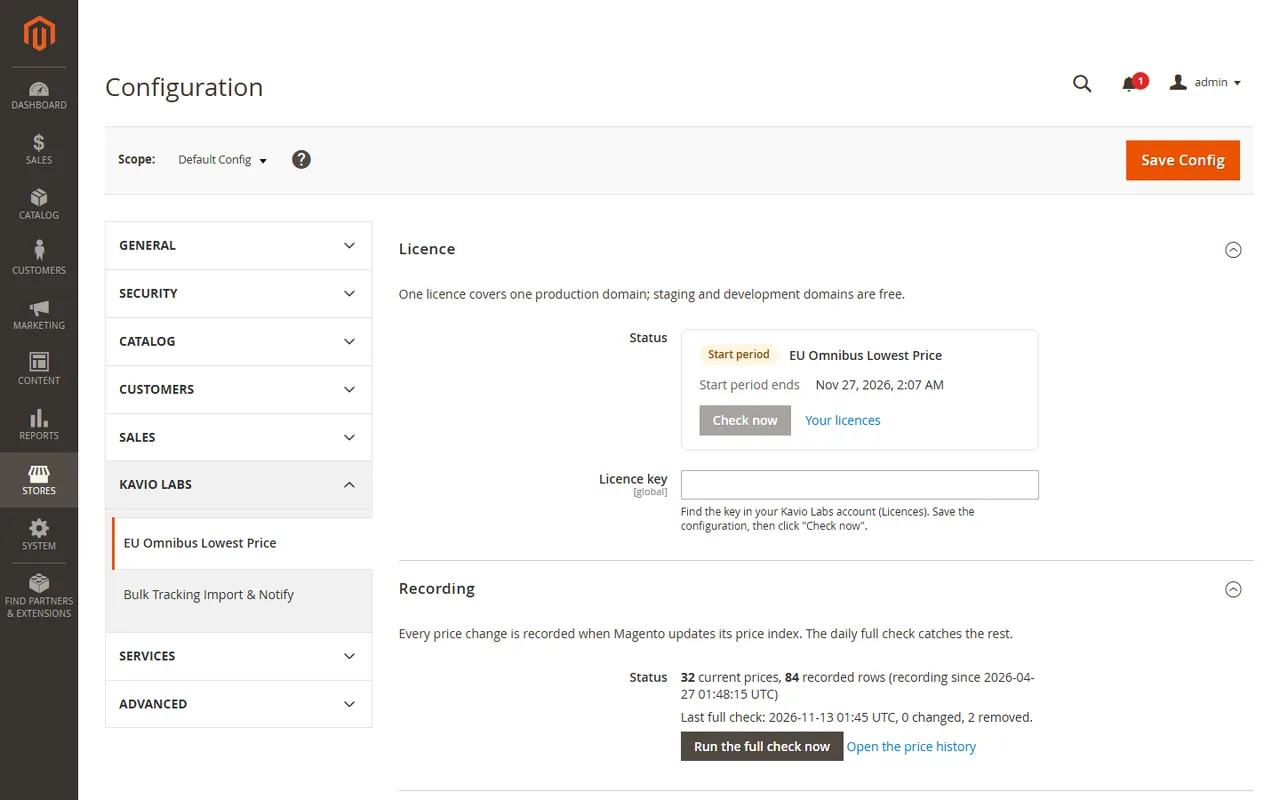
Open Stores > Configuration > Kavio Labs > EU Omnibus Lowest Price.
Settings
Licence
Enter your licence key in Licence > Licence key and click Save Config. The key is verified at once. The licence card shows the status, the licensed domain and the date until which updates are included; Check now verifies again. One licence covers one production domain; staging and development domains are free. (The Adobe Commerce Marketplace edition has no licence group.)
Recording
The status card shows how many current prices and rows are recorded, since when, and the result of the last full check. Run the full check now compares every price of Magento's price index with the history at once (the daily cron job does the same).
General and display
Setting
Meaning
Show the lowest price
Turns the label on or off. Recording continues when it is off, so the history stays complete. Store view scope.
On the product page
Shows the label on product pages.
In product lists, search results and widgets
Shows the label wherever Magento renders a price box in a list.
Text
The label text with the placeholders {days} and {price}. Translate it per store view.
Calculation
Setting
Meaning
Period in days
30 for the EU Omnibus rule (1 to 365).
Lowest price
Before the reduction started (EU directive): the lowest price of the period before the current price took effect; it does not change while the reduction runs. Rolling: the lowest price of the last N days, today included.
When no earlier price is recorded
Show the current price or Show nothing, for reductions that were already running when the module was installed.
Data
Keep ended prices for (days): ended rows older than this are removed by the daily job (at least twice the period, 400 days by default). Prices that are still current are never removed.
Exclude a product
In the product form, Exclude from the lowest price (EU Omnibus) = Yes shows no label for the product and its options. For an option of a configurable product, exclude the configurable product.
Permissions
System > Permissions > User Roles > Role Resources: Omnibus Price History (view), Export the price history, Run the full price check and, under Stores > Settings > Configuration, EU Omnibus Lowest Price.
Usage
On the storefront
When a price is shown reduced, the label appears inside the price box, under the prices:
Lowest price in the last 30 days: $100.00
It follows the price: the same tax display (including, excluding or both), the same display currency, the customer's group and the website.
It is added after the price box is rendered, as plain markup (a single span). Plain markup inside Magento's price box, tested on Luma (Hyva was not tested). Override view/frontend/templates/price/label.phtml in your theme to restyle it.
Magento's page cache stays on: guests share one page; customer groups get their own page variant as for every price.
Configurable products: in product lists the label belongs to the option that gives the shown price. On the product page the label shows the lowest price of the selected option and stays hidden until an option is selected.
Price history page
Catalog > Omnibus Price History lists every recorded price: SKU, name, website, customer group, price, old price, valid from and to (UTC). Filter by SKU, website, customer group, dates, or current prices only. Export CSV downloads the rows for the current filters; text cells that start with =, +, - or @ are prefixed with an apostrophe so a spreadsheet never runs them as a formula.
Price history
On a product
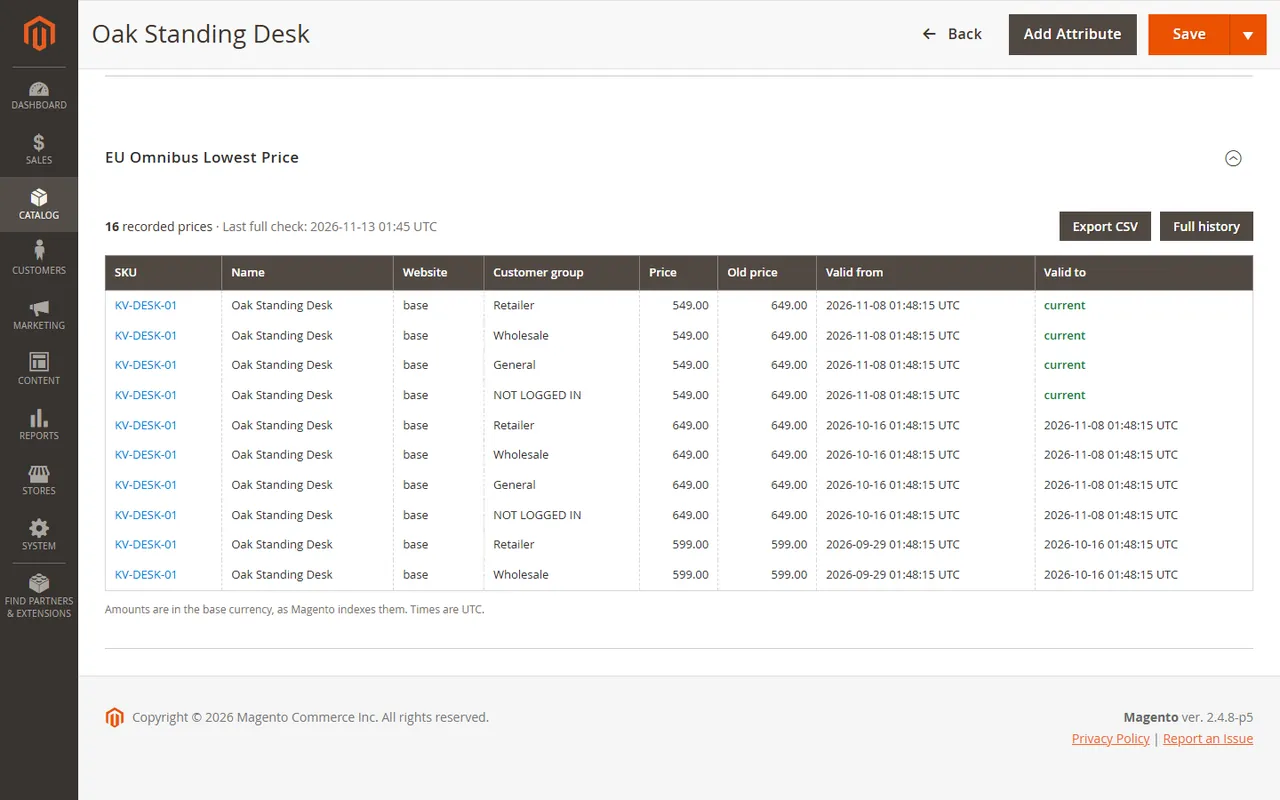
The product form has an EU Omnibus Lowest Price section with the latest rows of the product and a link to its full history. Exclude from the lowest price (EU Omnibus) switches the label off for the product.
Product section
How the lowest price is chosen
A reduction starts when the price took effect, or, when the old price was added more than 24 hours after the price change, when the old price appeared.
The label shows the lowest price recorded in the 30 days before that moment, for the same website and customer group.
A change of only the old price while the reduction runs is not a new reduction.
Example: a product costs 100, you set the special price 80 today. The label says 100. If it had been 90 for a week before, the label says 90. If you lowered the price to 80 forty days ago without an old price and add the old price 100 today, the label says 80: there is no saving to announce.
FAQ
Is this legal advice?
No. The module records prices and shows the lowest price according to your settings. Which reductions need a prior price and how you advertise them is your responsibility; ask your adviser when in doubt.
Why does a product show no lowest price?
It is not shown reduced: Magento shows an old price only when the price is below the regular price (special price, catalog price rule or a group price for quantity 1).
It is excluded in the product form, or its configurable parent is.
The label is off (General, product page or lists), or the licence is not active.
It is a bundle or grouped product, or the reduction is a tier price for a quantity above 1.
No price was recorded yet and When no earlier price is recorded is set to Show nothing.
The price index is out of date: run the indexers and make sure Magento's cron runs.
What about prices from before the installation?
The module cannot know them. It records the current prices when it is installed. A reduction that was already running then has no earlier price: the label shows the current price (or nothing, if you choose so) until an earlier price has been recorded.
I announce a reduction days after lowering the price
If you lower a price without an old price and add the old price days later, the reduction starts when the old price appears: the label shows the lowest price of the 30 days before that day, which is usually the lowered price itself. An old price added within 24 hours of the price change belongs to the same reduction.
The lowest price is lower than my regular price. Why?
That is what the rule asks for: the prior price is the lowest price you applied in the period, not the regular price you advertise.
Which prices does it record?
What Magento's price index computes for each product, website and customer group: special price with its dates, catalog price rules and group prices for quantity 1. The row changes when the price or the old price changes. Amounts are stored in the base currency and converted for display like the price on the page.
Tax and currency?
The label goes through the same price calculator as the price: including tax, excluding tax, or both, and the display currency of the store view.
Does it work with Hyva?
The label is added after the price box has been rendered, as one plain span. It was tested on the Luma theme of Magento Open Source 2.4.8-p5; no Hyva store was used for the tests. On the product page of a configurable product the label for the selected option is switched by a small RequireJS script (data-mage-init), which Hyva does not run: there the label stays hidden rather than show a wrong one. Simple products and lists are plain markup.
Does it slow down the store?
No. Prices are recorded when the price index changes, with set-based SQL. A price box with a reduction reads a few indexed rows of one product.
Does it work on SaaS editions?
No. It needs a store that runs PHP modules: Magento Open Source, self-hosted or on cloud hosting (tested on 2.4.8-p5). Adobe Commerce is not supported in 1.0.0 (content staging keys product data differently); support is planned for 1.0.1 and will be listed only after a run on it.
Does the licence check slow down my store?
No. The store reads the stored result; the server is asked only from the Admin or once a day by cron after a key was entered.
What happens on uninstall?
Disabling or removing the files keeps the history. module:uninstall with the remove-data option removes the history table, the settings, the product attribute and the licence state.
XRechnung (UBL and CII) and Peppol BIS Billing 3.0 from Magento invoices and credit memos: Leitweg-ID, buyer VAT ID, EU VAT categories, validated before you send.
Sell by the metre, square metre, kilogram or litre: customers enter 2.35 m, the line total is rounded once and the unit shows in cart, orders and e-mails.