1.0.0
Nov 14, 2026
Latest- Packaging and code quality changes, no change in how the product works.

by Kavio Labs · for Magento Open Source 2.4.8
Let shoppers name their price. You accept, counter or decline in the Admin, and the agreed price reaches the cart once, checked by the server.
Let shoppers name their price. You accept, counter or decline in the Admin, and the agreed price reaches the cart once, checked by the server.
Shoppers who would buy at a lower price leave, or write an e-mail that ends in a manual order or a coupon anyone can reuse. Make an Offer adds a button under Add to Cart, a short form and a real negotiation. You answer in the Admin; the agreed price is applied by the server, for one customer, one quantity, one order and a limited time.
Make an Offer for Magento 2 works with Magento Open Source 2.4.8 (tested on 2.4.8-p5, PHP 8.3).
We list the builds we install and test on. “Tested” means the test plan ran on that build; “Supported” means the build is inside the supported range.
| Version | Range | Runs on | Status |
|---|---|---|---|
| Magento 2.4.8 | Open Source 2.4.8-p5 | PHP 8.3 | Tested on 2.4.8-p5 |
| Editions | Magento Open Source | app/code (zip) or Composer | Self-hosted |
The Documentation tab covers the settings and every screen.
Magento Open Source 2.4.8 (tested on 2.4.8-p5, PHP 8.3). Tested on Magento 2.4.8. The Compatibility tab lists every version range.
Yes. Every Magento module on this site is on sale: one-time price per production store, staging and development domains included, 12 months of updates and support.
Each product page says what was tested. Admin-only modules do not depend on the storefront theme; modules that change the storefront name the tested theme (Luma) on their Compatibility tab.
One license per production store domain, with staging and development domains included. 12 months of updates and support; after that the module keeps working.
Yes. Kavio Labs sells add-ons and plugins for CS-Cart, OpenCart, WooCommerce, PrestaShop and Shopware, with the same license portal and support desk.
One production store domain with every subdomain (www, shop., staging.), plus local development hosts such as localhost, *.local and *.test. A store on another domain needs its own license; a second-store license is 40% off. You have 14 days after installing to enter the key. 12 months of updates and support are included; after that the module keeps working and renewals are 50% off. How licensing works
Yes. Ask for a full refund within 30 days of your first purchase, no reason needed: open a ticket or write to [email protected] with your order number. The money goes back to the card or bank account you paid with within 5 business days of approval. Refund policy
Open a ticket from your account, so your license details are attached. We answer with a same-day reply on weekdays (Mon-Fri 09:00-18:00 UTC+3). Support policy. Not a customer yet? Ask a pre-sales question.
14 more answers about setup and daily use in the Documentation tab.
Let shoppers name their price on a product page. You accept, counter or decline in the Admin; the agreed price reaches the cart once, applied by the server for one customer, one quantity and a limited time.
Tested on Magento Open Source 2.4.8 (PHP 8.3) with the Luma theme. Compatibility with other versions, themes and Adobe Commerce is listed only after it has been tested.
Requirements: Magento Open Source 2.4.8 (tested), PHP 8.3, MySQL or MariaDB as Magento itself, a working cron (offers lapse and reservations are released by a job that runs every ten minutes).
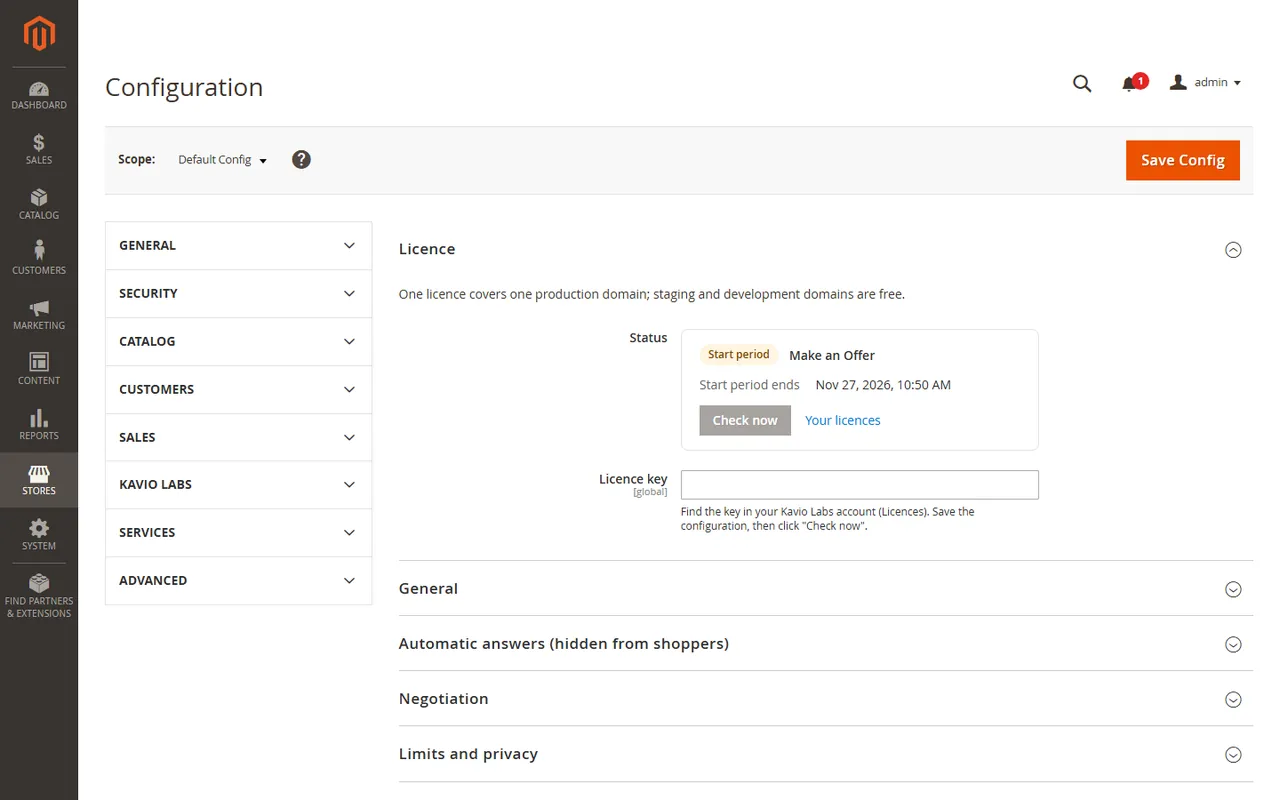
composer require kaviolabs/module-make-an-offer.bin/magento module:enable KavioLabs_MakeAnOffer, bin/magento setup:upgrade and, in production mode, bin/magento setup:di:compile and bin/magento setup:static-content:deploy.bin/magento cache:flush.app/code/KavioLabs/MakeAnOffer/ (the folder holds registration.php).bin/magento commands as above.Stores > Configuration > Kavio Labs > Make an Offer > Licence: paste the key from your Kavio Labs account, save, then click Check now. One licence covers one production domain; staging and development domains are free. The module works for a 14-day start period without a key. The Admin is never blocked. Only the licence check contacts our server; it does not send customer or offer data. Nothing is checked before you enter a key.
The module registers one job (kv_make_an_offer_sweep, every ten minutes): it closes offers whose window ran out, gives back order reservations that were never completed and, if you set a retention period, anonymises old closed offers. It sends no e-mail.
Two tables (kv_make_an_offer_offer, kv_make_an_offer_event), two product attributes (Offers and Hidden minimum offer price, in the group Product Details) and its settings. It adds no column to a core table and replaces no core class.
Update the module like any other (Composer or replace the folder), then run bin/magento setup:upgrade. Offers, settings and the licence state are kept.
bin/magento module:disable KavioLabs_MakeAnOffer (then delete the folder, or composer remove the package, and run setup:upgrade).bin/magento module:uninstall KavioLabs_MakeAnOffer --remove-data; zip install bin/magento module:uninstall KavioLabs_MakeAnOffer --non-composer, then module:disable, delete the folder and run setup:upgrade.Stores > Configuration > Kavio Labs > Make an Offer. Most settings can be set per website (a website is the sales channel of Magento).
| Setting | Default | What it does |
|---|---|---|
| Enable offers | Yes | No: the button is hidden and no new offers can be made. Accepted offers already in a cart keep their price until they expire. |
| Offers on all products | Yes | Yes: every simple and virtual product without custom options takes offers unless its product page says "Offers off". No: only products set to "Offers on". |
| Guests can make offers | Yes | Guests give name and e-mail and agree to the storage of the offer. No: signed-in customers only. Guests get a personal offer page link after sending and learn about answers by e-mail, so switch on the e-mails "Offer accepted" and "Counter-offer". |
| Customer groups that can make offers | all | Nothing selected = every group. Guests are the group NOT LOGGED IN. |
| Maximum quantity per offer | 10 | 0 = no limit. Stock, minimum quantity and quantity steps of the product are always checked. |
| Keep cart price rules off agreed prices | Yes | Yes: a cart price rule or coupon never discounts a line that carries an agreed price; the other lines of the cart keep their rules. No: rules may discount the agreed price too. Catalog prices, tier prices and shipping rules are not affected. |
| Setting | Default | What it does |
|---|---|---|
| Accept at once at (% of the price) | empty | Offers at or above this share of the current price are accepted at once, for example 90. Empty = you answer every offer. |
| Decline at once below (% of the price) | empty | Offers below this share are declined at once, for example 50. Empty = off. |
The price is the price the shopper sees for the quantity (tier prices, special prices and catalog price rules included). A hidden minimum offer price on the product (product page, group Product Details) accepts an offer at or above it at once; shoppers never see it.
| Setting | Default | What it does |
|---|---|---|
| Counter-offers per offer | 3 | How many counter-offers you can send, and how many new offers the shopper can answer with. |
| Days to answer an offer | 7 | Pending offers expire after this many days (0 = never). |
| Days for the shopper to answer a counter-offer | 3 | 0 = never. |
| Hours to buy at the accepted price | 48 | An accepted offer can be bought once within this time. |
| Setting | Default | What it does |
|---|---|---|
| Open offers per customer | 5 | Per account, or per e-mail address for guests (0 = no limit). |
| Offers per product in 30 days | 3 | Per customer (0 = no limit). |
| Offers per hour from one connection | 10 | Rate limit per visitor address, stored only as a keyed hash; signed-in customers get three times as many. Only the connection address is used: forwarding headers sent by visitors are not believed. Behind a CDN or load balancer configure the trusted proxies of your store, otherwise all visitors share one address and one bucket. |
| Anonymise closed offers after (days) | 0 | Declined, withdrawn, expired and ordered offers lose name, e-mail and messages after this many days. 0 = keep. |
When a customer account is deleted, its open offers are withdrawn and its offers lose name, e-mail and messages.
The module sends nothing on its own. Switch on the e-mails you want; each uses a Magento transactional e-mail template that you can edit under Marketing > Communications > Email Templates (the starting templates are "Make an Offer: ...").
| Goes to | |
|---|---|
| New offer | the shop owner address below |
| Offer accepted (with the one-time buy link) | the shopper |
| Counter-offer | the shopper |
| Offer declined | the shopper |
| Message about an offer | the shopper |
| The shopper answered | the shop owner address below |
Set E-mail sender and Shop owner e-mail address; without an address the two owner e-mails are not sent.
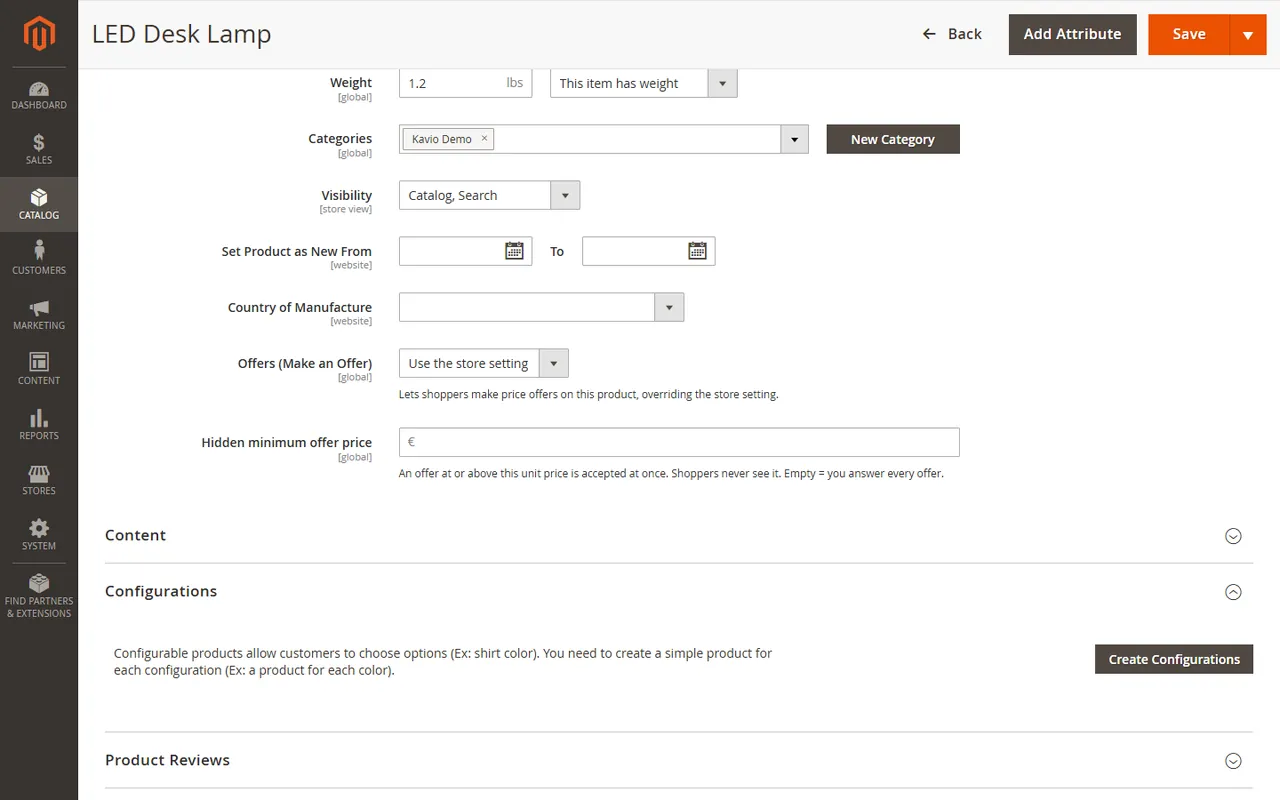
On the product page, group Product Details: Offers (use the store setting / Offers on / Offers off) and Hidden minimum offer price (in the base currency).
Simple and virtual products without custom options, whose quantity is a whole number. Configurable, bundle, grouped and downloadable products are not supported in 1.0.0. The store must show prices in the same tax state as it enters them (prices excluding tax shown excluding tax, or including shown including); otherwise the button is hidden, because the price a shopper types would not mean what the cart calculates.
System > Permissions > User Roles > Role Resources > Sales > Operations > Offers: the role can open the list and every offer. The sub-permission Answer offers is needed to accept, counter, decline, send messages and re-issue.
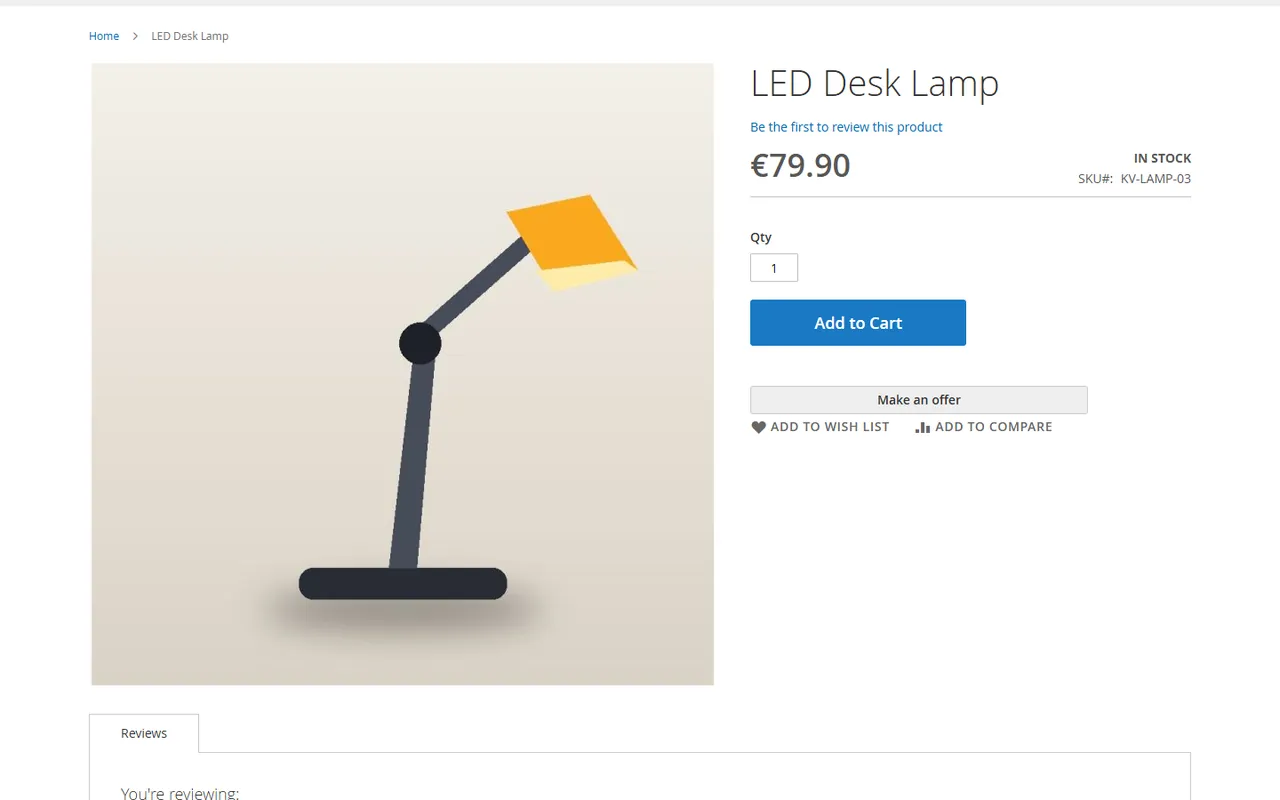
On a product page the Make an offer button sits under Add to Cart. The page itself is static HTML (the full page cache keeps it); the button and the shopper's offer state come from the module's JavaScript and one uncached request.
The dialog asks for quantity, price per piece and an optional message. Guests also give name and e-mail and agree to the storage of their offer.
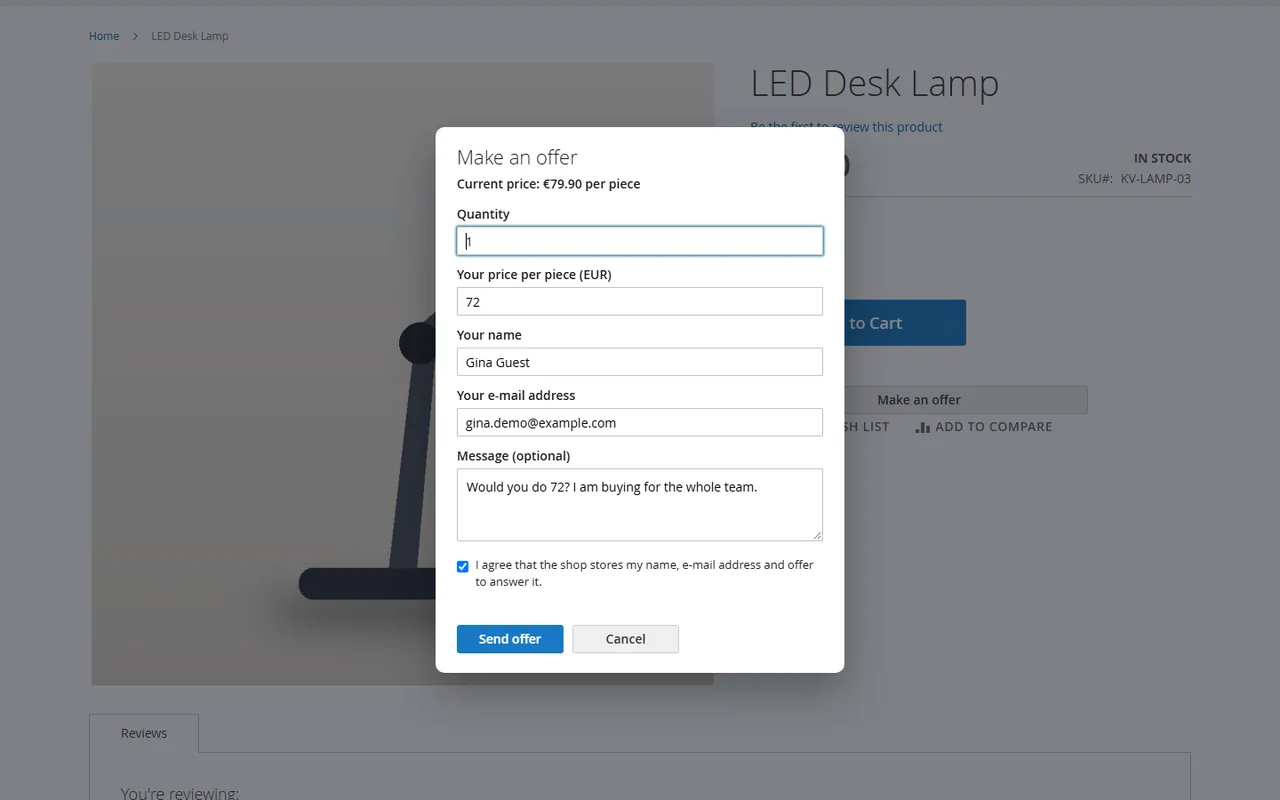
Offers must be lower than the current price. The answer is immediate when a hidden rule decides: accepted (the shopper gets a Buy link), declined, or "sent".
My offers in the customer account lists every offer with its history. The shopper can accept a counter-offer, answer it with a new price, withdraw, write a message and add an accepted offer to the cart.
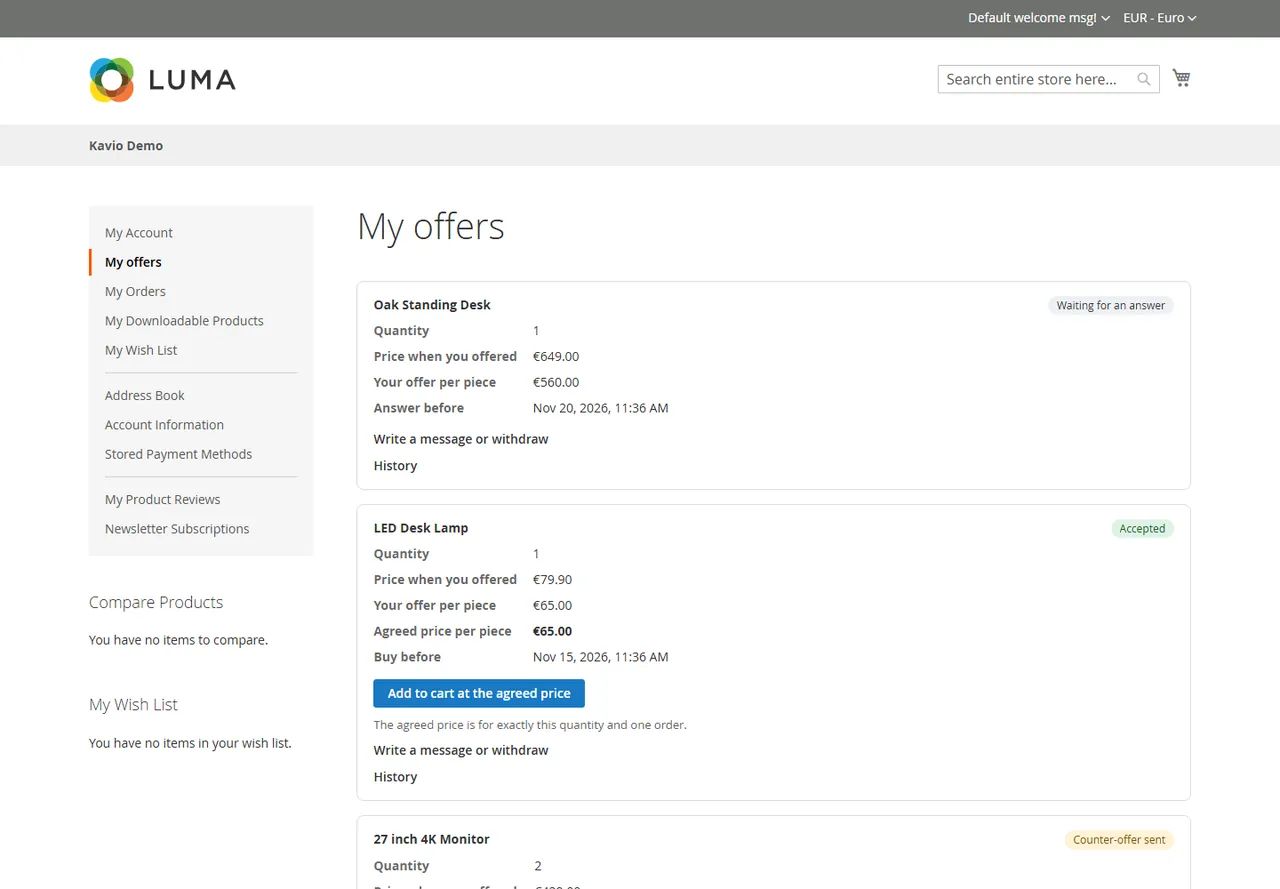
Guests get a personal link to their offer page right after sending the offer (keep it; staff see the same link on the offer in the Admin and can send it on). Guests also get a signed link by e-mail to view their offer and answer it; an accepted offer is bought with the one-time link in the e-mail, and a guest who accepts a counter-offer is taken straight to the cart. Guests are told about answers by e-mail only, so switch on the e-mails "Offer accepted" and "Counter-offer" when guest offers are on.
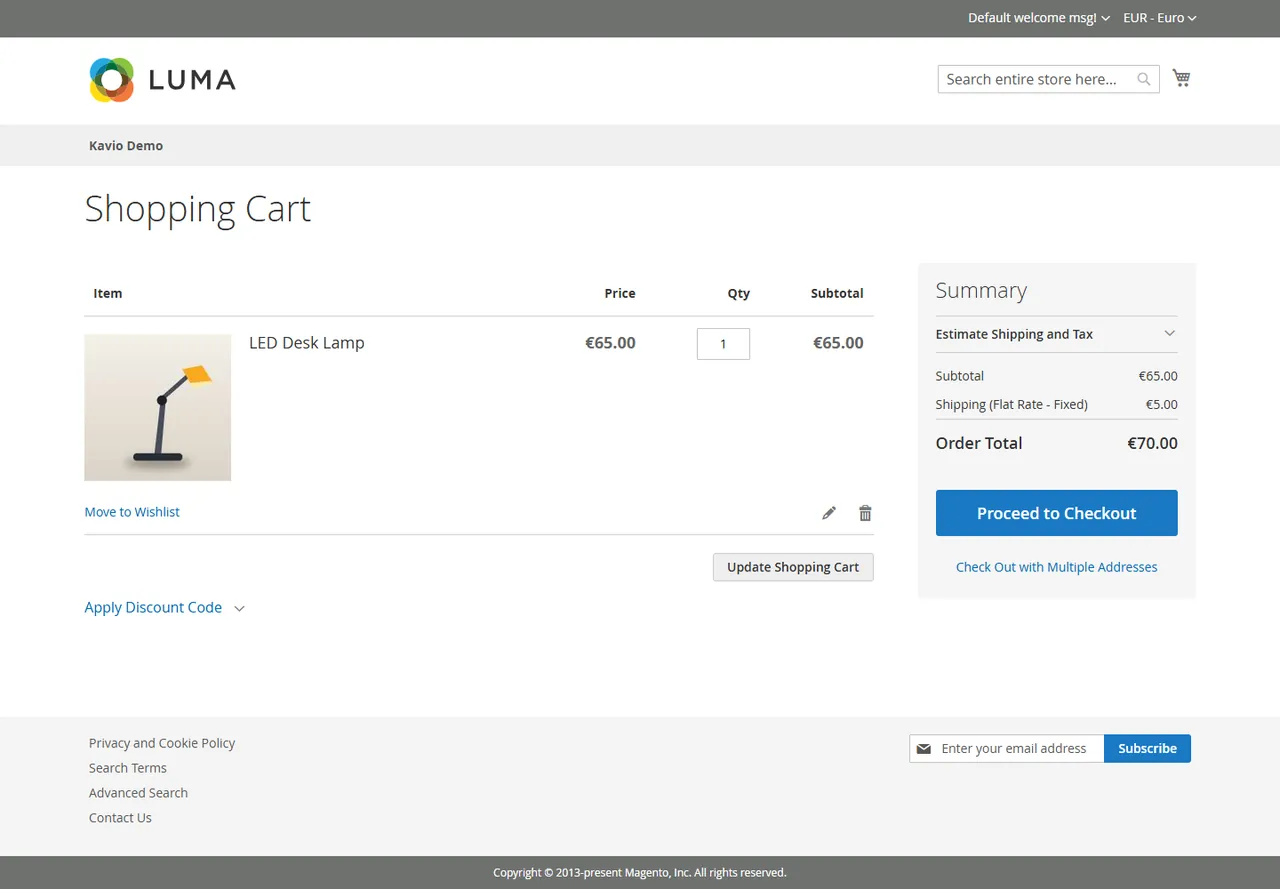
The cart line carries the offer: it is added by the module (the customer can not create it) and linked to the offer. On every totals calculation the server recomputes the price from the stored offer and applies it only when all of this is true:
Otherwise the line shows the regular price with a notice. When the order is placed the offer is taken in one atomic step: two carts holding the same offer can not both buy at the agreed price, the second one gets a clear message and its cart goes back to the regular price. A cancelled order closes the offer as expired, so it can not be used twice; Re-issue gives the shopper a new window. If an offer lapses while it sits in the cart, the line goes back to the regular price with a notice and the order is placed normally.
Promotions: by default a cart price rule or coupon does not discount a line that carries an agreed price, while the other lines of the cart keep their rules. Switch the setting "Keep cart price rules off agreed prices" off to let rules discount it too. Free-shipping rules are not affected.
Admin orders: editing an existing order in the Admin keeps the agreed unit price; a reorder is a new purchase at the current price and never reuses the offer. Neither can break the offer or the order.
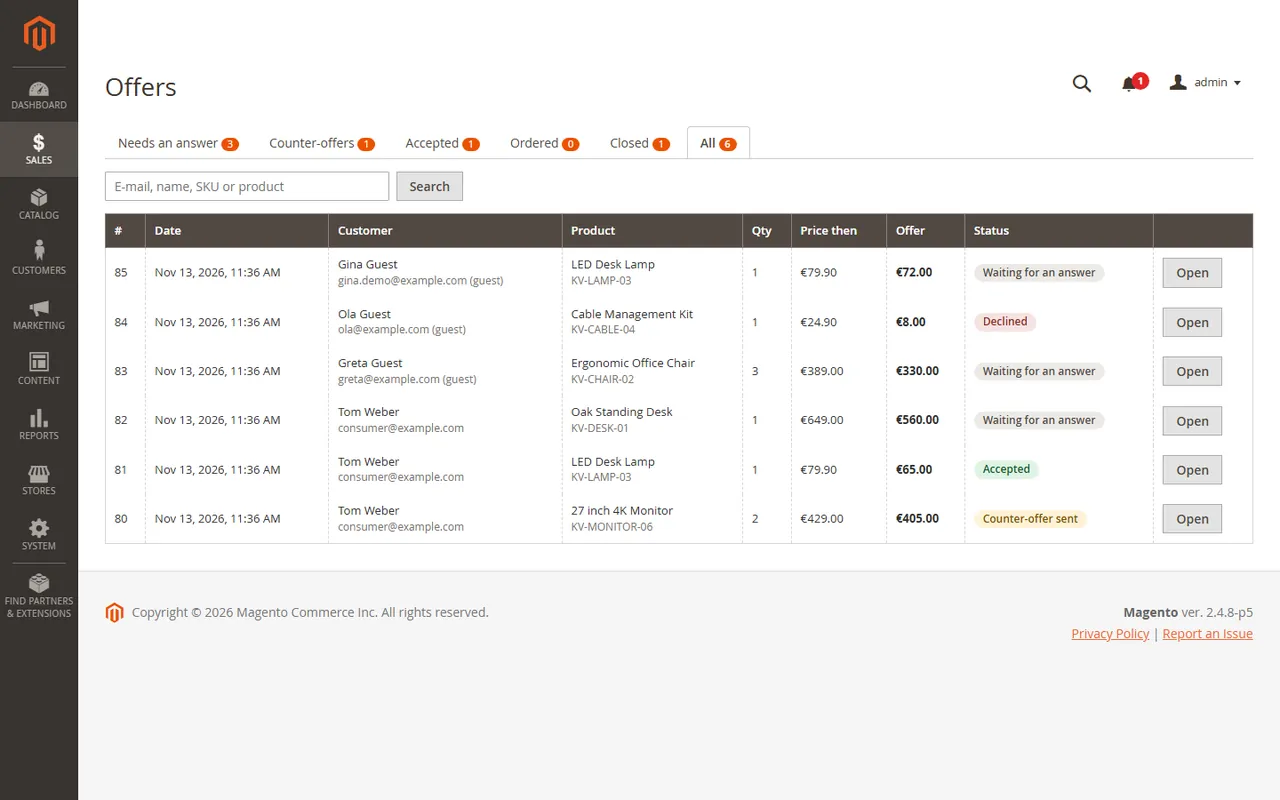
Sales > Offers: tabs for offers that need an answer, counter-offers, accepted, ordered and closed offers, search by e-mail, name, SKU or product.
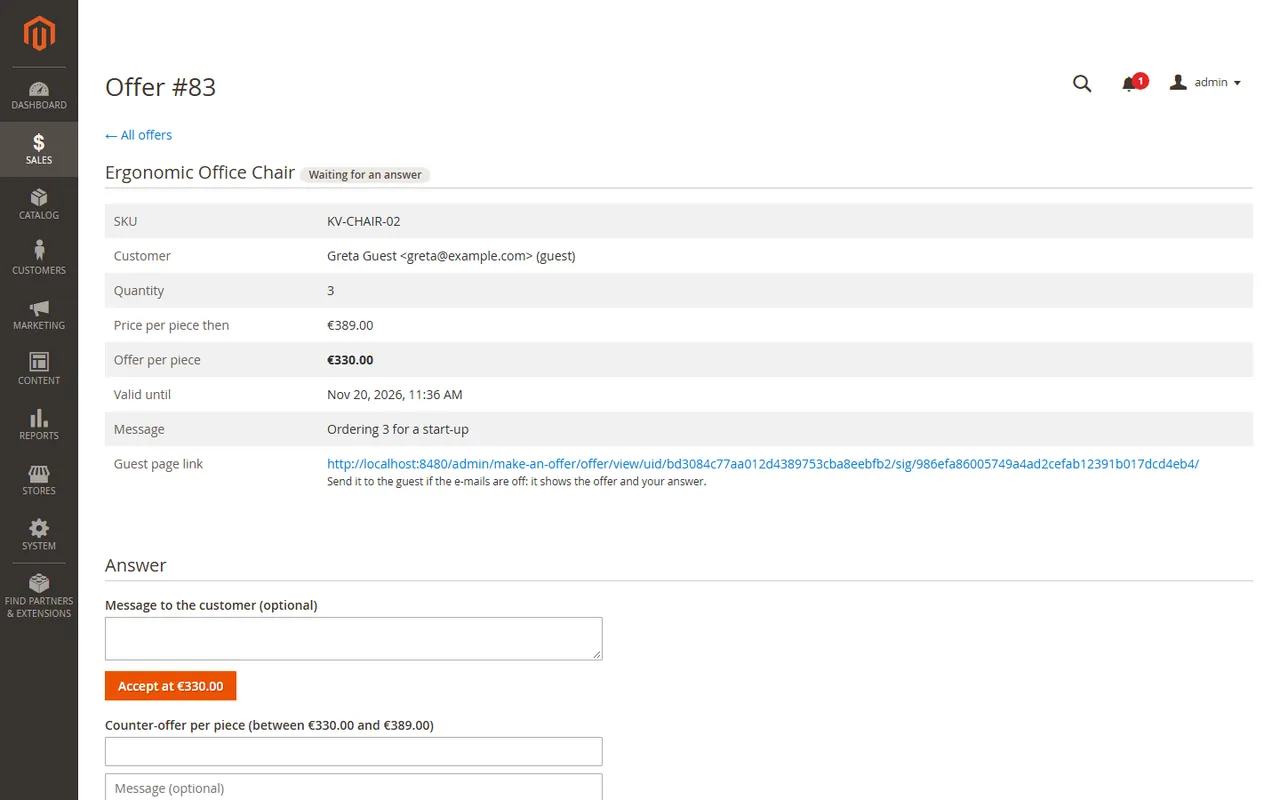
Open an offer to answer it: Accept, Send counter-offer (between the offer and the price at the time, up to the configured rounds, optional message), Decline, or just a message. Accepted and expired offers show Re-issue (new window, new link; the old link stops working). The one-time buy link of an accept is shown once, in case no e-mail is switched on. Every step is logged with the acting user.
On the Admin order page an order placed through an offer shows a "Placed through an offer" box with the agreed price.
Each product has a hidden minimum offer price and an offers switch on its product page in the Admin. An offer at or above the minimum is accepted at once; shoppers never see it.
The cron job kv_make_an_offer_sweep closes offers whose answer or payment window ran out, releases reservations that were never completed (after 20 minutes) and anonymises closed offers after the retention period.
No. The minimum price and the automatic percentages are never sent to the browser; the shopper only learns the answer.
The price is never taken from the request. The cart line is created by the module from the stored offer and checked against it on every calculation and again when the order is placed. A forged request or a line of another customer ends at the regular price.
The agreed price is only for the agreed quantity. Any other quantity is shown at the regular price with a notice; setting it back restores the agreed price.
No. The order placement takes the offer with one atomic database update. A second cart or a second order is stopped with a message and goes back to the regular price. A cancelled order closes the offer; staff can re-issue it.
The product page holds a static mount that is identical for every visitor; no price, customer data or form key is in the page. State and answers come from uncached routes. Tested with the built-in full page cache on Magento Open Source 2.4.8; Varnish and Hyva are not claimed.
Simple and virtual products without custom options and with whole-number quantities. Not configurable, bundle, grouped or downloadable products in 1.0.0.
Optional. Guests need to give a name and e-mail address and agree to the storage. They get a personal link to their offer page right after sending, and learn about answers by e-mail only, so switch on the e-mails "Offer accepted" and "Counter-offer". The buy link of a guest offer is valid for one order and the checkout e-mail must match.
No. Every e-mail is off until you switch it on; it then uses a Magento transactional template.
Offers are stored in the currency the shopper used, with that currency's decimals (no cents for JPY). If the shopper later pays in another currency the agreed price is converted at the current rate.
The offer stays used by that order until the order is cancelled. Returns and credit memos keep the offer as ordered.
Stock is never touched by the module; the normal Magento checks apply when the line is added and the order is placed.
Only the connection address is used (forwarding headers can be forged). Configure Magento's trusted proxies so the real visitor address is the connection address.
Not supported in 1.0.0. Only Magento Open Source 2.4.8 was tested.
Support: [email protected], same working day on weekdays.
The offer becomes buyable again within 20 minutes (a stopped order releases it at once in almost every case).
Buy with confidence
This product was tested on this build. Builds we did not test are not listed.
Updates and support are included in the price. The product keeps working afterwards; renewing is optional.
How licensing worksIf it is not what you expected, tell us within 30 days and we refund the order.
Refund policyPay by card, Apple Pay or Google Pay on Stripe's secure page. Your card number never reaches our server.
Ask a pre-sales questionSold by Kavio Labs Software Limited, registered in England and Wales No. 17532441. About us
More for Magento

XRechnung (UBL and CII) and Peppol BIS Billing 3.0 from Magento invoices and credit memos: Leitweg-ID, buyer VAT ID, EU VAT categories, validated before you send.

Sell by the metre, square metre, kilogram or litre: customers enter 2.35 m, the line total is rounded once and the unit shows in cart, orders and e-mails.

Upload one CSV or XLSX file with the day's tracking numbers: check the plan, then Magento creates every shipment. No e-mail unless you allow it.


