Sell by the metre, square metre, kilogram or litre: customers enter 2.35 m, the line total is rounded once and the unit shows in cart, orders and e-mails.
Tested on Magento 2.4.8Updated Nov 14, 2026Version 1.0.0Compatible with Magento Open Source 2.4.8 (tested on 2.4.8-p5, PHP 8.3) No core file edits
Built forMagento
Sell by Measure for Magento 2: price per metre, line total rounded once, the unit from product page to invoice.1 of 6
What it does
Sell by the metre, square metre, kilogram or litre: customers enter 2.35 m, the line total is rounded once and the unit shows in cart, orders and e-mails.
Sell cable, fabric, flooring, rope or sand in the amount your customers need. Magento can already take decimal quantities, but the shop never says what the number means, and 2.35 m at 24.90 is stored as 58.515. Sell by Measure turns a product into "price per metre": the customer types 2.35, sees "2.35 m = €58.52", and the cart, order, invoice and credit memo all carry the unit and the right amount.
Features
Set up per product
Unit (m, cm, mm, m², m³, kg, g, l, ml, ft, yd, in, sq ft, lb), step (0.01 m), minimum, maximum and default measure
Written to the stock item as decimal quantity, quantity increment and sale limits: Magento itself enforces them, stock counts in the unit
Right amounts
One rounding of the line total (2.35 m x 24.90 = 58.52, not 58.515), tax on the rounded line, also with prices incl. tax
Partial invoices and credit memos (1.15 m + 1.20 m) add up exactly to the order; the last part of a measure can always be refunded
The unit everywhere
"€24.90 / m" after the price on product pages, listings and widgets
Live total on the product page; "Measure: 2.35 m" and "Price: €24.90 / m" in cart, mini cart, checkout, order view and e-mails
Plain markup and a small script (no Knockout): Luma tested; other themes with the standard quantity field
What you get
Download & installThe module .zip for Magento Open Source 2.4.8, extracted into app/code/KavioLabs (it is also a Composer package). Download it from My licenses right after payment.
12 months of updates & supportNew versions and help for 12 months (24 or 36 months at checkout). After that the module keeps working; renew anytime at 50%.
License for your storeOne production domain with all its subdomains; staging and local development hosts are free. How licensing works
30-day refundFull refund within 30 days of your first purchase, no reason needed. Refund policy
Tested buildsMagento Open Source 2.4.8 (tested on 2.4.8-p5, PHP 8.3). Tested on Magento 2.4.8.
Documentation & supportFull guide (Installation, Configuration, Usage, FAQ) on this page. Tickets from your account, same-day reply on weekdays (Mon-Fri 09:00-18:00 UTC+3).
Compatibility
Sell by Measure for Magento works with Magento Open Source 2.4.8 (tested on 2.4.8-p5, PHP 8.3).
We list the builds we install and test on. “Tested” means the test plan ran on that build; “Supported” means the build is inside the supported range.
Compatibility
Version
Range
Runs on
Status
Magento 2.4.8
Open Source 2.4.8-p5
PHP 8.3
Tested on 2.4.8-p5
Editions
Magento Open Source
app/code (zip) or Composer
Self-hosted
1.0.0
Nov 14, 2026
Latest
First release: sell simple and virtual products by measure (m, cm, mm, m², m³, kg, g, l, ml, ft, yd, in, sq ft, lb) with step, minimum, maximum and default measure per product, written to the stock item (decimal quantity, quantity increment, sale limits); one rounding of the line total for decimal quantities (tax on the rounded line, also with prices incl. tax); decimal-safe remaining quantities for partial invoices, shipments and credit memos; "/ unit" after the price; product page measure box with live total; "Measure" and "Price / unit" in cart, mini cart, checkout, order view, e-mails and PDFs; clean uninstall with or without data. Admin mass "Update attributes" applies the stock settings; reorder / order edit rebuilds the measure texts; net unit price on stores with prices incl. tax; tier prices in the live total.
How do I install the module?
Install the module. Unzip into app/code/KavioLabs (the zip is also a Composer package).
Enable and upgrade. bin/magento: module:enable, then setup:upgrade (and di:compile in production mode).
Enter the license key. Stores > Configuration > Kavio Labs: paste the key from My licenses. Staging and local stores are included.
Magento Open Source 2.4.8 (tested on 2.4.8-p5, PHP 8.3). Tested on Magento 2.4.8. The Compatibility tab lists every version range.
Can I buy a Magento module today?
Yes. Every Magento module on this site is on sale: one-time price per production store, staging and development domains included, 12 months of updates and support.
Do the modules work with Hyva?
Each product page says what was tested. Admin-only modules do not depend on the storefront theme; modules that change the storefront name the tested theme (Luma) on their Compatibility tab.
How does licensing work?
One license per production store domain, with staging and development domains included. 12 months of updates and support; after that the module keeps working.
Do you already sell modules for other platforms?
Yes. Kavio Labs sells add-ons and plugins for CS-Cart, OpenCart, WooCommerce, PrestaShop and Shopware, with the same license portal and support desk.
What does the license cover?
One production store domain with every subdomain (www, shop., staging.), plus local development hosts such as localhost, *.local and *.test. A store on another domain needs its own license; a second-store license is 40% off. You have 14 days after installing to enter the key. 12 months of updates and support are included; after that the module keeps working and renewals are 50% off. How licensing works
Can I get a refund?
Yes. Ask for a full refund within 30 days of your first purchase, no reason needed: open a ticket or write to [email protected] with your order number. The money goes back to the card or bank account you paid with within 5 business days of approval. Refund policy
How do I get help?
Open a ticket from your account, so your license details are attached. We answer with a same-day reply on weekdays (Mon-Fri 09:00-18:00 UTC+3). Support policy. Not a customer yet? Ask a pre-sales question.
Sell cable, fabric, flooring, rope, timber, sand or liquids by the metre, square metre, kilogram or litre. Customers enter the amount they need (2.35 m, 4.2 m²), the product price is the price of one unit, and the line total is rounded once: 2.35 m at 24.90 / m is 58.52, with the tax calculated on that amount.
Product page with the measure box
What it does
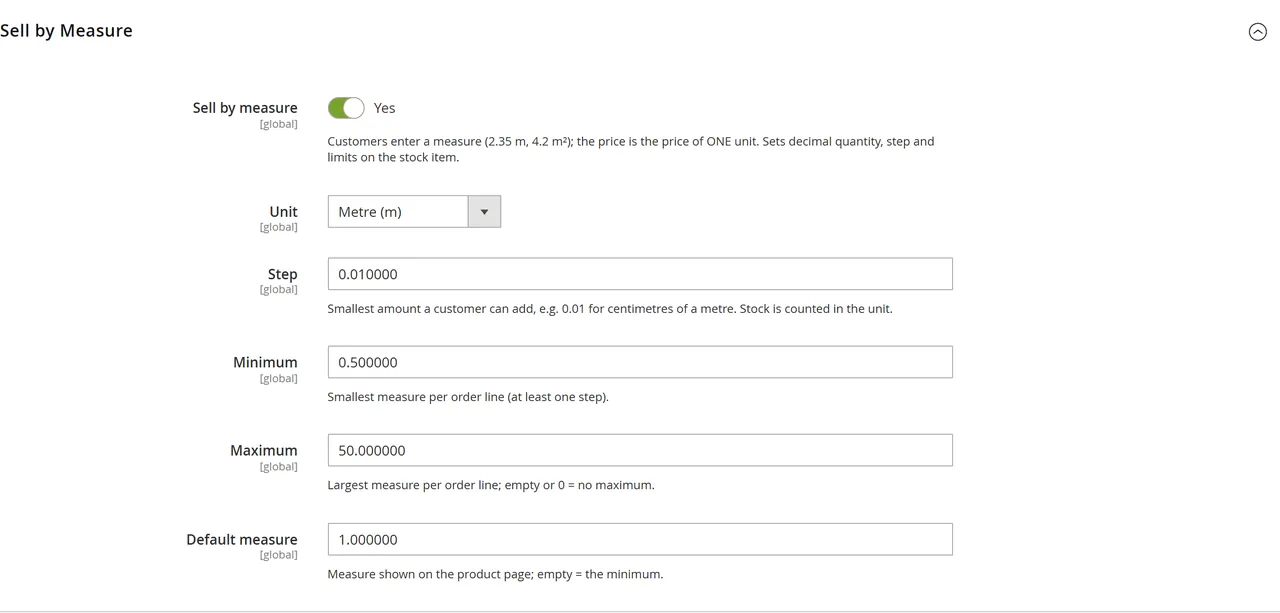
Per product: unit (m, cm, mm, m², m³, kg, g, l, ml, ft, yd, in, sq ft, lb), step, minimum, maximum and default measure, in a "Sell by Measure" group of the product page in the Admin.
Uses the decimal quantities Magento already has: the module writes "decimal quantity", the step as quantity increment and the limits to the product's stock item, so stock, Multi-Source Inventory reservations, invoices, shipments and credit memos count in the unit.
One rounding of the line total: Magento keeps the unrounded product of price and quantity (58.515); the module makes it 58.52 before tax and totals are calculated, also for prices that include tax. (Cart rule discounts are calculated by Magento from price x quantity; the difference is at most 0.01 and consistent within the order.)
Partial invoices and credit memos of a measure add up exactly to the order (remaining quantities are kept to 4 decimals).
The unit everywhere: "24.90 / m" after the price (product page, listings, widgets), "Measure: 2.35 m" and "Price: 24.90 / m" in the cart, mini cart, checkout, order view, customer account, e-mails and PDF invoices and credit memos.
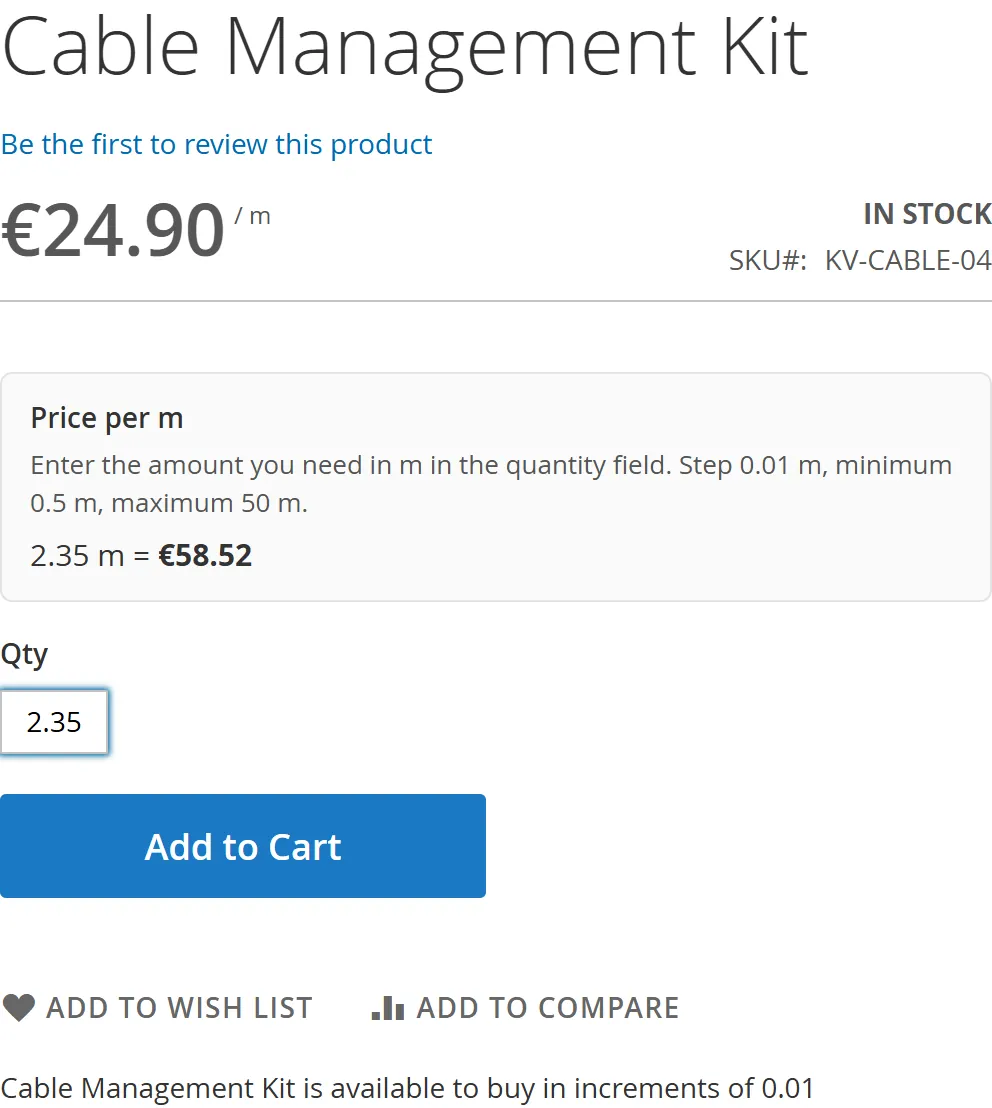
Product page box: unit, step, minimum / maximum and a live total ("2.35 m = €58.52"), plain markup without Knockout.
Requirements
Magento Open Source 2.4.8 with PHP 8.3 (tested on 2.4.8-p5). Magento 2.4.7, Adobe Commerce and other PHP versions are not tested yet.
Simple and virtual products (configurable, bundle and grouped products are not supported in this version).
Installation
Download the zip from your Kavio Labs account (My licences > Downloads).
Extract it into app/code/KavioLabs/SellByMeasure/ (the folder then contains registration.php and etc/).
Run:
bin/magento module:enable KavioLabs_SellByMeasure
bin/magento setup:upgrade
in production mode also bin/magento setup:di:compile and bin/magento setup:static-content:deploy
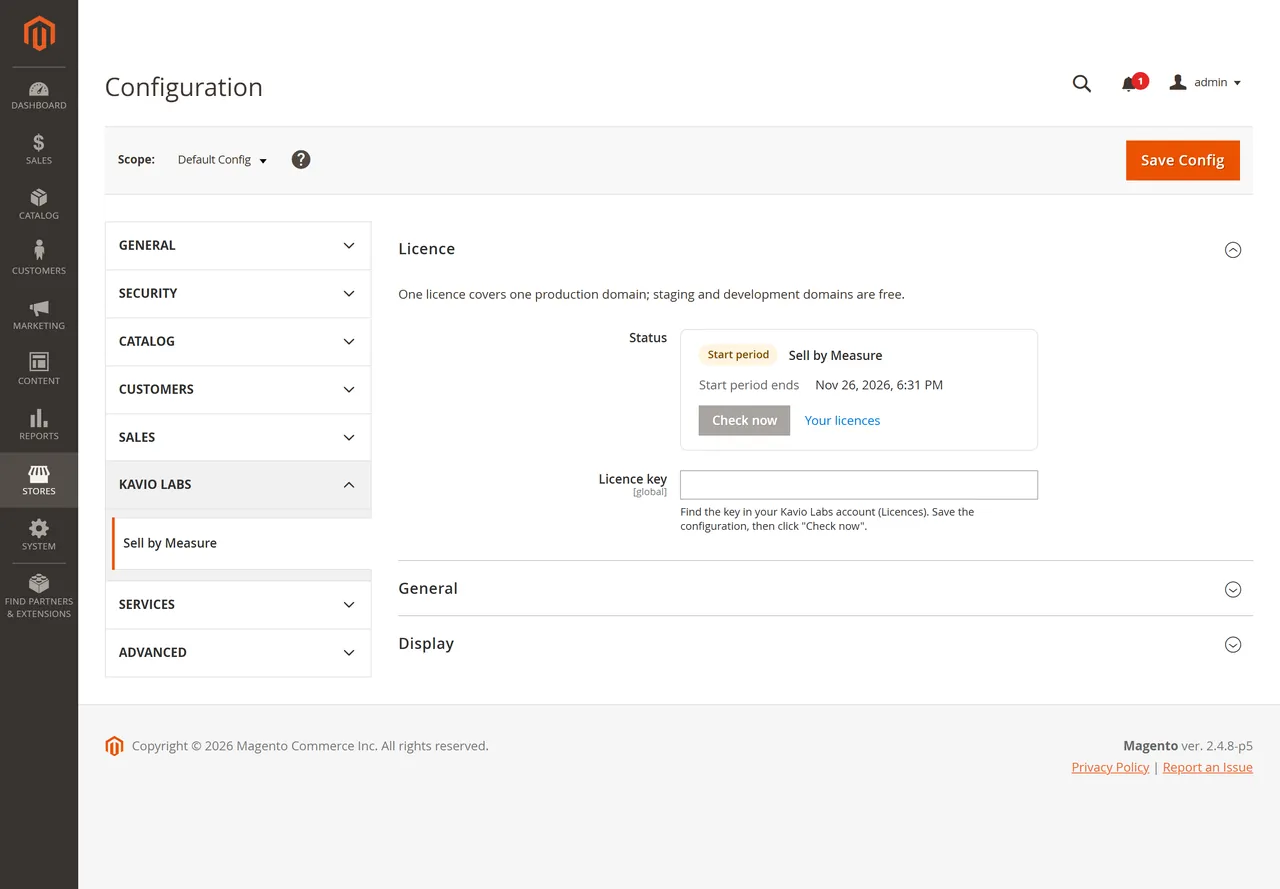
Open Stores > Configuration > Kavio Labs > Sell by Measure and enter your licence key.
The zip is also a Composer package (kaviolabs/module-sell-by-measure, composer.json at the root), so a Composer artifact repository can install it as well.
Update
Replace the folder with the new version and run bin/magento setup:upgrade (plus setup:di:compile and setup:static-content:deploy in production mode). Product settings stay.
Uninstall
Keep the data: bin/magento module:disable KavioLabs_SellByMeasure, delete the folder and run bin/magento setup:upgrade. The product attributes and their values stay for a later reinstall.
Remove everything (the six product attributes and their values, the settings, the licence state): bin/magento module:uninstall KavioLabs_SellByMeasure --non-composer first, then module:disable, delete the folder and run setup:upgrade. For a Composer install use bin/magento module:uninstall KavioLabs_SellByMeasure --remove-data.
The stock settings of your products (decimal quantity, quantity increments, minimum / maximum) are left as they are: switch "Sell by measure" off on a product before uninstalling to put them back on the store defaults.
Configuration
Store settings
Stores > Configuration > Kavio Labs > Sell by Measure
Settings
Licence key: from your Kavio Labs account. The licence check never changes prices or carts.
Enabled: the unit display and the cart / order texts. The one rounding of measure lines always applies to decimal quantities.
Show the unit after the price: "24.90 / m" on the product page, in listings and widgets (store view level).
Show the measure box on the product page: unit, step, limits and the live total above "Add to Cart" (store view level).
A product sold by measure
Catalog > Products > (product) > Sell by Measure
Product settings
Sell by measure: Yes.
Price: the price of ONE unit (one metre, one square metre, one kilogram).
Unit: m, cm, mm, m², m³, kg, g, l, ml, ft, yd, in, sq ft or lb.
Step: the smallest amount a customer can add, e.g. 0.01 m (centimetres), 0.1 m², 0.5 kg.
Minimum / Maximum: per order line; empty or 0 = the store default maximum (Stores > Configuration > Catalog > Inventory). The minimum is at least one step.
Default measure: the amount shown on the product page; empty = the minimum.
Quantity / stock: counted in the unit (100 = 100 m). Stock decreases by 2.35 for an order of 2.35 m.
On save the module sets the product's stock item to decimal quantity with the step as quantity increment and the minimum / maximum as sale limits (the same fields as Advanced Inventory). Switching "Sell by measure" off puts them back on the store defaults. The Admin mass action "Update attributes" does the same. After a CSV product import, save each imported product once (or run "Update attributes" on them), because the core import does not save products through the product model.
Weight: enter the weight of ONE unit (one metre); the shipping weight is weight x measure.
Usage
Product page
The price shows the unit ("€24.90 / m"). The measure box above "Add to Cart" names the unit, the step and the limits, and shows the total while the customer types ("2.35 m = €58.52"). A comma is accepted as decimal separator. Magento checks the step, the minimum and the maximum again on the server.
Product page
Cart and checkout
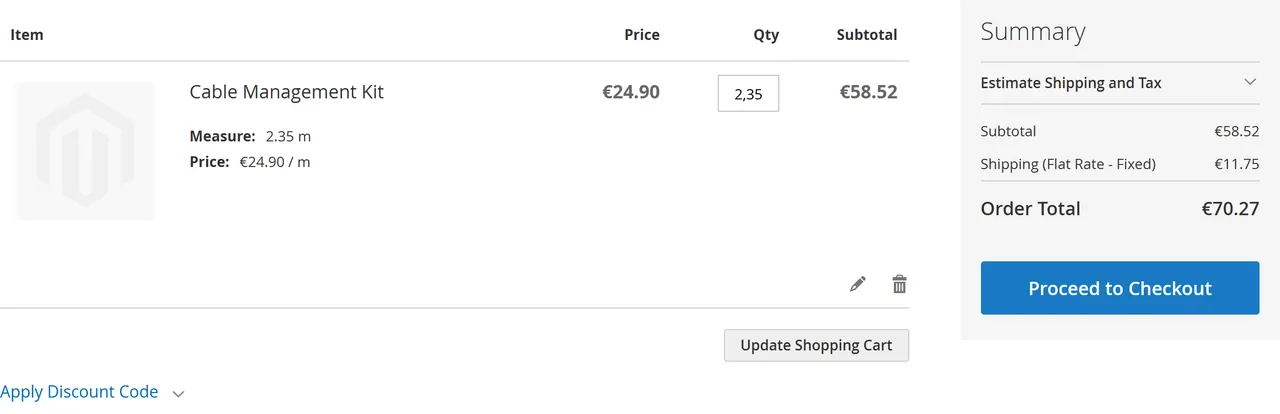
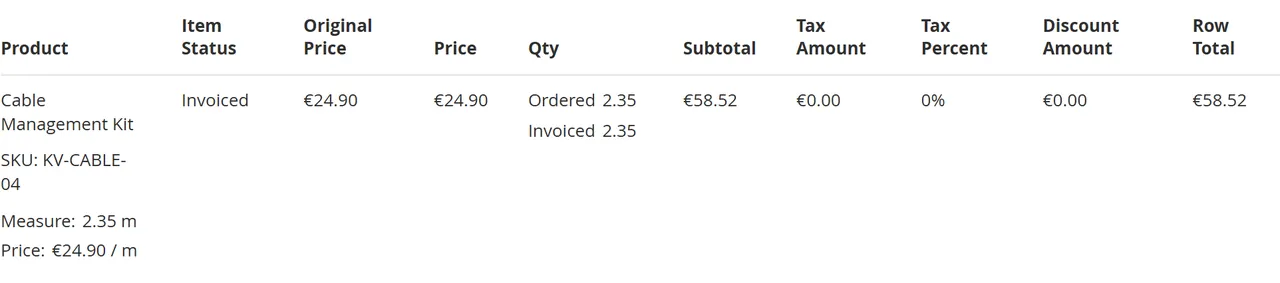
Each measure line shows "Measure: 2.35 m" and "Price: €24.90 / m". The subtotal is the rounded line total (58.52), and the tax is calculated on that amount.
Cart
Orders, invoices, credit memos
The order keeps the measure as quantity (2.35) and shows "Measure: 2.35 m" and "Price: €24.90 / m" in the Admin order view, the customer account, the e-mails and the PDF invoices and credit memos. Partial invoices and credit memos in the unit (1.15 m + 1.20 m) add up exactly to the order.
Order view
Stock
Stock and Multi-Source Inventory reservations count in the unit: an order of 2.35 m reserves 2.35, a credit memo with "Return to Stock" gives it back.
FAQ
Why is 2.35 m x 24.90 = 58.52 and not 58.515?
Magento multiplies the unit price by the quantity and keeps four decimals. The module rounds the line total once to the currency precision before tax and totals, like a till would. It never rounds per step.
Can I sell by area (width x length)?
Not in this version: the customer enters the area in m² directly. An area calculator and packs with waste are planned for a later version.
Which products are supported?
Simple and virtual products. Configurable, bundle and grouped products are not supported in this version.
Does it work with Hyva and other themes?
The product page box and the "/ m" suffix are plain markup with a small script, without Knockout or RequireJS. Tested with Luma; other themes need the standard quantity field (name="qty") in the add-to-cart form.
What about tier prices and cart rules?
Tier prices and "quantity" conditions refer to the measure (10 = 10 m). The live total on the product page uses the tier prices of the customer group.
Does the licence affect prices?
No. Prices, rounding and carts never depend on the licence check.
Which Magento versions are supported?
Magento Open Source 2.4.8 with PHP 8.3 (tested on 2.4.8-p5). Magento 2.4.7, Adobe Commerce and other PHP versions are not tested yet.
XRechnung (UBL and CII) and Peppol BIS Billing 3.0 from Magento invoices and credit memos: Leitweg-ID, buyer VAT ID, EU VAT categories, validated before you send.
Customers upload resale and exemption certificates, you approve them for chosen countries or states and dates, and Magento stops charging them tax until the certificate expires.