Sell gift wrap in Magento Open Source: wrap designs with picture, price and tax, for the whole order or per item, as a real total in cart, checkout, invoice and credit memo.
Tested on Magento 2.4.8Updated Nov 13, 2026Version 1.0.0Compatible with Magento Open Source 2.4.8 (tested on 2.4.8-p5, PHP 8.3) No core file edits
Built forMagento
Gift Wrap & Messages for Magento 2: wrap designs with picture, price and tax in cart, checkout, invoice and credit memo.1 of 7
What it does
Sell gift wrap in Magento Open Source: wrap designs with picture, price and tax, for the whole order or per item, as a real total in cart, checkout, invoice and credit memo.
Gift wrap is a small extra that shoppers gladly pay for, and Magento Open Source has no way to sell it. Gift wrapping with a price is an Adobe Commerce feature; the Open Source gift options only carry a free message. Gift Wrap & Messages adds the priced wrap: a box in the cart with your designs, a line in the totals and the same amount on the order, the invoice and the credit memo.
Features
What the shopper gets
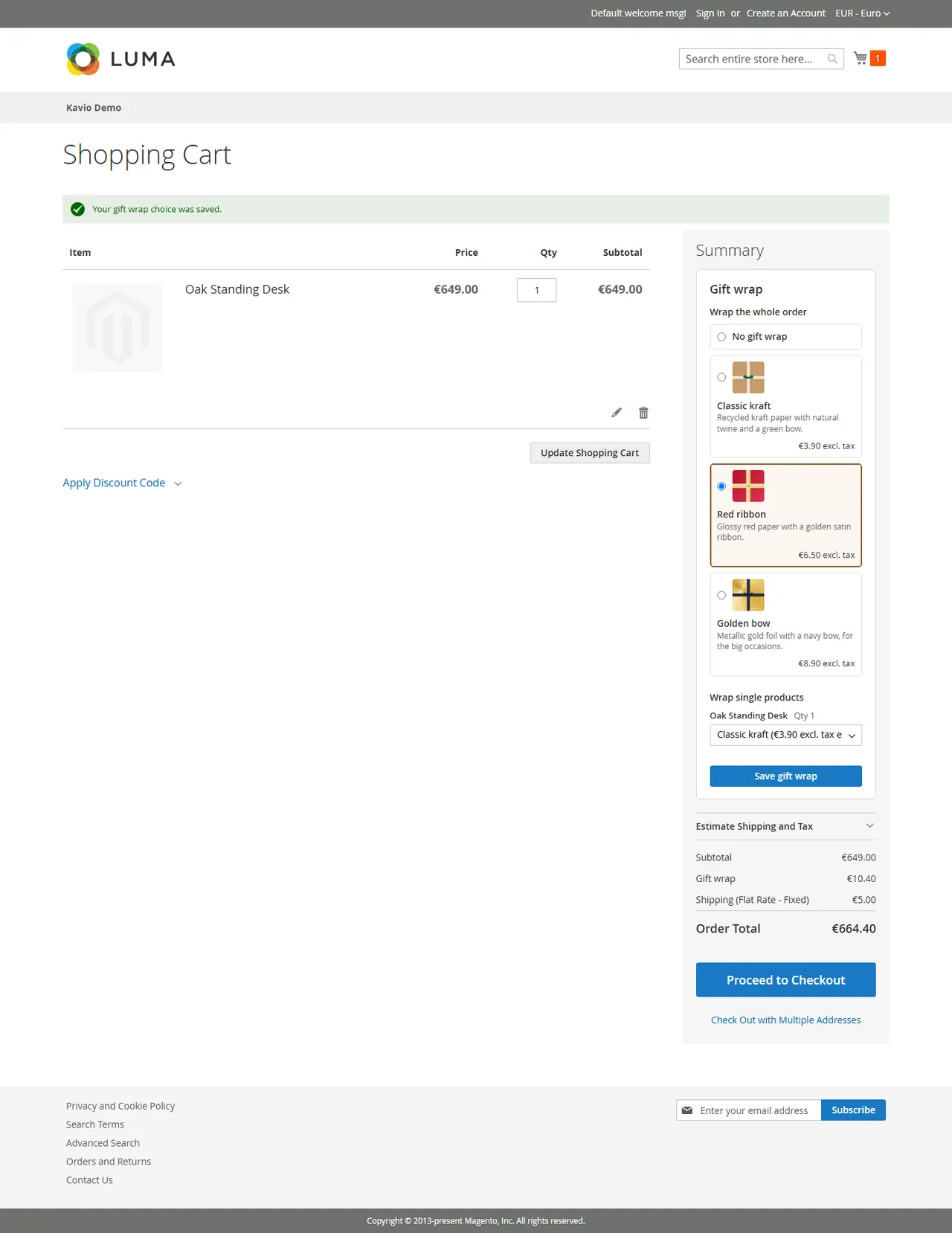
A gift wrap box in the cart: wrap designs with picture, description and price, for the whole order, for single products, or both
A wrap per product line is charged per unit, so two wrapped items cost twice
The "Gift wrap" row appears in the cart and checkout totals at once, with the right tax
What you get
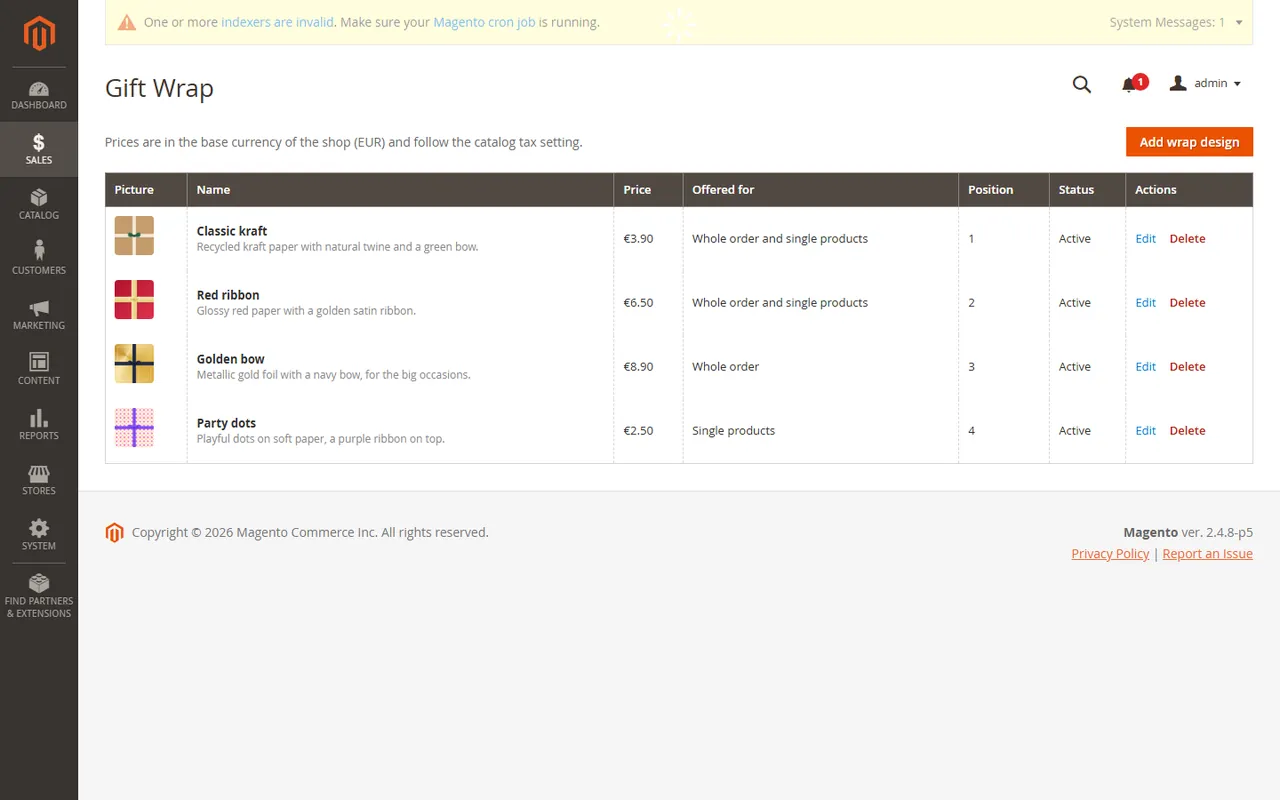
Wrap designs under Sales > Gift Wrap: name, description, picture, price, tax class, offered for (order, product or both), position and on or off
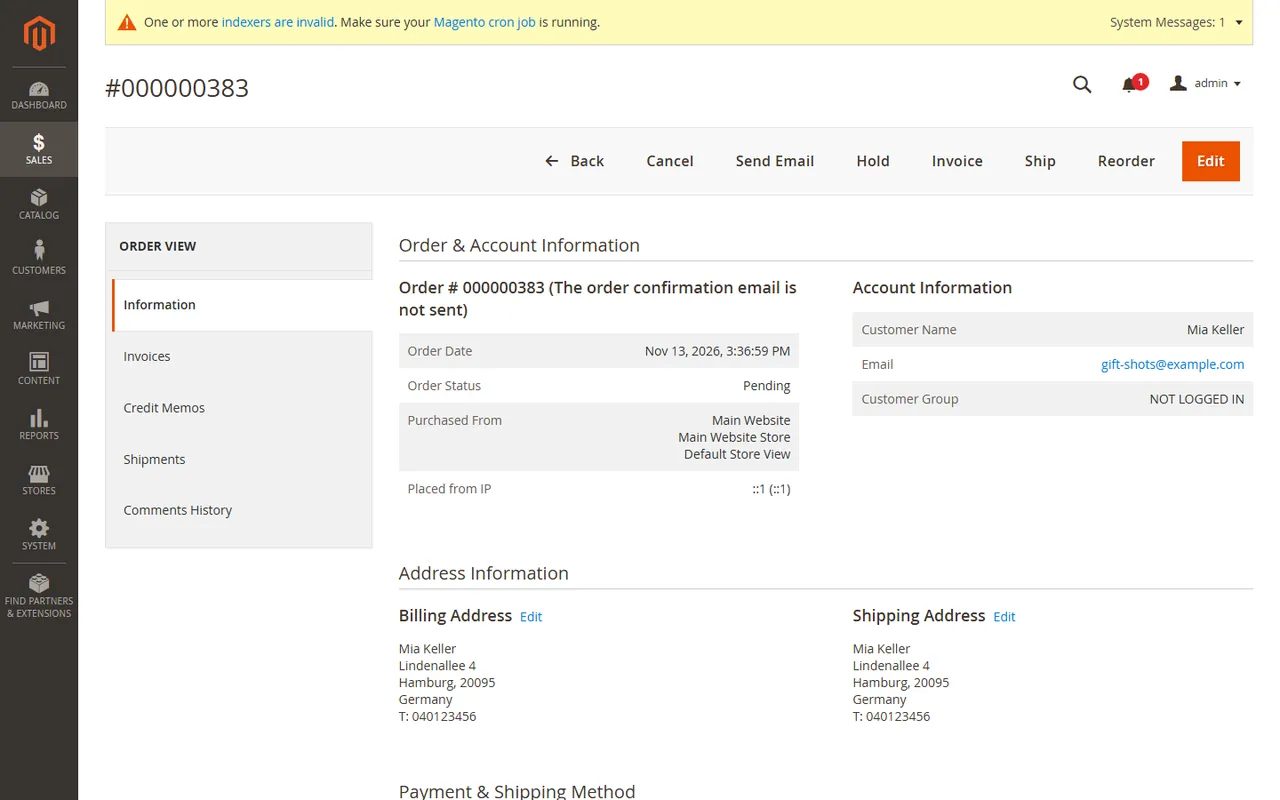
The wrap on the order page in the Admin, in the customer's order history and as a "Gift wrap" row in the totals of orders, invoices and credit memos
A placed order keeps its wrap prices, also when you change a design later
Credit memos give the wrap back, invoices charge it
Messages
The personal gift message stays with Magento's built-in Gift Options (Stores > Configuration > Sales > Gift Options). Gift Wrap & Messages works next to it and does not duplicate it
Made for Magento 2
Magento Open Source 2.4.8 (tested on 2.4.8-p5), PHP 8.3
A quote total collector on the core tax calculation, declarative schema, plugins and observers on public APIs only, no core overrides, no column added to a core table; passes the Adobe coding standard (phpcs Magento2)
REST and GraphQL to read the designs and set a wrap on a cart (headless shops), and the wrap as an extension attribute of the order
Runs in your store; only the licence check contacts our server
What you get
Download & installThe module .zip for Magento Open Source 2.4.8, extracted into app/code/KavioLabs (it is also a Composer package). Download it from My licenses right after payment.
12 months of updates & supportNew versions and help for 12 months (24 or 36 months at checkout). After that the module keeps working; renew anytime at 50%.
License for your storeOne production domain with all its subdomains; staging and local development hosts are free. How licensing works
30-day refundFull refund within 30 days of your first purchase, no reason needed. Refund policy
Tested buildsMagento Open Source 2.4.8 (tested on 2.4.8-p5, PHP 8.3). Tested on Magento 2.4.8.
Documentation & supportFull guide (Installation, Configuration, Usage, FAQ) on this page. Tickets from your account, same-day reply on weekdays (Mon-Fri 09:00-18:00 UTC+3).
Compatibility
Gift Wrap & Messages for Magento 2 works with Magento Open Source 2.4.8 (tested on 2.4.8-p5, PHP 8.3).
We list the builds we install and test on. “Tested” means the test plan ran on that build; “Supported” means the build is inside the supported range.
Compatibility
Version
Range
Runs on
Status
Magento 2.4.8
Open Source 2.4.8-p5
PHP 8.3
Tested on 2.4.8-p5
Editions
Magento Open Source
app/code (zip) or Composer
Self-hosted
1.0.0
Nov 13, 2026
Latest
First release: wrap designs with picture, price, tax class, scope and position (Sales > Gift Wrap); gift wrap box in the cart for the whole order and per product line (charged per unit); "Gift wrap" row in cart, checkout, order, invoice and credit memo totals priced by the core tax calculation; wrap block on the Admin order page and the storefront order view; placed orders keep their wrap prices; REST routes (customer, admin, guest carts, public design list), GraphQL and the order extension attribute kv_gift_wrap; clean uninstall.
How do I install the module?
Install the module. Unzip into app/code/KavioLabs/ModuleName/ (the folder that holds registration.php; the module name is on the Installation page). The zip is also a Composer package.
Enable and upgrade. bin/magento: module:enable, then setup:upgrade (and di:compile in production mode).
Enter the license key. Stores > Configuration > Kavio Labs: paste the key from My licenses. Staging and local stores are included.
Magento Open Source 2.4.8 (tested on 2.4.8-p5, PHP 8.3). Tested on Magento 2.4.8. The Compatibility tab lists every version range.
Can I buy a Magento module today?
Yes. Every Magento module on this site is on sale: one-time price per production store, staging and development domains included, 12 months of updates and support.
Do the modules work with Hyva?
Each product page says what was tested. Admin-only modules do not depend on the storefront theme; modules that change the storefront name the tested theme (Luma) on their Compatibility tab.
How does licensing work?
One license per production store domain, with staging and development domains included. 12 months of updates and support; after that the module keeps working.
Do you already sell modules for other platforms?
Yes. Kavio Labs sells add-ons and plugins for CS-Cart, OpenCart, WooCommerce, PrestaShop and Shopware, with the same license portal and support desk.
What does the license cover?
One production store domain with every subdomain (www, shop., staging.), plus local development hosts such as localhost, *.local and *.test. A store on another domain needs its own license; a second-store license is 40% off. You have 14 days after installing to enter the key. 12 months of updates and support are included; after that the module keeps working and renewals are 50% off. How licensing works
Can I get a refund?
Yes. Ask for a full refund within 30 days of your first purchase, no reason needed: open a ticket or write to [email protected] with your order number. The money goes back to the card or bank account you paid with within 5 business days of approval. Refund policy
How do I get help?
Open a ticket from your account, so your license details are attached. We answer with a same-day reply on weekdays (Mon-Fri 09:00-18:00 UTC+3). Support policy. Not a customer yet? Ask a pre-sales question.
Sell gift wrap in Magento Open Source stores: wrap designs with picture, price and tax, for the whole order or per product line, as a real total in the cart, the checkout, the order, the invoice and the credit memo.
Magento Open Source can carry a free gift message, but it cannot charge for wrapping. This module adds the priced wrap. The personal message stays with Magento's built-in Gift Options, which the module works next to.
Tested on Magento Open Source 2.4.8-p5 (PHP 8.3) with the Luma storefront. Compatibility with other versions is listed only after it has been tested. Not for SaaS editions that cannot run PHP modules.
The gift wrap box in the cart
Installation
Composer (recommended)
Add the Kavio Labs repository and your licence credentials (see your Kavio Labs account).
Run composer require kaviolabs/module-gift-wrap.
Run bin/magento module:enable KavioLabs_GiftWrap, bin/magento setup:upgrade and, in production mode, bin/magento setup:di:compile and bin/magento setup:static-content:deploy.
Zip upload
Download the zip from your Kavio Labs account.
Extract it into app/code/KavioLabs/GiftWrap/ (the folder holds registration.php).
Run the same bin/magento commands as above.
Uninstall
Keep the data: bin/magento module:disable KavioLabs_GiftWrap (then delete the folder or composer remove the package and run setup:upgrade).
Remove everything (tables, settings, licence state): Composer install bin/magento module:uninstall KavioLabs_GiftWrap --remove-data; zip install bin/magento module:uninstall KavioLabs_GiftWrap --non-composer, then module:disable, delete the folder and run setup:upgrade.
Configuration
Open Stores > Configuration > Kavio Labs > Gift Wrap & Messages.
Enter your licence key in Licence > Licence key and click Save Config. The key is verified at once. A new installation works for a 14-day start period without a key.
The licence card shows the status, the licensed domain and the date until which updates are included. Check now verifies again.
Licence card
General
Setting
What it does
Enabled
Turns the gift wrap box and the totals row on or off. Existing orders keep their wrap.
Wrap the whole order
Offers designs for the whole order in the cart.
Wrap single products
Offers a design per product line in the cart. The price is charged per unit of the line.
Tax class of new wrap designs
Pre-selects the tax class when you add a design.
Cart box
Setting
What it does
Heading
The title of the box in the cart (per store view).
Show design pictures
Shows the picture of each design in the cart.
Wrap designs
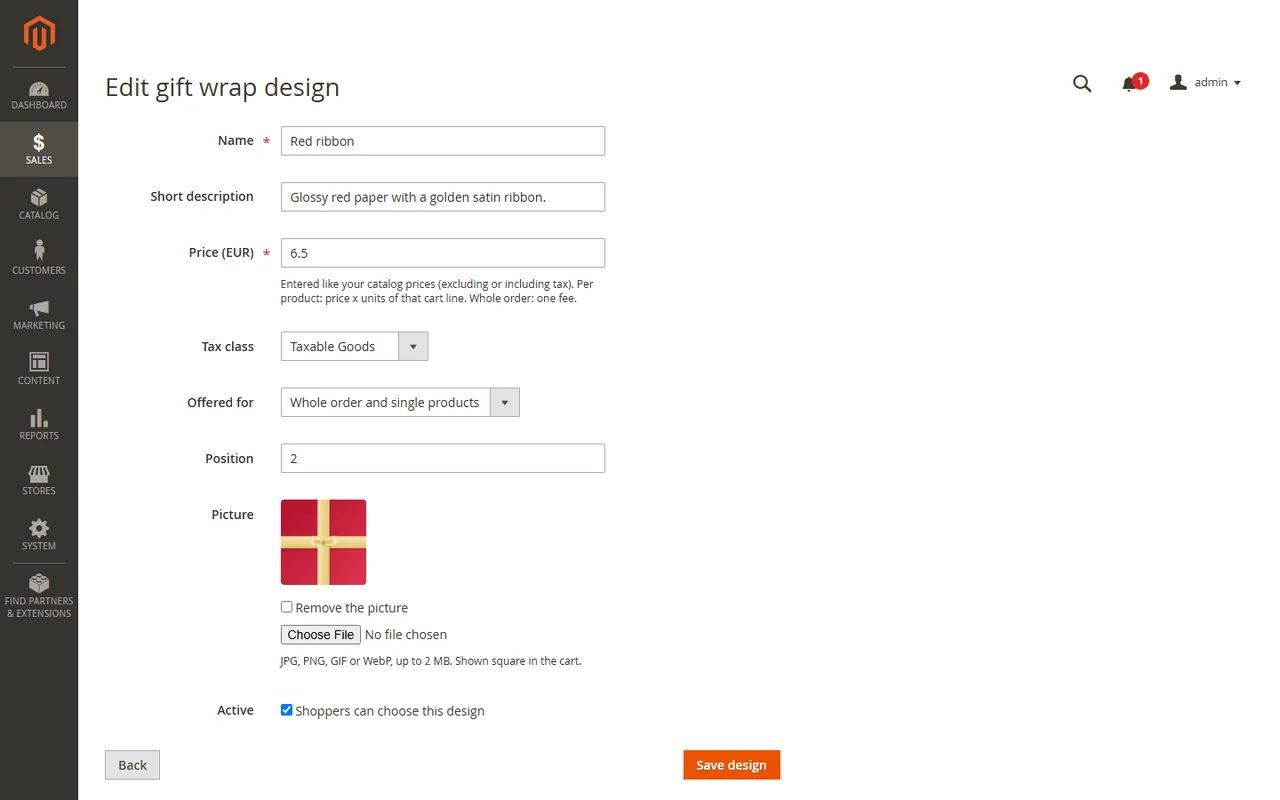
Open Sales > Gift Wrap and click Add wrap design. Each design has a name, a short description, a picture (JPG, PNG, GIF or WebP up to 2 MB), a price, a tax class, Offered for (whole order, single products or both), a position and an Active switch.
Wrap designs
The price is entered like your catalog prices (excluding or including tax, following Stores > Configuration > Sales > Tax > Calculation Settings) in the base currency of the shop.
The tax class decides the tax rate through your tax rules. Tax class "None" means the wrap is not taxed.
A design can be switched off or deleted at any time. Placed orders keep their wrap lines and prices.
The design form
Permissions
System > Permissions > User Roles > Role Resources > Kavio Labs > Gift Wrap controls who may see the designs and the settings.
Gift messages
The personal message is Magento's built-in gift message: Stores > Configuration > Sales > Gift Options. The module neither replaces nor duplicates it.
Usage
In the cart
When at least one design is active, the cart shows a Gift wrap box. The shopper picks a design for the whole order and, per product line, a design for that product. A design chosen for a line is charged once per unit, so two wrapped pieces cost twice the price. Save gift wrap stores the choice; the totals update at once.
The gift wrap box in the cart
Only designs that are offered for the whole order appear in the first group, and only designs offered for single products appear in the product list. Virtual products and carts without a shipping address step cannot be wrapped.
In the checkout
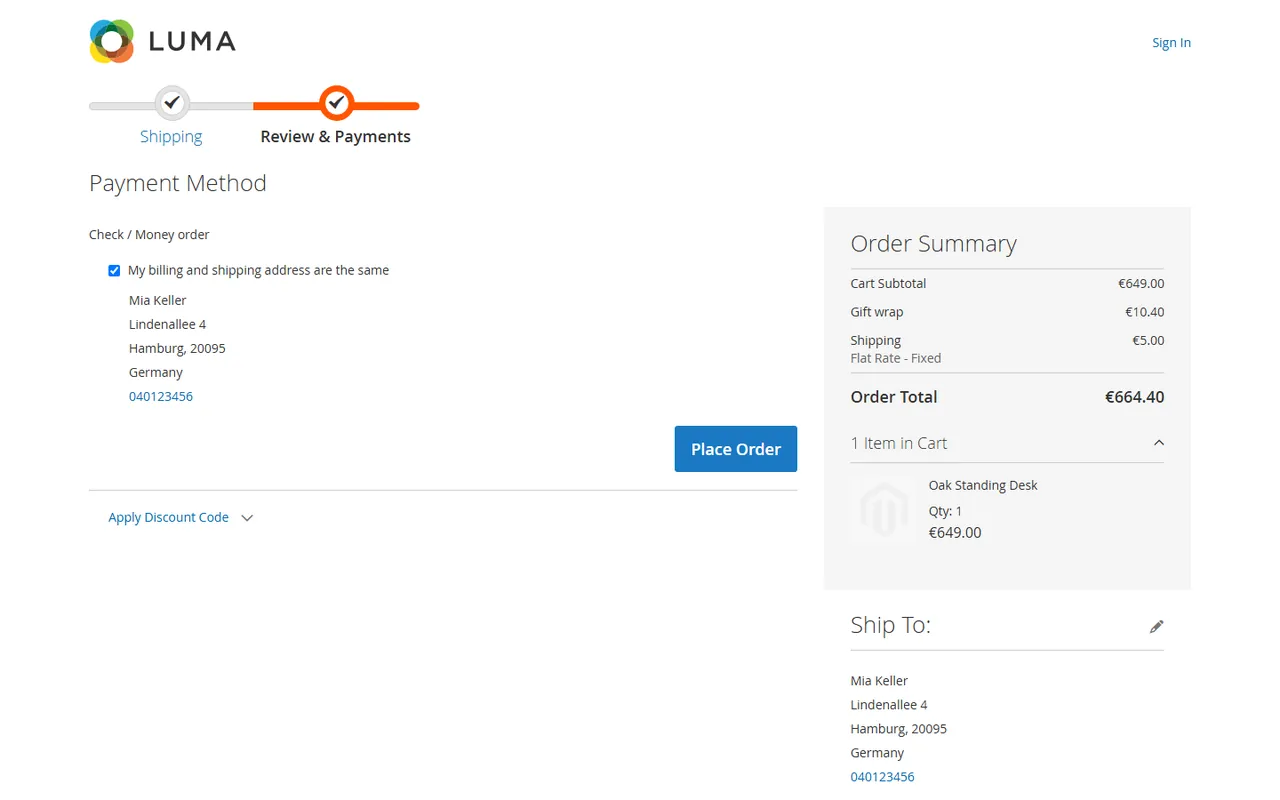
The order summary shows a Gift wrap row between the subtotal and the grand total, with the tax the core tax calculation computed. The row follows the tax display settings of your shop (excluding, including or both).
The Gift wrap row in the checkout totals
In the Admin
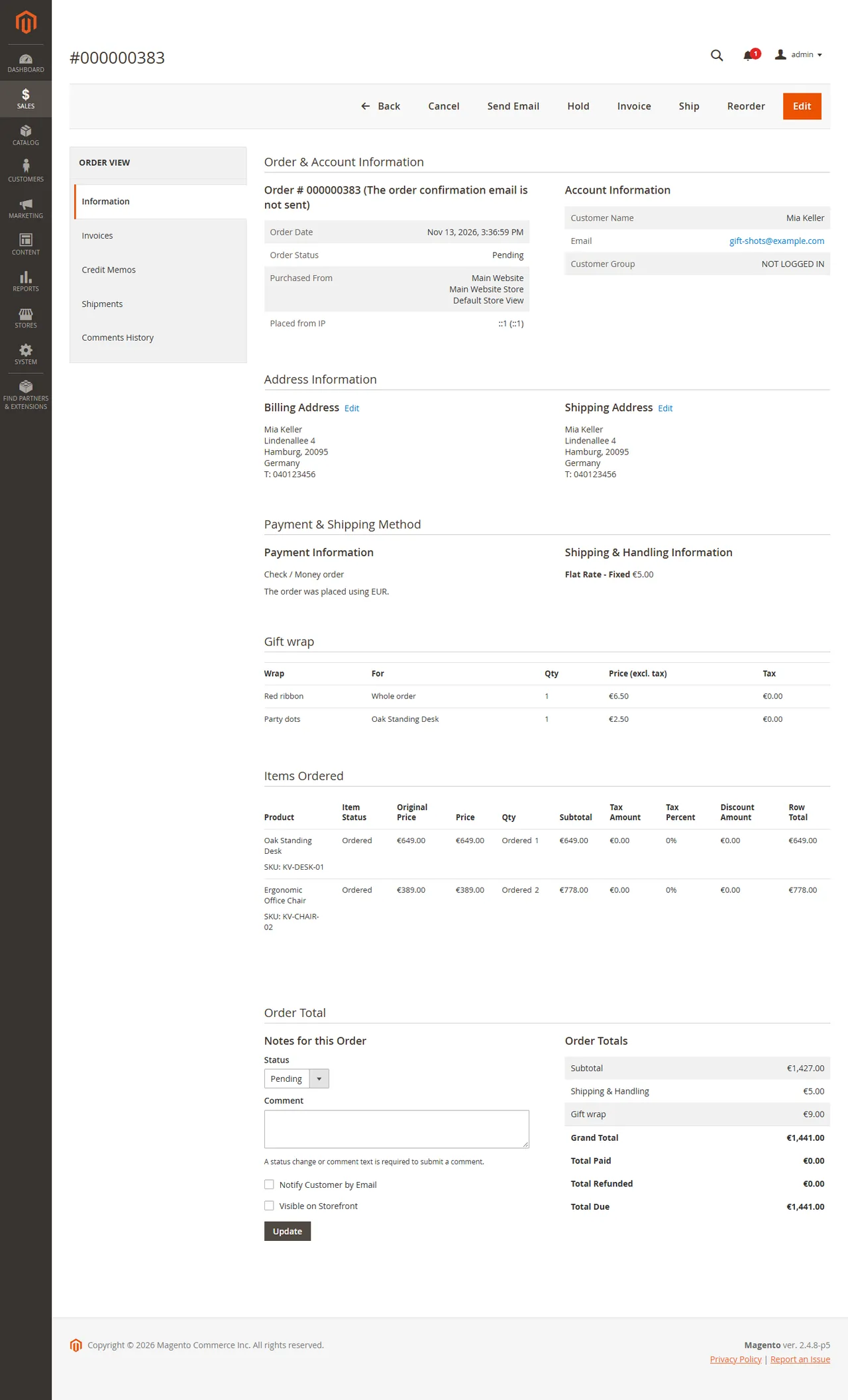
Open the order under Sales > Orders. A Gift wrap block lists each wrap with its target, quantity, price and tax. The totals of the order, of its invoices and of its credit memos carry a Gift wrap row.
The wrap on an order
An invoice charges the wrap. A credit memo gives it back.
A placed order keeps the wrap prices of the moment it was placed, also when you edit or delete the design later.
In the customer account
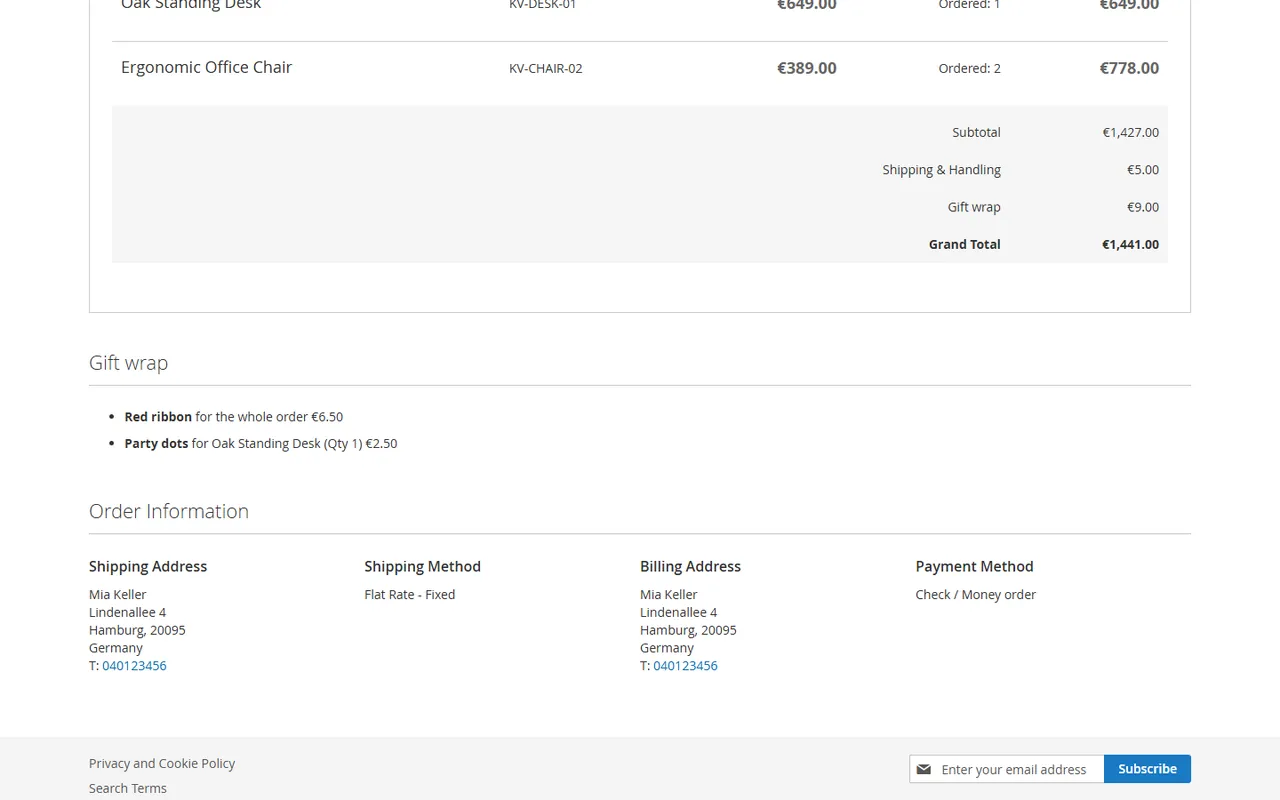
The order page of the customer (and the guest order view) shows the same wrap block and totals row.
The wrap block on the storefront order page
Headless shops
GET /V1/kv-gift-wrap/designs lists the active designs (public).
GET and PUT /V1/carts/mine/kv-gift-wrap, /V1/carts/:cartId/kv-gift-wrap and /V1/guest-carts/:cartId/kv-gift-wrap read and set the choice of a cart: {"selection": {"order_design_id": 1, "items": [{"item_id": 12, "design_id": 2}]}}.
Orders carry the wrap in the extension attribute kv_gift_wrap (amount, tax amount and lines).
GraphQL: the designs query and the set mutation are declared in etc/schema.graphqls.
FAQ
Does it work with Hyva?
Not claimed. The module is tested with the Luma storefront (the cart box is server-rendered markup; the checkout row is a Knockout component of the Luma checkout). A Hyva checkout needs its own integration.
What about the gift message?
Magento Open Source already has gift messages (Stores > Configuration > Sales > Gift Options). The module keeps using them and adds the priced wrap next to them.
Is the wrap taxed?
Yes, through the tax class of the design and your normal tax rules. Tax class "None" gives an untaxed wrap.
What happens to placed orders when I change a design?
Nothing. The wrap lines and prices are frozen on the order when it is placed.
Can a customer wrap only some products?
Yes. Offer designs for single products and the cart lists each product line with a selector. The price is charged per unit of the line.
Does it work on SaaS editions?
No. It needs a Magento Open Source store that runs PHP modules (tested on 2.4.8-p5). Adobe Commerce has its own gift wrapping and is not claimed.
Are there limits in 1.0.0?
The wrap is chosen by the shopper in the cart (or over REST / GraphQL). Orders created in the Admin and checkout with multiple addresses carry no gift wrap.
Does the licence check slow down my store?
No. The store reads the stored result; the server is asked only from the Admin or once a day by cron after a key was entered.
How do I remove it?
See Installation: keep your data (disable) or remove everything with module:uninstall --remove-data.
XRechnung (UBL and CII) and Peppol BIS Billing 3.0 from Magento invoices and credit memos: Leitweg-ID, buyer VAT ID, EU VAT categories, validated before you send.
Sell by the metre, square metre, kilogram or litre: customers enter 2.35 m, the line total is rounded once and the unit shows in cart, orders and e-mails.