Edit placed orders in place: items, prices, addresses, shipping and offline payment, with totals, tax and stock updated and every change logged. Same order number.
Tested on Magento 2.4.8Updated Nov 13, 2026Version 1.0.0Compatible with Magento Open Source 2.4.8 (tested on 2.4.8-p5, PHP 8.3) No core file edits
Built forMagento
Order Editor for Magento 2: edit placed orders in place, with totals, stock and an audit log that follow every change.1 of 7
What it does
Edit placed orders in place: items, prices, addresses, shipping and offline payment, with totals, tax and stock updated and every change logged. Same order number.
A customer calls: "make it three lamps, ship to the office, and the bank transfer is fine". In Magento's own admin the only way is Edit, which cancels the order and creates a new one with a new number, new e-mails and a new stock movement. Order Editor changes the order you already have: same number, same invoices and shipments, one history.
Features
Change what the customer changed
Quantity, price and discount of a line, add a product by SKU, remove a line
Billing and shipping address, checked against Magento's country and state lists
Shipping method and amount, and the payment method of offline orders (check, bank transfer, purchase order)
See the totals before and after, tax included, before you save
Safe by construction
Invoiced, shipped, refunded and cancelled lines stay locked, with the reason shown; an edit can never push the total below what the customer already paid
One transaction: totals, tax, stock reservations, history and audit row are saved together or not at all
Two admins cannot overwrite each other; every save checks the order has not changed since the page was opened
Separate permissions for items, addresses, shipping, payment and the log; the customer e-mail is off unless you tick it
Made for Magento 2
Magento Open Source 2.4.8 (tested on 2.4.8-p5), PHP 8.3
Uses the Inventory reservation API for stock, Magento's tax calculation for new lines, declarative schema, and one plugin on the order toolbar; no core overrides; passes the Adobe coding standard (phpcs Magento2)
Runs in your store; only the licence check contacts our server
What you get
Download & installThe module .zip for Magento Open Source 2.4.8, extracted into app/code/KavioLabs (it is also a Composer package). Download it from My licenses right after payment.
12 months of updates & supportNew versions and help for 12 months (24 or 36 months at checkout). After that the module keeps working; renew anytime at 50%.
License for your storeOne production domain with all its subdomains; staging and local development hosts are free. How licensing works
30-day refundFull refund within 30 days of your first purchase, no reason needed. Refund policy
Tested buildsMagento Open Source 2.4.8 (tested on 2.4.8-p5, PHP 8.3). Tested on Magento 2.4.8.
Documentation & supportFull guide (Installation, Configuration, Using the Order Editor, FAQ) on this page. Tickets from your account, same-day reply on weekdays (Mon-Fri 09:00-18:00 UTC+3).
Compatibility
Order Editor for Magento 2 works with Magento Open Source 2.4.8 (tested on 2.4.8-p5, PHP 8.3).
We list the builds we install and test on. “Tested” means the test plan ran on that build; “Supported” means the build is inside the supported range.
Compatibility
Version
Range
Runs on
Status
Magento 2.4.8
Open Source 2.4.8-p5
PHP 8.3
Tested on 2.4.8-p5
Editions
Magento Open Source
app/code (zip) or Composer
Self-hosted
1.0.0
Nov 13, 2026
Latest
First release: edit items (quantity, price, discount, add, remove), addresses, shipping method and amount, offline payment method of a placed order in place; totals preview; inventory reservations; audit log; permissions per kind of change; optional customer e-mail.
How do I install the module?
Install the module. Unzip into app/code/KavioLabs/ModuleName/ (the folder that holds registration.php; the module name is on the Installation page). The zip is also a Composer package.
Enable and upgrade. bin/magento: module:enable, then setup:upgrade (and di:compile in production mode).
Enter the license key. Stores > Configuration > Kavio Labs: paste the key from My licenses. Staging and local stores are included.
Magento Open Source 2.4.8 (tested on 2.4.8-p5, PHP 8.3). Tested on Magento 2.4.8. The Compatibility tab lists every version range.
Can I buy a Magento module today?
Yes. Every Magento module on this site is on sale: one-time price per production store, staging and development domains included, 12 months of updates and support.
Do the modules work with Hyva?
Each product page says what was tested. Admin-only modules do not depend on the storefront theme; modules that change the storefront name the tested theme (Luma) on their Compatibility tab.
How does licensing work?
One license per production store domain, with staging and development domains included. 12 months of updates and support; after that the module keeps working.
Do you already sell modules for other platforms?
Yes. Kavio Labs sells add-ons and plugins for CS-Cart, OpenCart, WooCommerce, PrestaShop and Shopware, with the same license portal and support desk.
What does the license cover?
One production store domain with every subdomain (www, shop., staging.), plus local development hosts such as localhost, *.local and *.test. A store on another domain needs its own license; a second-store license is 40% off. You have 14 days after installing to enter the key. 12 months of updates and support are included; after that the module keeps working and renewals are 50% off. How licensing works
Can I get a refund?
Yes. Ask for a full refund within 30 days of your first purchase, no reason needed: open a ticket or write to [email protected] with your order number. The money goes back to the card or bank account you paid with within 5 business days of approval. Refund policy
How do I get help?
Open a ticket from your account, so your license details are attached. We answer with a same-day reply on weekdays (Mon-Fri 09:00-18:00 UTC+3). Support policy. Not a customer yet? Ask a pre-sales question.
Edit a placed order in place: the same order number, the same order page. Change items (quantity, price, discount, add or remove a line), the billing and shipping address, the shipping method and amount and the payment method of offline orders. Totals and tax are re-collected, stock is reserved or released, and every change is written to an audit log.
Magento's own "Edit" button cancels the order and creates a new one with a new number. Order Editor does not.
Tested on Magento Open Source 2.4.8 (PHP 8.3). Compatibility with other versions is listed only after it has been tested. Not for SaaS editions that cannot run PHP modules.
The edit page with the totals preview
What you get
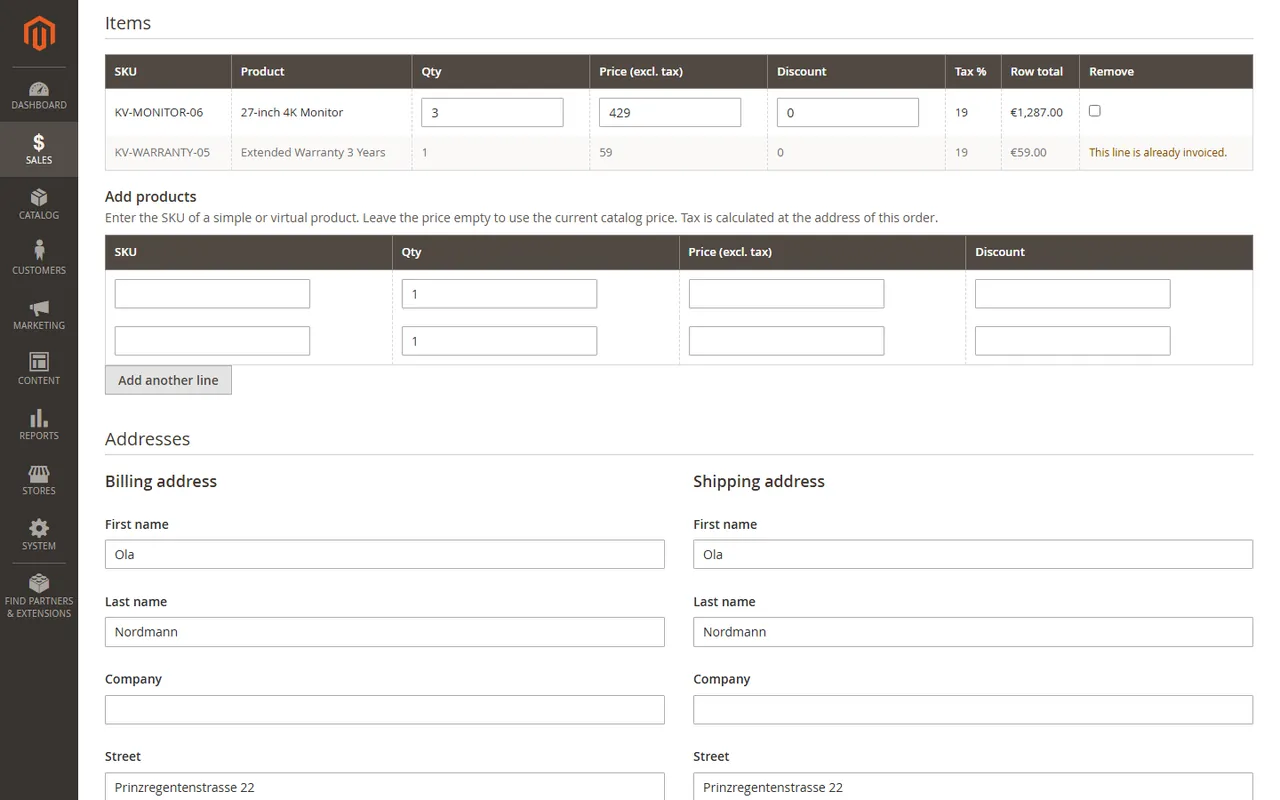
Items: change quantity, price (excluding tax) and discount of a line, add a product by SKU, remove a line.
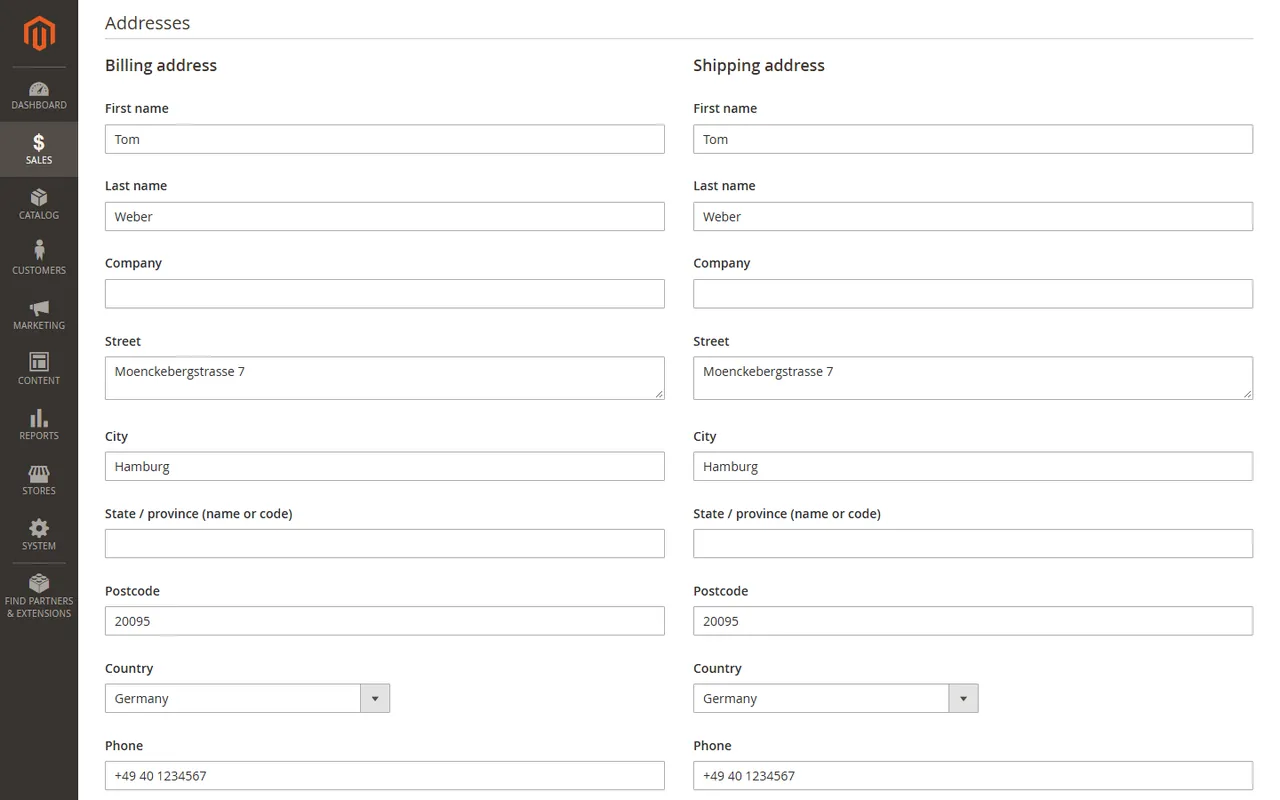
Addresses: correct the billing and the shipping address, with country and state checks.
Shipping and payment: pick another shipping method and type the amount; switch between offline payment methods.
Totals preview: see the order total, tax and discount before and after, before you save.
Stock: higher quantities and new lines reserve stock (Inventory reservations), lower quantities and removed lines give it back.
Safe: lines that are invoiced, shipped or refunded stay locked; a total below what the customer paid is refused; two admins cannot overwrite each other.
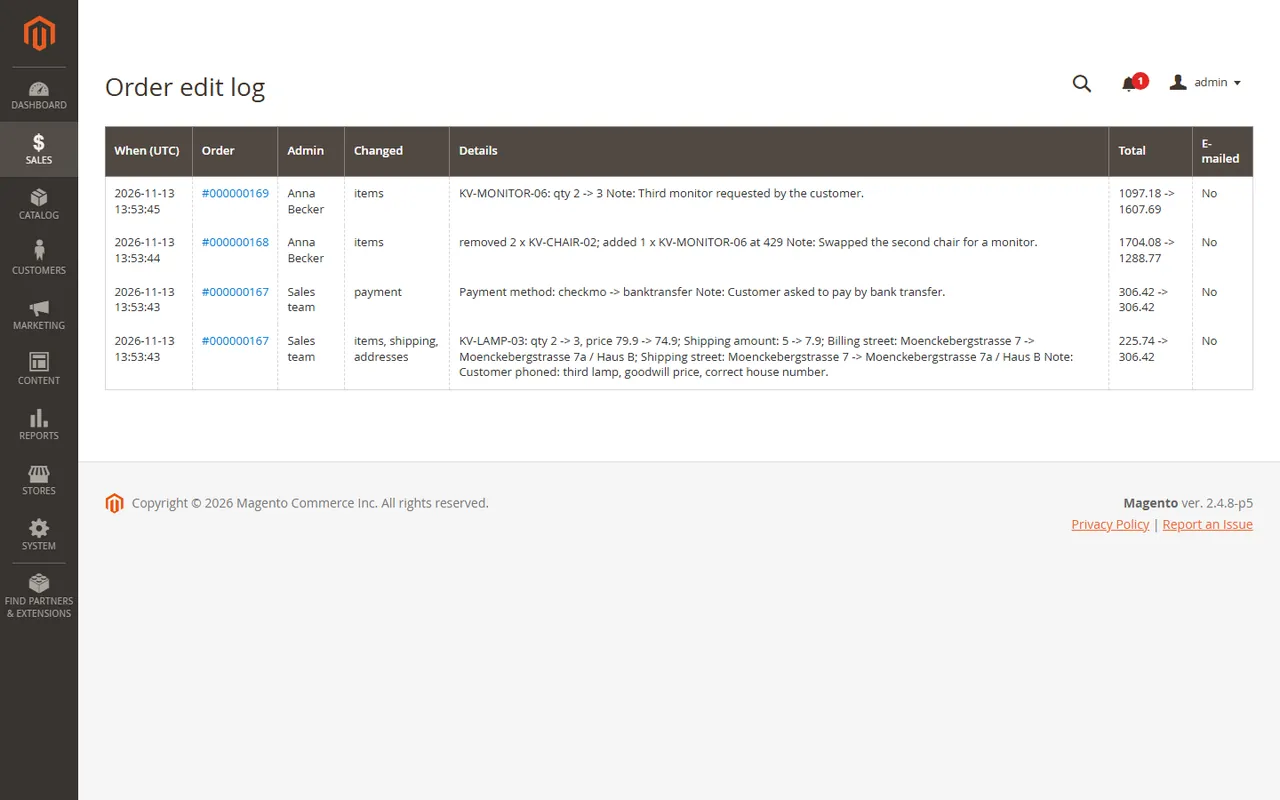
Audit log: who changed what, when, and the order total before and after, on the order page and on one list for all orders.
Permissions: separate rights for items, addresses, shipping, payment and the log.
Installation
Composer (recommended)
Add the Kavio Labs repository and your licence credentials (see your Kavio Labs account).
Run composer require kaviolabs/module-order-editor.
Run bin/magento module:enable KavioLabs_OrderEditor, bin/magento setup:upgrade and, in production mode, bin/magento setup:di:compile and bin/magento setup:static-content:deploy.
Zip upload
Download the zip from your Kavio Labs account.
Extract it into app/code/KavioLabs/OrderEditor/ (the folder holds registration.php).
Run the same bin/magento commands as above.
Uninstall
Keep the data: bin/magento module:disable KavioLabs_OrderEditor (then delete the folder or composer remove the package and run setup:upgrade).
Remove everything (tables, settings, licence state): Composer install bin/magento module:uninstall KavioLabs_OrderEditor --remove-data; zip install bin/magento module:uninstall KavioLabs_OrderEditor --non-composer, then module:disable, delete the folder and run setup:upgrade.
Configuration
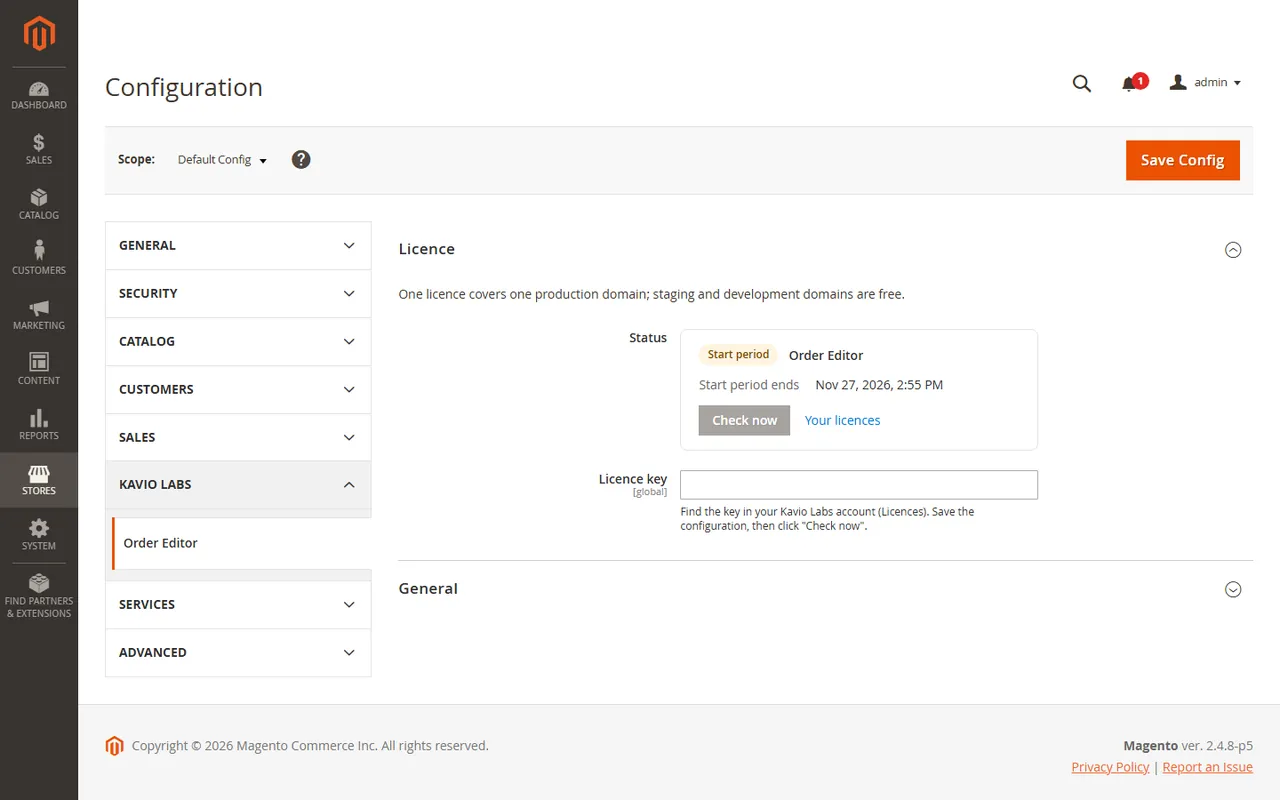
Open Stores > Configuration > Kavio Labs > Order Editor.
Enter your licence key in Licence > Licence key and click Save Config. The key is verified at once.
The licence card shows the status, the licensed domain and the date until which updates are included. Check now verifies again.
Settings and licence card
General
Setting
Default
What it does
Enabled
Yes
Switches the editor on or off. Off hides the button and blocks every save.
Edit window (days)
0
Orders older than this many days can no longer be edited. 0 means no limit.
E-mail the customer by default
No
Sets the default of the "Notify the customer" box on the edit page. Nothing is ever sent without that box.
Check stock when quantities grow
Yes
Refuses a higher quantity or a new line that is not salable. Stock is reserved or released either way.
Hide the core "Edit" button
No
The core button cancels the order and creates a new one with a new number. Hide it so staff use "Edit in place".
Permissions
System > Permissions > User Roles > Role Resources > Sales > Operations > Order Editor has one right per kind of change:
Edit items (add, remove, quantity, price)
Edit addresses
Edit shipping method and amount
Edit payment method (offline methods)
View the edit log
A section an admin may not edit is not shown on the edit page, and a save that tries to change it is refused.
Using the Order Editor
Open an order for editing
Open Sales > Orders, open an order and click Edit in place in the toolbar. The button appears for orders that are new, pending payment or processing (not on hold, complete, closed or cancelled) and for admins who have at least one Order Editor right.
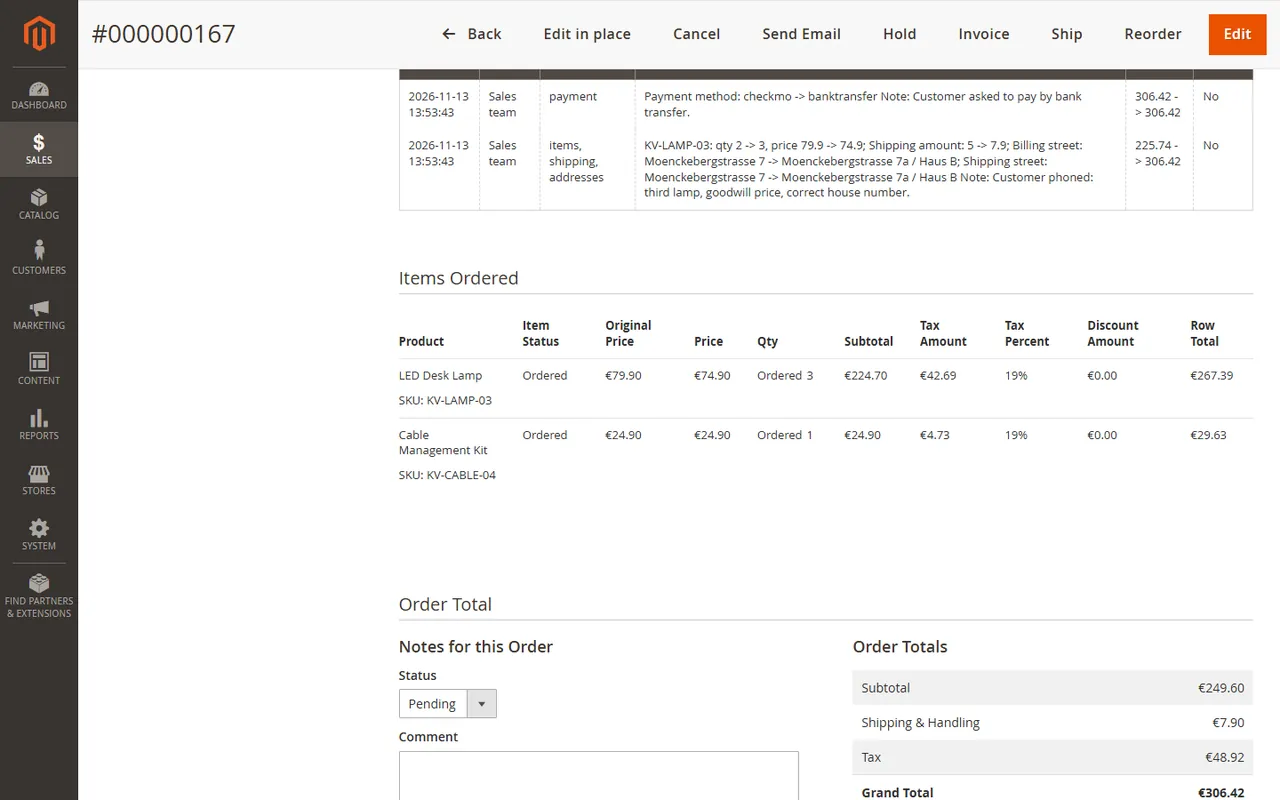
The edit history on the order page
Items
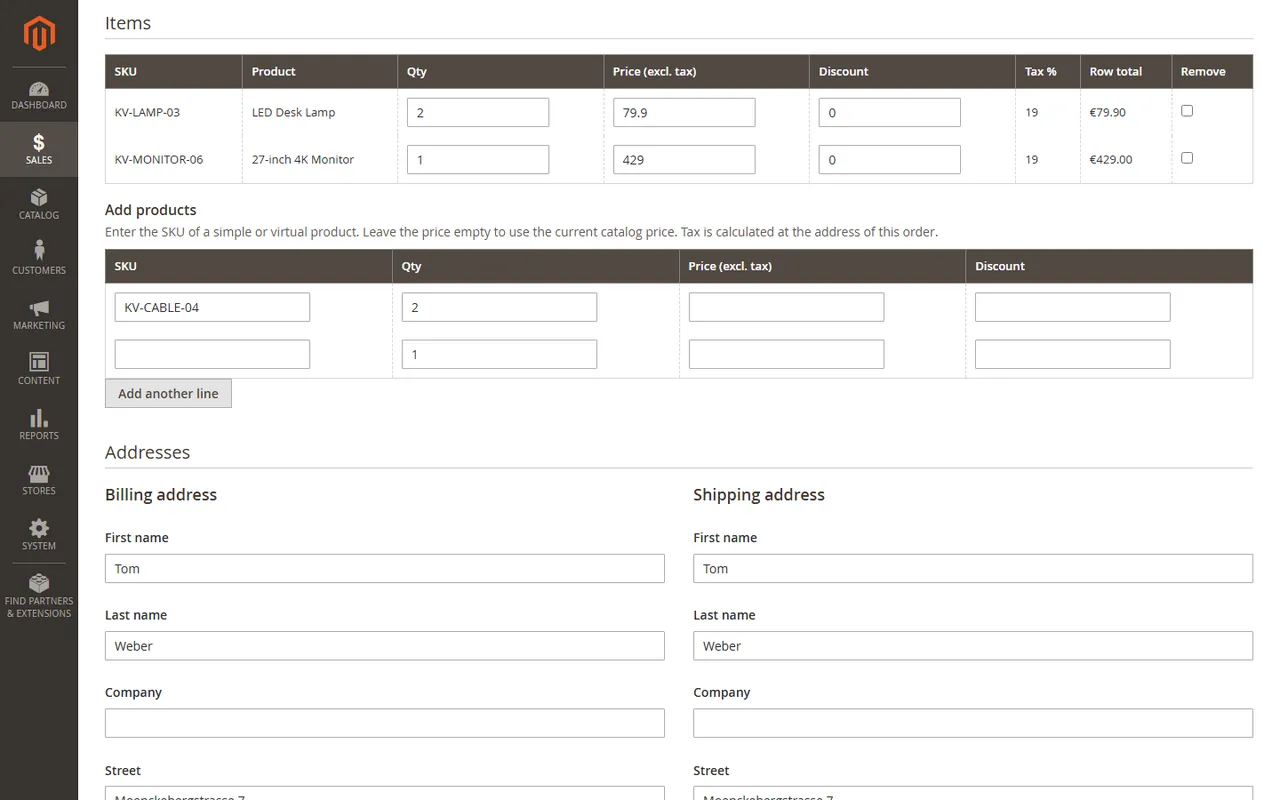
Items: quantity, price, discount, remove and add lines
Qty is a whole number of at least 1. Price (excl. tax) and Discount accept 12.50 or 12,50.
Tick Remove to delete a line. An order must keep at least one line; to drop everything, cancel the order.
Under Add products type the SKU of a simple or virtual product. Leave the price empty to use the current catalog price. Tax is calculated at the address of the order.
If you change a line's quantity or price and leave its discount alone, the discount scales with the line total. Type a discount to set it yourself.
Lines that were invoiced, shipped, refunded or cancelled are locked and show the reason. Configurable, bundle, grouped and downloadable products and lines with custom options are locked as well in this version.
Totals preview
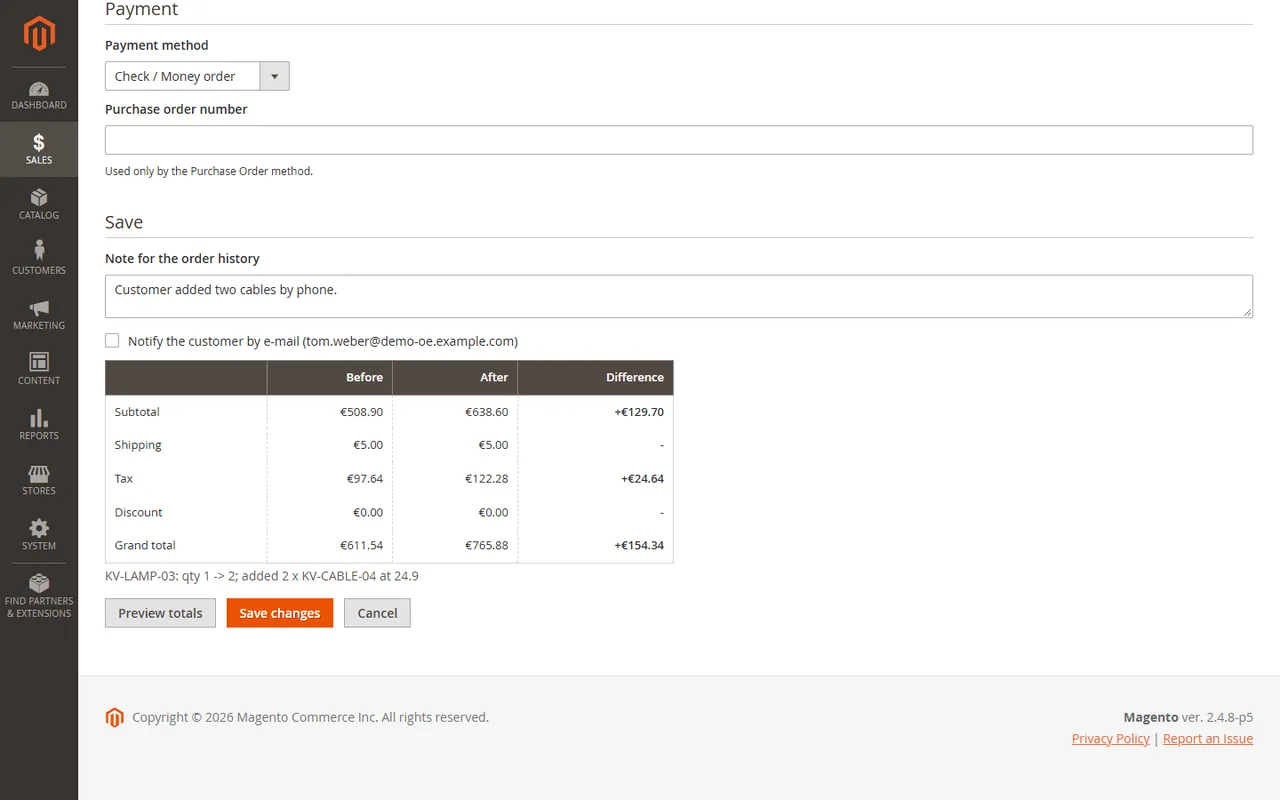
Click Preview totals to see subtotal, shipping, tax, discount and the grand total before and after. Nothing is saved by the preview.
Totals before and after
How the money is calculated: tax of a line is the line total minus its discount (or the plain line total, following your tax setting "Apply tax after discount") times the tax percent the line was ordered with; a new line uses the rate at the order's address. Shipping tax keeps the ratio the order was placed with. Other totals of the order, for example a payment fee from another module, are carried over unchanged. Cart price rules are not evaluated again.
Addresses
Billing and shipping address
Correct names, company, street lines, city, state, postcode, country and phone. Country and state are checked against Magento's lists. The tax rate of existing lines does not change when the address changes.
Shipping and payment
Shipping: choose among the active carriers' methods and type the amount (excluding tax). Rates are not re-quoted. Not available once a shipment exists or the shipping was invoiced or refunded.
Payment: switch between active offline methods (for example Check / Money order, Bank Transfer, Purchase Order with a PO number). Not available for online methods, and not after an invoice or a payment.
Locked lines
A partly invoiced order: the invoiced line is locked
On a partly invoiced order you can still change the open lines and add new ones. An edit that would bring the total below the amount already paid is refused: refund the difference with a credit memo instead.
Save
Add a note for the order history (optional), tick Notify the customer by e-mail if you want the customer to get the change by e-mail (uses the "order comment" e-mail of Magento; off by default), and click Save changes. The order keeps its number. If the order was changed by someone else since you opened the page, the save is refused; reload the page and edit again.
Stock follows the saved quantities through the Inventory reservations (the same way placing and cancelling an order does).
The edit log
The edit log
Every saved edit is one row: time (UTC), admin, what was changed (items, addresses, shipping, payment), a one-line summary, the order total before and after and whether the customer was e-mailed. The rows are shown on the order page and, for all orders, under Sales > Operations > Order edit log. The summary is also added to the order's comment history.
FAQ
What is different from Magento's own "Edit" button?
The core button cancels the order and creates a new order with a new number (and a new quote, stock movement and e-mails). Order Editor changes the order you have: same number, same invoices and shipments, one history.
Can I edit an order that was invoiced?
Open lines yes, invoiced lines no. You can still add lines and correct addresses. The total can never be lowered below the amount already paid (use a credit memo to refund).
Can I edit a shipped order?
You can correct the addresses and change open lines. Shipped lines and the shipping method of an order with a shipment are locked.
Which products can I edit or add?
Simple and virtual products without custom options. Configurable, bundle, grouped, downloadable and custom-option lines are shown as locked.
Are cart price rules and promotions recalculated?
No. The discount of a line scales with its total or you type it. New lines get the discount you type, not a promotion.
Which tax rate does a new line get?
The rate of the product's tax class at the shipping address of the order (billing address for virtual orders), as Magento's tax calculation returns it. Existing lines keep the percent they were ordered with.
Does the tax breakdown by rate stay right?
The grand total, the tax of every line and the shipping tax are recalculated. The tax summary by rate (the lines under "Tax" on the order page) is scaled with the new tax total: exact when the order has one tax rate, an approximation when it has several.
Does it change the stock?
Yes. A higher quantity or a new line reserves stock, a lower quantity or a removed line gives it back, through the Inventory reservation API (the same API that placing and cancelling an order use). With "Check stock when quantities grow" on, a quantity that is not salable is refused.
Does the customer get an e-mail?
Only if you tick the box on the edit page and the order comment e-mail is enabled in Magento (Stores > Configuration > Sales > Sales Emails > Order Comments). The default is off.
Does it work with payment methods like PayPal or Stripe?
Payment methods that charge online are not changed by this module. The order can still be edited when only items, addresses and shipping change and nothing was paid; the payment section is locked for online methods.
What if two people edit the same order?
The page carries a token of the order's state. The first save wins; the second is refused with a message to reload.
Where is the history?
On the order page (Edit history), under Sales > Operations > Order edit log, and as a comment in the order's comment history.
Does it work with Hyva?
The module changes only admin pages. The storefront is not touched.
Does it work on SaaS editions?
No. It needs a store that runs PHP modules (Magento Open Source or Adobe Commerce, self-hosted or cloud).
Does the licence check slow down my store?
No. The store reads the stored result; the server is asked only from the Admin or once a day by cron after a key was entered.
XRechnung (UBL and CII) and Peppol BIS Billing 3.0 from Magento invoices and credit memos: Leitweg-ID, buyer VAT ID, EU VAT categories, validated before you send.
Sell by the metre, square metre, kilogram or litre: customers enter 2.35 m, the line total is rounded once and the unit shows in cart, orders and e-mails.