Withdrawal button, guest withdrawal statement and a returns portal with credit memo refunds for Magento Open Source.
Tested on Magento 2.4.8Updated Nov 13, 2026Version 1.0.0Compatible with Magento Open Source 2.4.8 No core file edits
Built forMagento
EU Withdrawal Button & Returns Portal for Magento 2: the withdrawal button, the statement and the returns that follow.1 of 8
What it does
Withdrawal button, guest withdrawal statement and a returns portal with credit memo refunds for Magento Open Source.
From 19 June 2026, EU online shops have to offer a withdrawal button, and Magento Open Source has no returns management. Directive (EU) 2023/2673 asks shops that sell to consumers to offer a clearly labelled "withdraw from contract here" function and to confirm every statement on a durable medium with its date and time. RMA is an Adobe Commerce feature; Open Source has nothing to receive, track or refund a return. This module helps you offer the button and gives your team a place to work the requests.
Features
A withdrawal that is stored, confirmed and visible
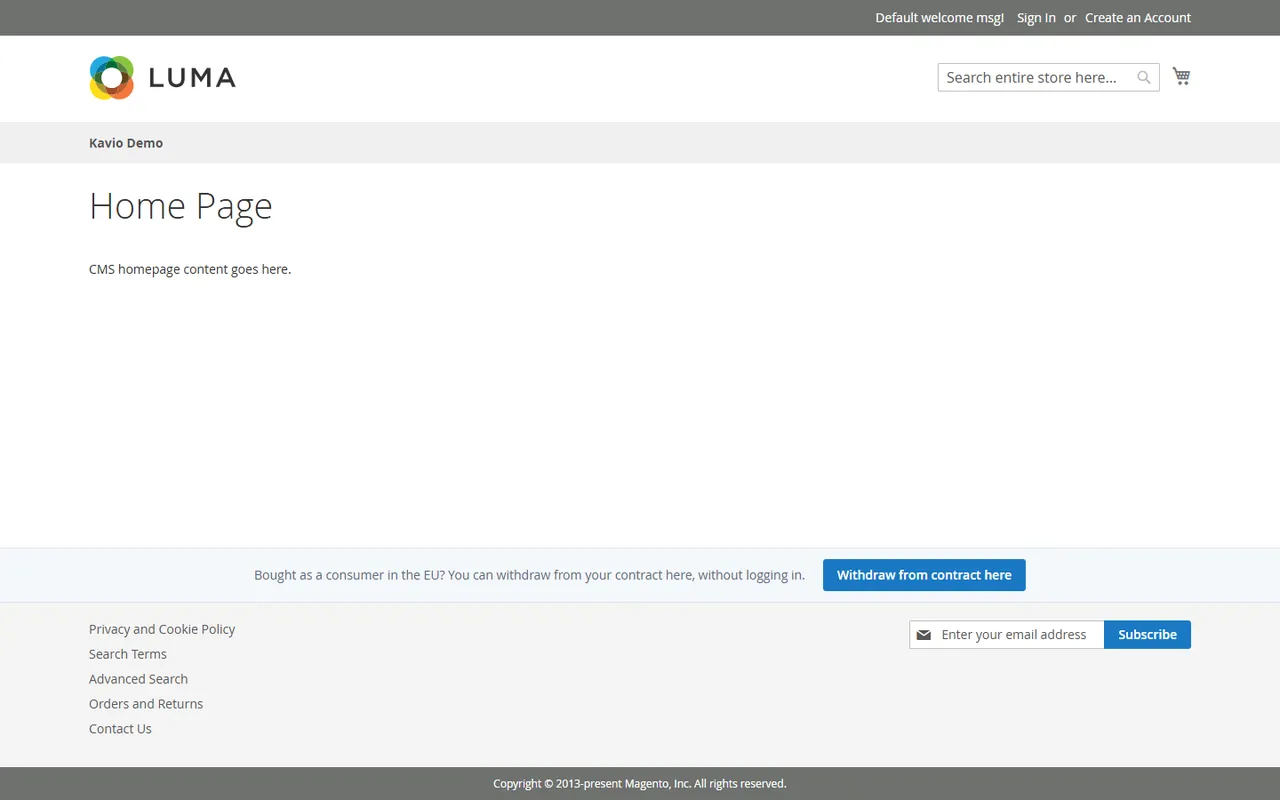
A "Withdraw from contract here" button in the footer of every page, in its own strip
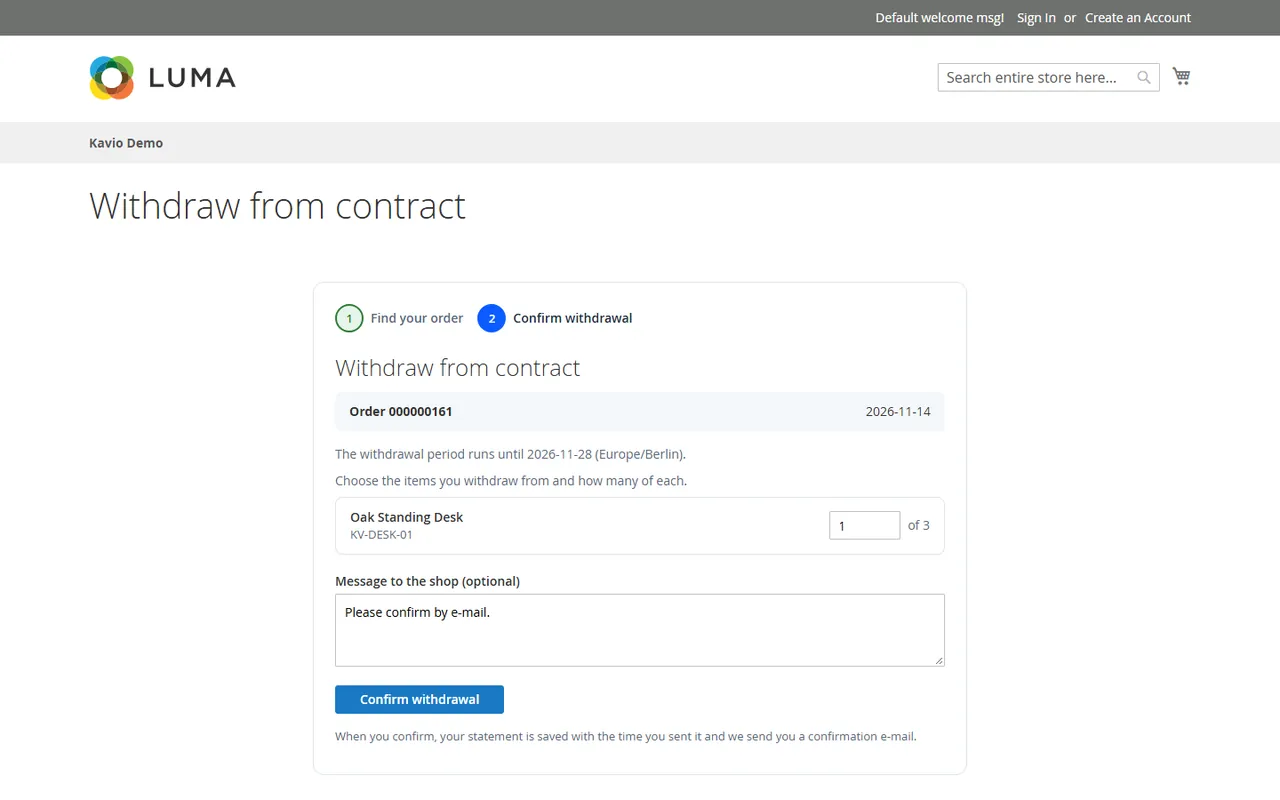
Two steps without a login: order number + e-mail, then the items; no account needed for guests
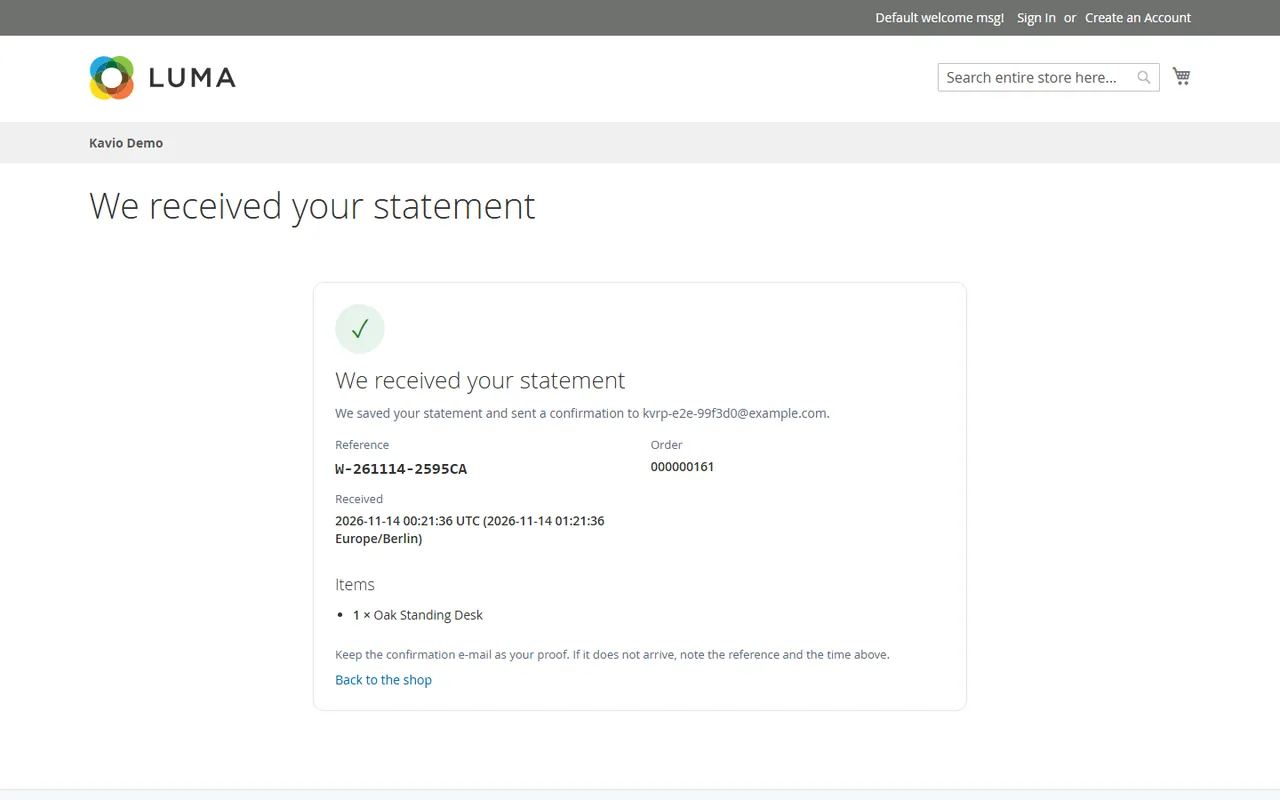
The statement is saved first with a reference and a UTC time stamp, then the confirmation e-mail goes out (a double click never creates two)
Statements that arrive after your withdrawal period are still stored and flagged, so you decide
A returns portal for the work that follows
Signed-in customers start a return per order line inside your period (14 days by default, 30 if you offer it) from My Account
Status flow requested, approved, shipped back, received, refunded or rejected, with answer templates and a return label upload
Refund through the core credit memo for the returned units, online when the payment method supports it and a clear offline fallback otherwise; optional back to stock
Return rate by product and by reason, with CSV export
Made for Magento 2
Magento Open Source 2.4.8 (tested on 2.4.8-p5 with PHP 8.3), store views aware
Declarative schema with its own tables, no column on a core table, no core overrides
Credit memos are created through the Sales API, never by writing to sales tables
Runs in your shop; only the licence check contacts our server
What you get
Download & installThe module .zip for Magento Open Source 2.4.8, extracted into app/code/KavioLabs (it is also a Composer package). Download it from My licenses right after payment.
12 months of updates & supportNew versions and help for 12 months (24 or 36 months at checkout). After that the module keeps working; renew anytime at 50%.
License for your storeOne production domain with all its subdomains; staging and local development hosts are free. How licensing works
30-day refundFull refund within 30 days of your first purchase, no reason needed. Refund policy
Tested buildsMagento Open Source 2.4.8. Tested on Magento 2.4.8.
Documentation & supportFull guide (Installation, Configuration, Usage, FAQ) on this page. Tickets from your account, same-day reply on weekdays (Mon-Fri 09:00-18:00 UTC+3).
Compatibility
EU Withdrawal Button & Returns Portal for Magento 2 works with Magento Open Source 2.4.8.
We list the builds we install and test on. “Tested” means the test plan ran on that build; “Supported” means the build is inside the supported range.
Compatibility
Version
Range
Runs on
Status
Magento 2.4.8
Open Source 2.4.8-p5
PHP 8.3
Tested on 2.4.8-p5
Editions
Magento Open Source
app/code (zip) or Composer
Self-hosted
1.0.0
Nov 13, 2026
Latest
First release: "Withdraw from contract here" strip in the footer, guest withdrawal statement in two steps with a signed token and a confirmation e-mail with reference and time stamp, returns in My Account, Sales > Returns & withdrawals with status flow, answer templates, return label, credit memo refund (online or offline fallback) with back to stock, reports with CSV export.
How do I install the module?
Install the module. Unzip into app/code/KavioLabs/ModuleName/ (the folder that holds registration.php; the module name is on the Installation page). The zip is also a Composer package.
Enable and upgrade. bin/magento: module:enable, then setup:upgrade (and di:compile in production mode).
Enter the license key. Stores > Configuration > Kavio Labs: paste the key from My licenses. Staging and local stores are included.
Magento Open Source 2.4.8. Tested on Magento 2.4.8. The Compatibility tab lists every version range.
Can I buy a Magento module today?
Yes. Every Magento module on this site is on sale: one-time price per production store, staging and development domains included, 12 months of updates and support.
Do the modules work with Hyva?
Each product page says what was tested. Admin-only modules do not depend on the storefront theme; modules that change the storefront name the tested theme (Luma) on their Compatibility tab.
How does licensing work?
One license per production store domain, with staging and development domains included. 12 months of updates and support; after that the module keeps working.
Do you already sell modules for other platforms?
Yes. Kavio Labs sells add-ons and plugins for CS-Cart, OpenCart, WooCommerce, PrestaShop and Shopware, with the same license portal and support desk.
What does the license cover?
One production store domain with every subdomain (www, shop., staging.), plus local development hosts such as localhost, *.local and *.test. A store on another domain needs its own license; a second-store license is 40% off. You have 14 days after installing to enter the key. 12 months of updates and support are included; after that the module keeps working and renewals are 50% off. How licensing works
Can I get a refund?
Yes. Ask for a full refund within 30 days of your first purchase, no reason needed: open a ticket or write to [email protected] with your order number. The money goes back to the card or bank account you paid with within 5 business days of approval. Refund policy
How do I get help?
Open a ticket from your account, so your license details are attached. We answer with a same-day reply on weekdays (Mon-Fri 09:00-18:00 UTC+3). Support policy. Not a customer yet? Ask a pre-sales question.
Withdrawal button, guest withdrawal statement and a returns portal with credit memo refunds for Magento Open Source.
Tested on Magento Open Source 2.4.8 (PHP 8.3). Compatibility with other versions is listed only after it has been tested. Not for SaaS editions that cannot run PHP modules.
Configuration
Installation
Composer (recommended)
Add the Kavio Labs repository and your licence credentials (see your Kavio Labs account).
Run composer require kaviolabs/module-returns-portal.
Run bin/magento module:enable KavioLabs_ReturnsPortal, bin/magento setup:upgrade and, in production mode, bin/magento setup:di:compile and bin/magento setup:static-content:deploy.
Zip upload
Download the zip from your Kavio Labs account.
Extract it into app/code/KavioLabs/ReturnsPortal/ (the folder holds registration.php).
Run the same bin/magento commands as above.
Uninstall
Keep the data: bin/magento module:disable KavioLabs_ReturnsPortal (then delete the folder or composer remove the package and run setup:upgrade).
Remove everything (tables, settings, licence state): Composer install bin/magento module:uninstall KavioLabs_ReturnsPortal --remove-data; zip install bin/magento module:uninstall KavioLabs_ReturnsPortal --non-composer, then module:disable, delete the folder and run setup:upgrade.
Before you go live
Send yourself a test statement: the confirmation e-mail is part of the withdrawal function. If no e-mail arrives, check Stores > Configuration > Advanced > System > Mail Sending Settings.
Set the length of the period and where it starts (see Configuration); the time zone is the one of the store view.
Make sure orders that customers may return get an invoice: Magento can only refund an invoiced order with a credit memo.
Configuration
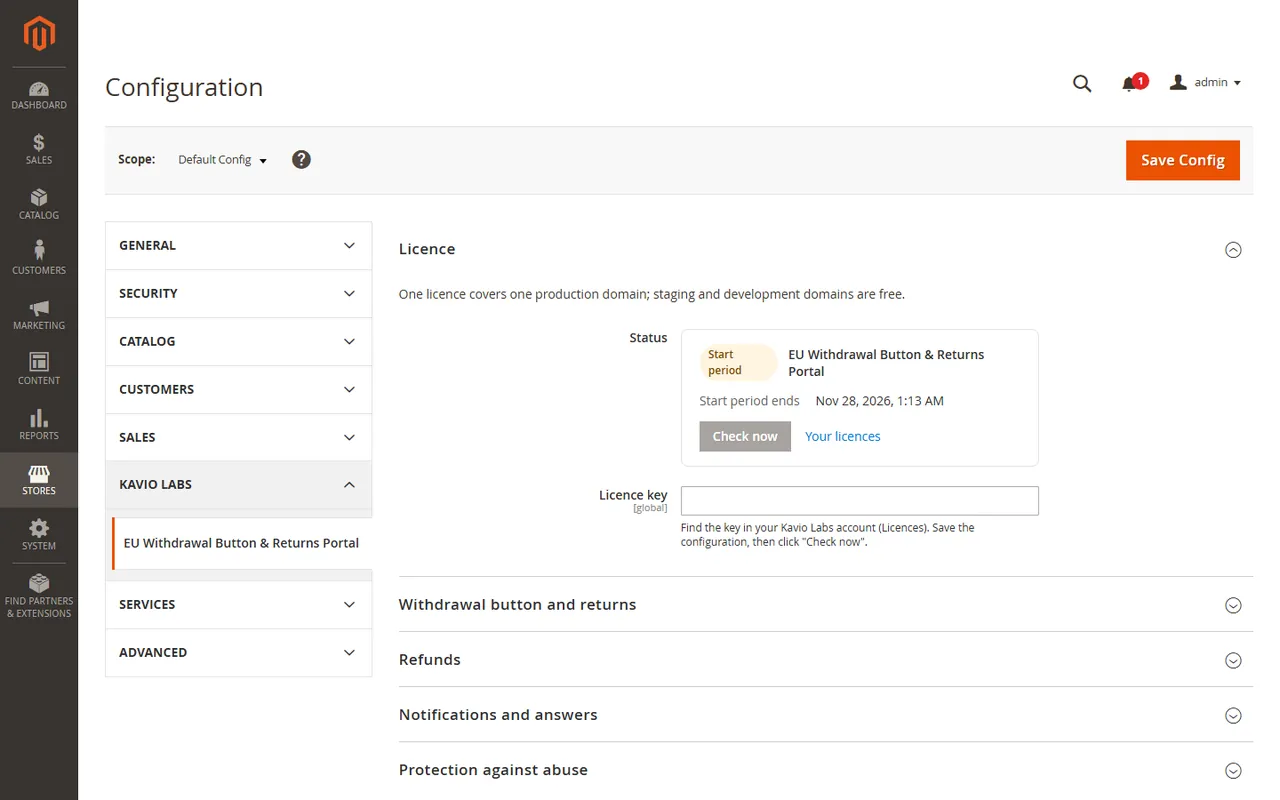
Open Stores > Configuration > Kavio Labs > EU Withdrawal Button & Returns Portal.
Enter your licence key in Licence > Licence key and click Save Config. The key is verified at once.
The licence card shows the status, the licensed domain and the date until which updates are included. Check now verifies again.
Licence card
Withdrawal button and returns
Setting
Default
What it does
Enabled
Yes
No hides the withdrawal page, the footer button and the account returns. Existing statements and returns stay in the Administration. Can be set per store view.
"Withdraw from contract here" in the footer
Yes
The strip above the footer links on every page.
Returns in My Account
Yes
Signed-in customers can request a return per order line inside the period.
Withdrawal / return period (days)
14
The EU minimum is 14 days; many shops offer 30. The period ends at the end of the last day, in the time zone of the store view (General > Locale Options).
Period starts
On the order date
Or "when the first shipment is created". For goods the legal period normally starts when the customer receives them; the first shipment is the closest date Magento records.
Return reasons
five defaults
One per line, offered per item in the return form.
Customers can always send a withdrawal statement with the footer button, also after the period. A statement that arrives after the end of the period is stored, flagged "after the period" and left for you to decide.
Refunds
Credit memo: "Online when the payment method supports it, otherwise offline" (default) or "Always offline". Refund always creates a credit memo for the returned units through the Magento Sales API. When the online refund is not possible or fails, the credit memo is created offline and the request is marked as a manual refund: you refund the customer in your payment provider.
Notifications and answers
Notify this address: new statements and returns are mailed here. Empty uses the general contact address of the store.
Templates: the texts prefilled when you approve or reject a return. You can edit the text per request before you send it.
Protection against abuse
Attempts per hour and address: limit of the public form per connection address and per order number (default 20, between 3 and 500). IPv6 addresses count per /64 range.
Trusted proxies: the limit uses the address of the connection. Forwarded headers such as X-Forwarded-For are ignored, because any visitor can send them. If your shop runs behind your own reverse proxy or load balancer, list its address or range here (one per line, CIDR allowed); the module then takes the client address from the forwarded header. Cloudflare needs its published ranges. Leave empty when the shop is reached directly.
Roles
Under System > Permissions > User Roles > Role Resources you find Sales > Operations > Returns & withdrawals. The resource opens the list, the detail and the reports; the child resource Answer, refund and upload labels allows changes.
Usage
The withdrawal button
A strip above the footer links carries the Withdraw from contract here button on every page of the shop. It helps you offer the withdrawal function that Directive (EU) 2023/2673 asks online shops to provide from 19 June 2026 (clearly labelled, always reachable, confirmed on a durable medium with date and time). Whether your shop meets the rules in your country is for you and your adviser to decide.
Footer strip with the withdrawal button
Other modules can add their own links next to the button: put a block into the layout container kv.returns.strip.extra.
The statement in two steps
The customer needs no account.
Find your order: order number and the e-mail address of the order. A wrong number and a wrong e-mail give the same answer, so nobody can probe your orders.
Confirm withdrawal: choose the items and quantities, add an optional message, press Confirm withdrawal.
Step 2: choose the items
The statement is saved first. Then the customer sees the confirmation page and gets an e-mail with the reference, the order number, the items and the time the statement arrived (UTC and your time zone). That e-mail is the acknowledgement of receipt. A second click, a reload or a retry never creates a second statement. If the e-mail could not be sent, the detail page in the Administration says so and has Send confirmation e-mail again.
Confirmation page
Quantities that already belong to another statement or return are not offered again. After the period you configured, the statement is still accepted and flagged after the period, and you decide how to answer.
Returns in My Account
Signed-in customers find Returns in the My Account menu. The page lists their requests and the orders that still have items inside the period.
Start return on an order, choose the items, quantities and reasons, send.
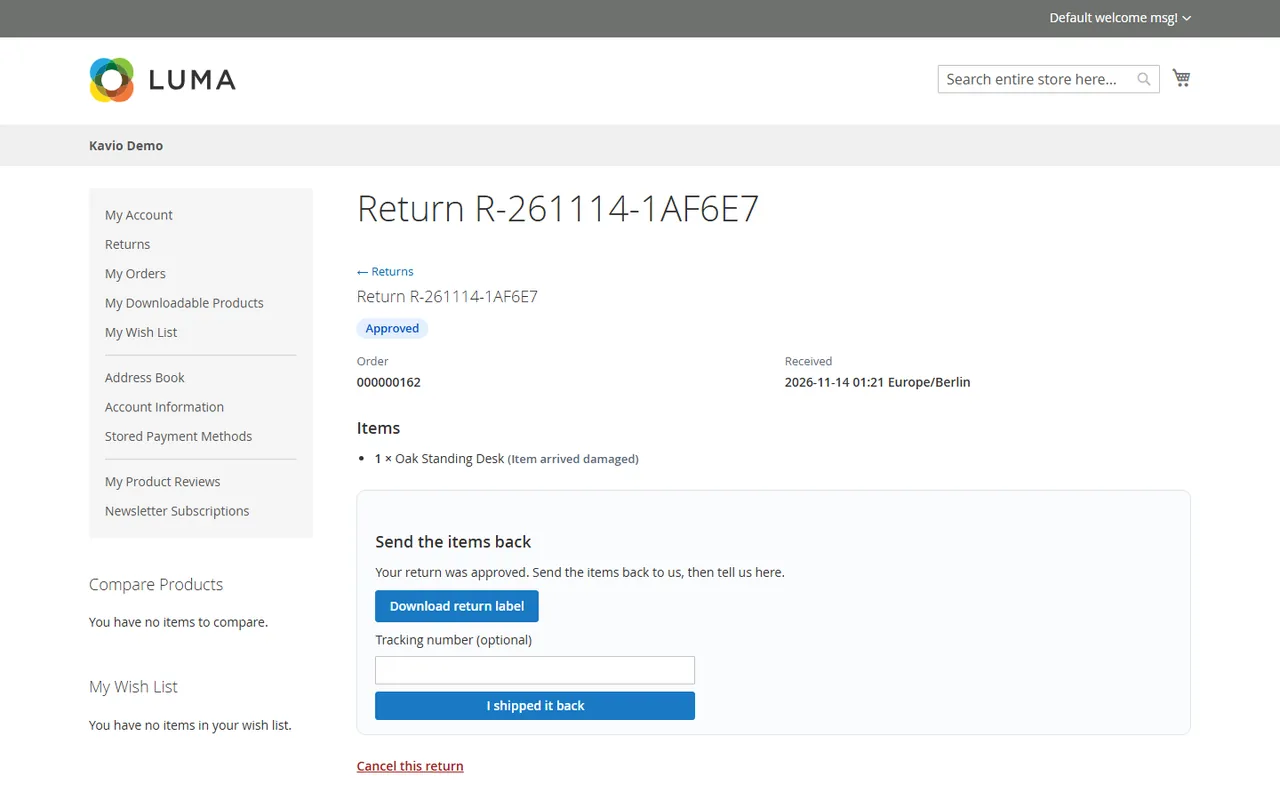
The request is Requested. When you approve it, the customer sees the instructions and your return label (if you added one) and presses I shipped it back with an optional tracking number.
You mark it Received and Refunded. The customer follows every step on the return page, and every status change you make sends an e-mail.
The return page of an approved return
Customers can cancel a return while it is requested or approved.
In the Administration
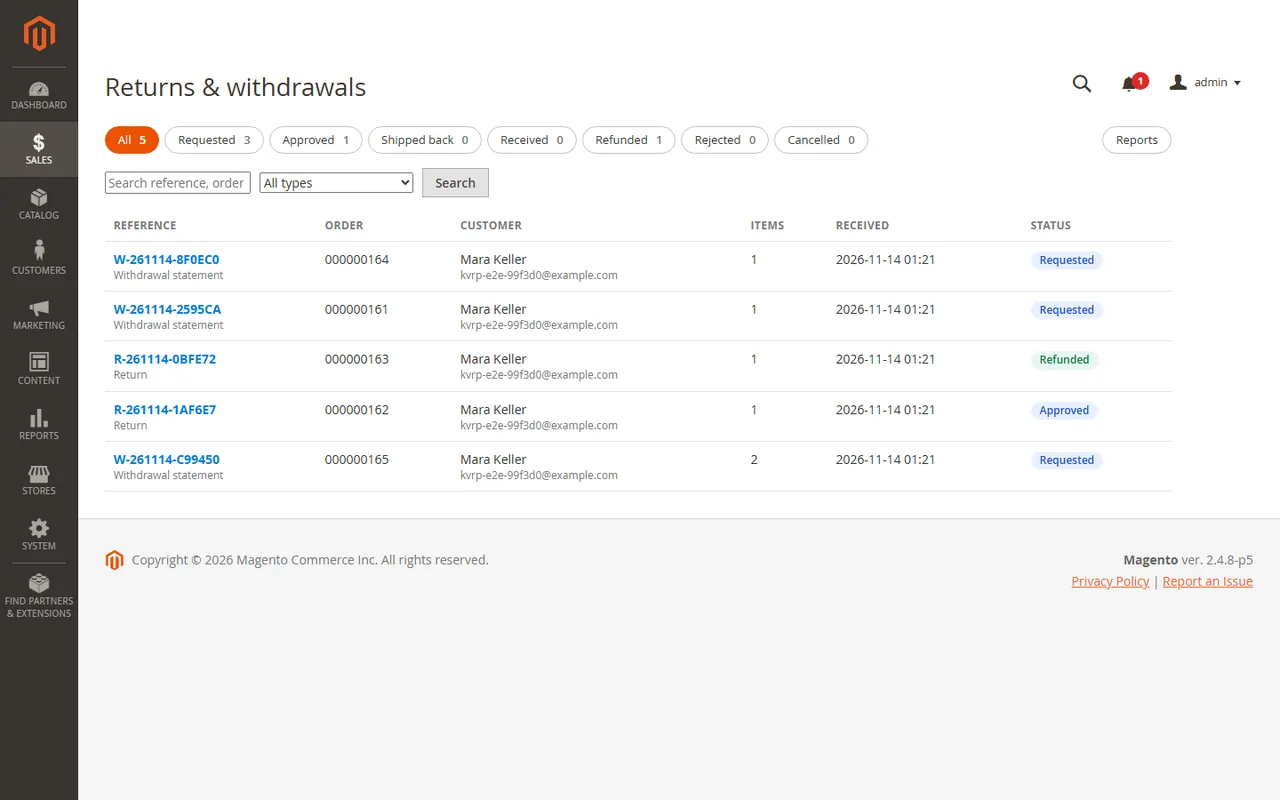
Sales > Operations > Returns & withdrawals lists everything, with status tabs and counts, a search for reference, order number and e-mail, and a filter for statements or returns.
Requests list
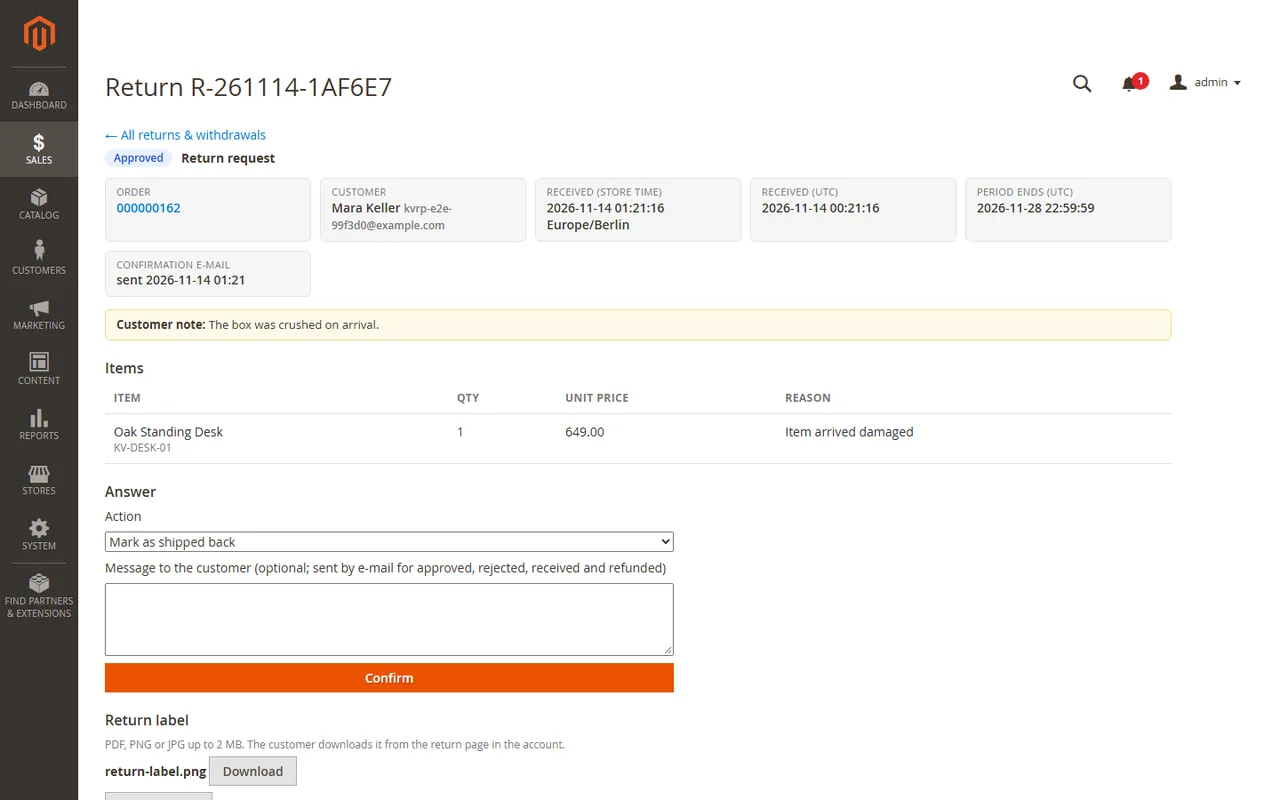
Open a request to see the customer, the time the request arrived, the items, the history and the form that answers it:
Action lists what fits the status: Approve, Reject, Mark as shipped back, Mark as received, Refund, Cancel. Approve and Reject prefill the message from the templates in the configuration; edit it before you confirm.
Refund (credit memo) creates a credit memo for the returned units through the Magento Sales API (the amount shown includes tax; shipping is not refunded). The payment is refunded online when its method supports it, otherwise offline: the request is then marked as a manual refund and says why, so you refund in your payment provider. Tick Put the items back into stock to return the units to the inventory with the credit memo.
Return label: upload a PDF, PNG or JPG (up to 2 MB) for the customer. The file type is checked by its content and the file is kept in var/kv_returns, which the web server does not serve.
Internal note: visible only in the Administration.
Detail of a request
Refunds and status changes of one order are serialised with a lock, and a status can only be moved from the state the request is really in, so two administrators cannot refund the same return twice.
Reports
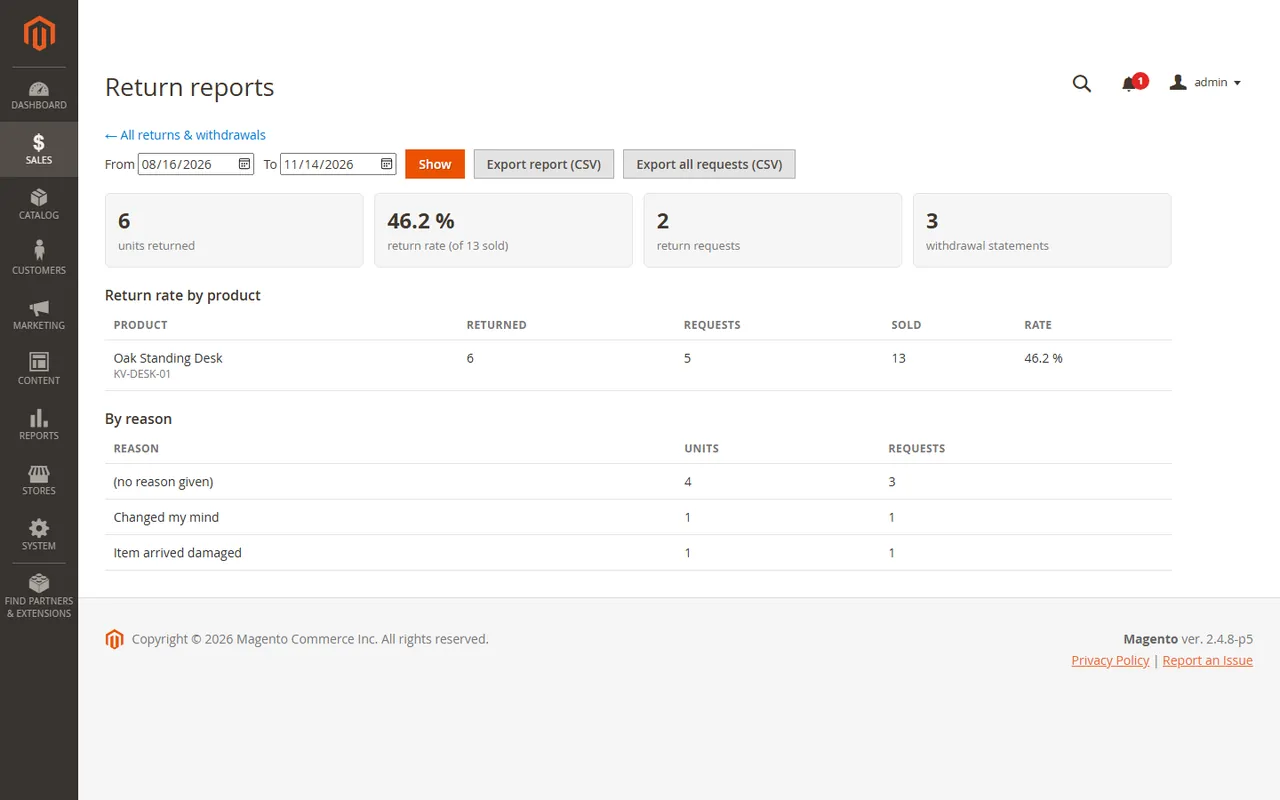
Sales > Operations > Returns & withdrawals > Reports shows, for a period you choose, the units returned, the return rate (returned units of products sold in the same period), return requests and withdrawal statements, the table by product and the table by reason. Export report (CSV) and Export all requests (CSV) download the data. Cells that start like a formula are escaped for spreadsheets.
Return rate by product and reason
FAQ
Does it work with Adobe Commerce?
The module is built and tested for Magento Open Source. Adobe Commerce has its own RMA; this module does not replace it and is not tested against it.
Does it make my shop compliant?
No tool can promise that. The module helps you offer a clearly labelled withdrawal function that works without a login and confirms the statement with date and time, which is what Directive (EU) 2023/2673 describes. How the rules apply to your shop, your goods and your terms is a question for your legal adviser.
Does it move the money?
It creates the credit memo through the Magento Sales API. With a payment method that can refund online, the money goes back through it. With a method that cannot, or when the online refund fails, the credit memo is created offline and the request says "refund the customer manually": you refund in your payment provider.
"The order cannot get a credit memo"
Magento needs a paid invoice first. Create the invoice (or capture the payment), then refund again, or create the credit memo by hand from the order.
What does the period start with?
You choose in the configuration: the order date, or the day of the first shipment. The statement button is available in both cases. Check the choice against your terms.
A customer sent a statement after the period. What now?
It is stored and flagged after the period. You decide whether to accept it. Returns started from My Account are refused after the period; the customer is pointed to the statement form instead.
A customer says the confirmation e-mail never arrived.
Open the request: the detail shows whether the e-mail was sent and has Send confirmation e-mail again. The statement itself is stored the moment the customer confirms, with its time. Check Stores > Configuration > Advanced > System > Mail Sending Settings if no e-mails leave the shop.
Is the form safe against bots?
The form is limited per connection address and per order number (default 20 attempts per hour, see Configuration). Forwarded headers are ignored unless the connection comes from a proxy you list under Trusted proxies.
Which data does the module keep?
Order number, customer name and e-mail (copied from the order), the chosen items, the optional message, the reason, timestamps, status history and, for refunds, the amount and the credit memo. Statements may be records you have to keep; module:uninstall --remove-data removes them, so export first.
Which storefront themes work?
The pages are server-rendered Luma markup with their own CSS classes (kv-rp-...). Other themes can restyle them.
Where do the e-mails come from?
From the store's sender identity "General Contact". The text is built by the module; customer input is never evaluated as a template.
Why does a customer not see an older guest order in the account?
The account returns page lists only orders placed with that customer account. An account e-mail address is not verified, so matching guest orders by e-mail would let anyone who registers with someone else's address see that person's orders. For a guest order the customer uses the "Withdraw from contract here" button (order number + e-mail), or you handle the return in the Administration.
XRechnung (UBL and CII) and Peppol BIS Billing 3.0 from Magento invoices and credit memos: Leitweg-ID, buyer VAT ID, EU VAT categories, validated before you send.
Sell by the metre, square metre, kilogram or litre: customers enter 2.35 m, the line total is rounded once and the unit shows in cart, orders and e-mails.