1.0.0
Nov 13, 2026
Latest- First release.

by Kavio Labs · for Magento Open Source 2.4.8
Custom stock status labels with colours, lead-time and ETA dates, pre-order and backorder text, stock-based rules and out-of-stock-last sorting.
Custom stock status labels with colours, lead-time and ETA dates, pre-order and backorder text, stock-based rules and out-of-stock-last sorting.
Magento tells shoppers "In stock" or "Out of stock" and nothing in between. Stock Status Labels & Lead Times lets you write the status in your own words, colour it, add a lead time and a dispatch date, and decide by stock level, category or product which status a product shows.
Stock Status Labels & Lead Times for Magento 2 works with Magento Open Source 2.4.8 (tested on 2.4.8, PHP 8.3).
We list the builds we install and test on. “Tested” means the test plan ran on that build; “Supported” means the build is inside the supported range.
| Version | Range | Runs on | Status |
|---|---|---|---|
| Magento 2.4.8 | Open Source 2.4.8-p5 | PHP 8.3 | Tested on 2.4.8-p5 |
| Editions | Magento Open Source | app/code (zip) or Composer | Self-hosted |
The Documentation tab covers the settings and every screen.
Magento Open Source 2.4.8 (tested on 2.4.8, PHP 8.3). Tested on Magento 2.4.8. The Compatibility tab lists every version range.
Yes. Every Magento module on this site is on sale: one-time price per production store, staging and development domains included, 12 months of updates and support.
Each product page says what was tested. Admin-only modules do not depend on the storefront theme; modules that change the storefront name the tested theme (Luma) on their Compatibility tab.
One license per production store domain, with staging and development domains included. 12 months of updates and support; after that the module keeps working.
Yes. Kavio Labs sells add-ons and plugins for CS-Cart, OpenCart, WooCommerce, PrestaShop and Shopware, with the same license portal and support desk.
One production store domain with every subdomain (www, shop., staging.), plus local development hosts such as localhost, *.local and *.test. A store on another domain needs its own license; a second-store license is 40% off. You have 14 days after installing to enter the key. 12 months of updates and support are included; after that the module keeps working and renewals are 50% off. How licensing works
Yes. Ask for a full refund within 30 days of your first purchase, no reason needed: open a ticket or write to [email protected] with your order number. The money goes back to the card or bank account you paid with within 5 business days of approval. Refund policy
Open a ticket from your account, so your license details are attached. We answer with a same-day reply on weekdays (Mon-Fri 09:00-18:00 UTC+3). Support policy. Not a customer yet? Ask a pre-sales question.
9 more answers about setup and daily use in the Documentation tab.
Custom stock status labels with colours, lead-time and ETA dates, pre-order and backorder text, stock-based rules and out-of-stock-last sorting.
Tested on Magento Open Source 2.4.8 (PHP 8.3). Compatibility with other versions is listed only after it has been tested. Not for SaaS editions that cannot run PHP modules.
{days}, {date} and {qty}, for example "Only {qty} left" or "Ships in {days}".composer require kaviolabs/module-stock-status-manager.bin/magento module:enable KavioLabs_StockStatusManager, bin/magento setup:upgrade and, in production mode, bin/magento setup:di:compile and bin/magento setup:static-content:deploy.app/code/KavioLabs/StockStatusManager/ (the folder holds registration.php).bin/magento commands as above.bin/magento module:disable KavioLabs_StockStatusManager (then delete the folder or composer remove the package and run setup:upgrade).bin/magento module:uninstall KavioLabs_StockStatusManager --remove-data; zip install bin/magento module:uninstall KavioLabs_StockStatusManager --non-composer, then module:disable, delete the folder and run setup:upgrade.Open Stores > Configuration > Kavio Labs > Stock Status Labels & Lead Times. The display, sorting and delivery settings can be changed per website and store view.
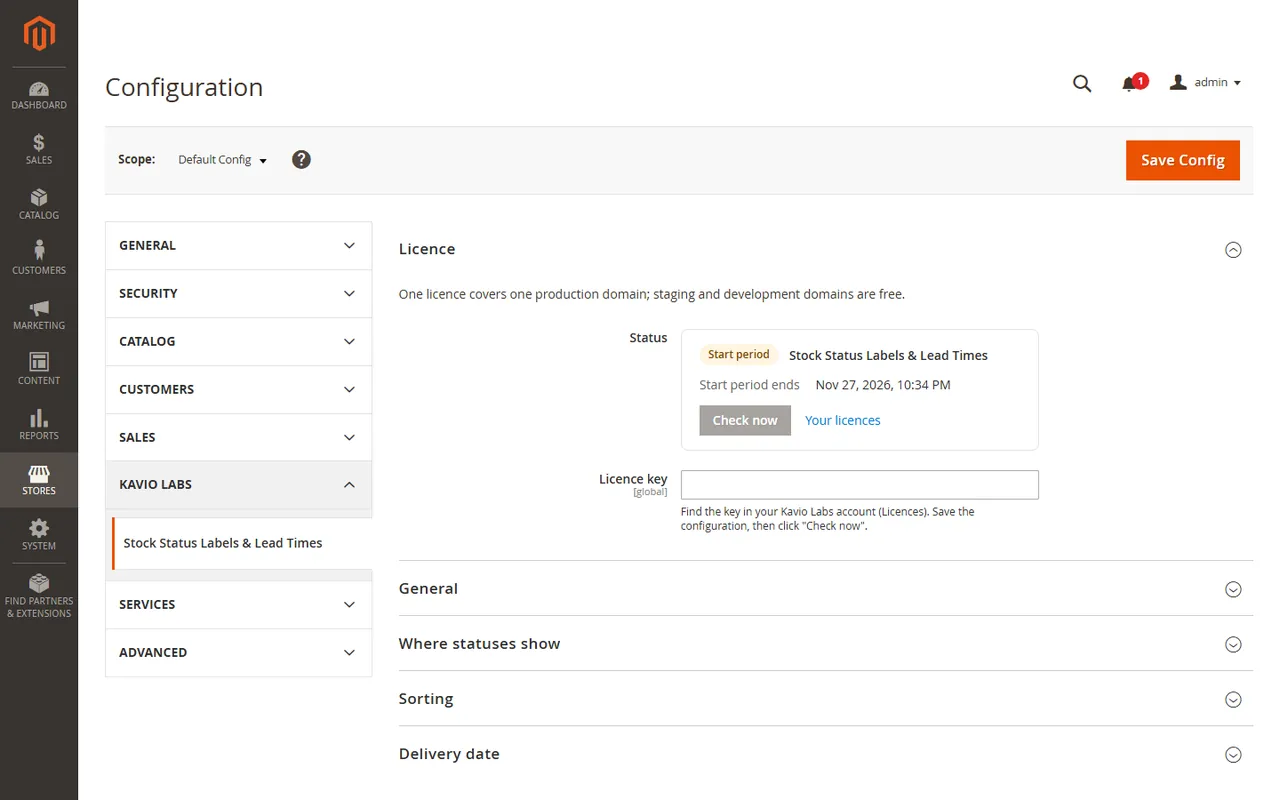
| Setting | What it does |
|---|---|
| Enabled | Turns every status on or off. Your statuses, rules and assignments stay. |
| Setting | What it does |
|---|---|
| Product page | The status under the price block of the product page. |
| Category and search listings | A compact badge (label only) on every product card. |
| Shopping cart lines | The status below the product name of each cart line. |
| Stock line of the product page | Add the status to the core line keeps Magento's In stock / Out of stock line next to the status, Replace the core line hides it when a status applies. |
| Badge shape | Rounded, pill or square. |
Out-of-stock products last puts the stock flag in front of the sorting of category and search listings. Whatever order the shopper picks (position, price, name, relevance) is kept inside the in-stock group and the out-of-stock group, and it is right across pages because the search engine does the sorting. It is off by default.
It needs the stock flag in the search index: Multi-Source Inventory with the module Magento_InventoryElasticsearch (the default of Magento 2.4) and Stores > Configuration > Catalog > Inventory > Display Out of Stock Products = Yes, otherwise there are no sold-out products in the listing to move.
| Setting | What it does |
|---|---|
| Count working days only | Saturday and Sunday are skipped when the dispatch date is counted. |
| Cut-off hour | An order placed at or after this hour (1-23) counts from the next working day. 0 = off. |
| Time zone | PHP time zone name (for example Europe/Berlin). Empty = the locale time zone of the store. |
| Holidays | Dates as YYYY-MM-DD, separated by spaces, commas or line breaks. Skipped when working days are counted. |
The date shown is "Dispatch by ..." in the locale of the store. Pages are cached by Magento: a changed status, rule, assignment or setting purges the affected pages (full page cache and Varnish) by the tag kv_ssm at once; a page that shows a dispatch date or a pre-order is cached only until the next midnight, cut-off hour or release moment of the store's time zone, so the date is never older than that.
The module adds two optional attributes to the General group of the product form: Available from (pre-order) (a date in the future shows the pre-order status until then) and Lead time in days (supplier) (used by statuses that take their lead time from the product).
Catalog > Inventory > Stock Statuses > Statuses lists your statuses. A status has:
{days} (for example "2-3 days"), {date} (the dispatch date) and {qty} (the stock) in either text;{days} and the dispatch date;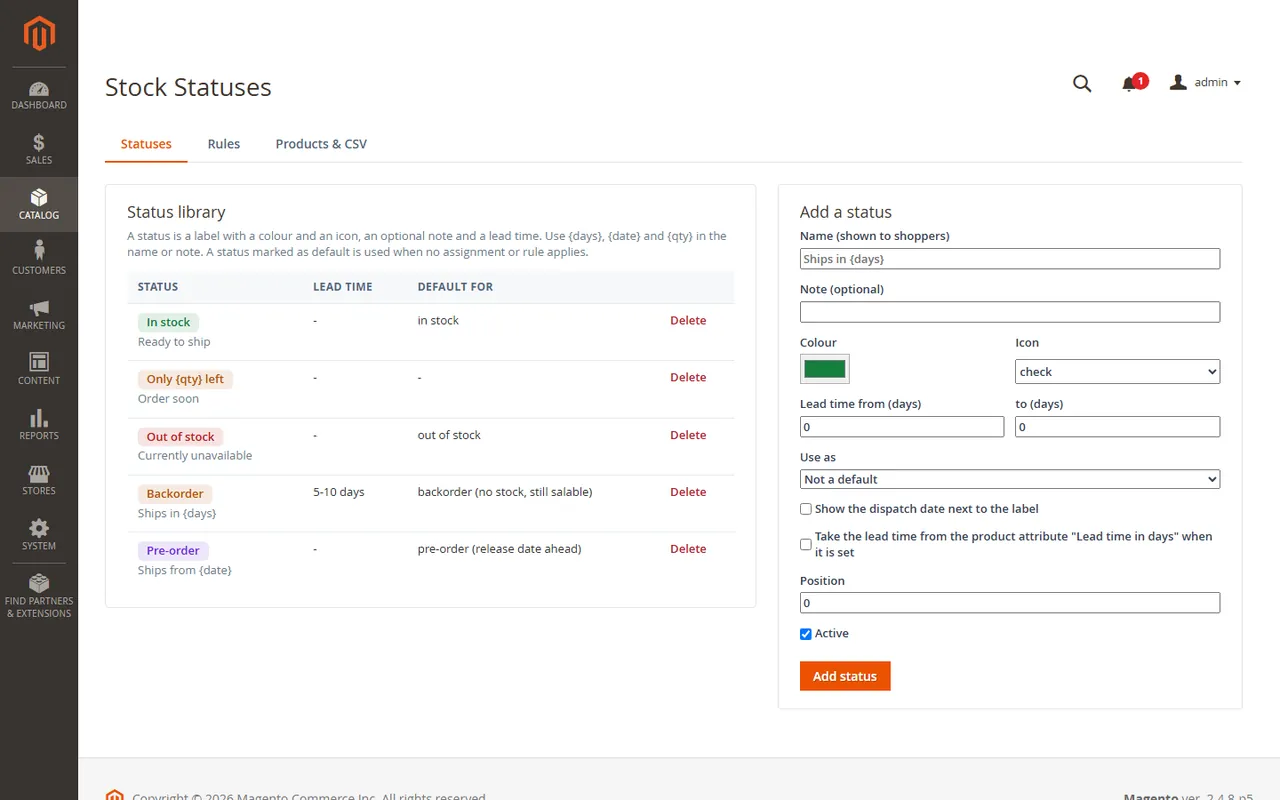
On the first install the module creates four statuses (In stock, Out of stock, Backorder, Pre-order) so the storefront works at once.
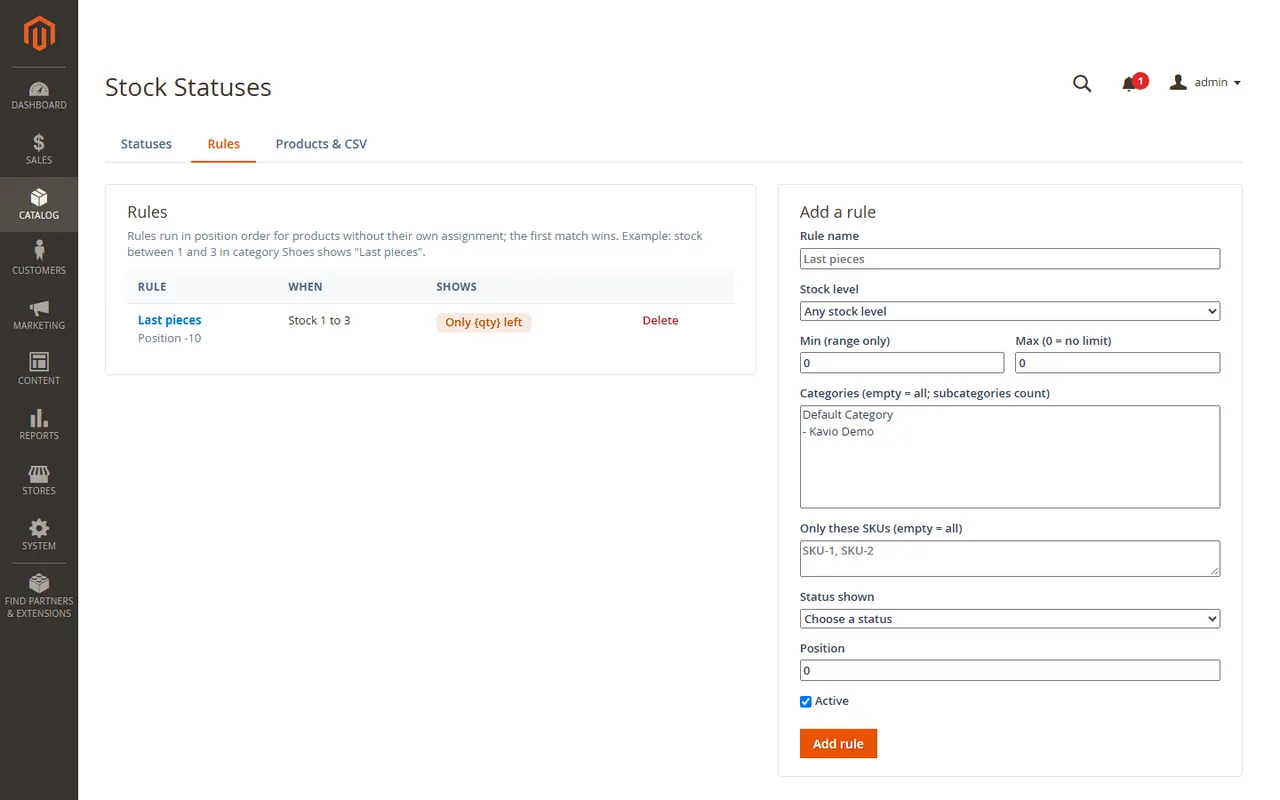
Rules pick a status for products without their own assignment. A rule combines a stock level (any, in stock, out of stock, or between a minimum and a maximum), optional categories (subcategories count) and optional SKUs. Rules run in position order and the first match wins. A status that is switched off is skipped.
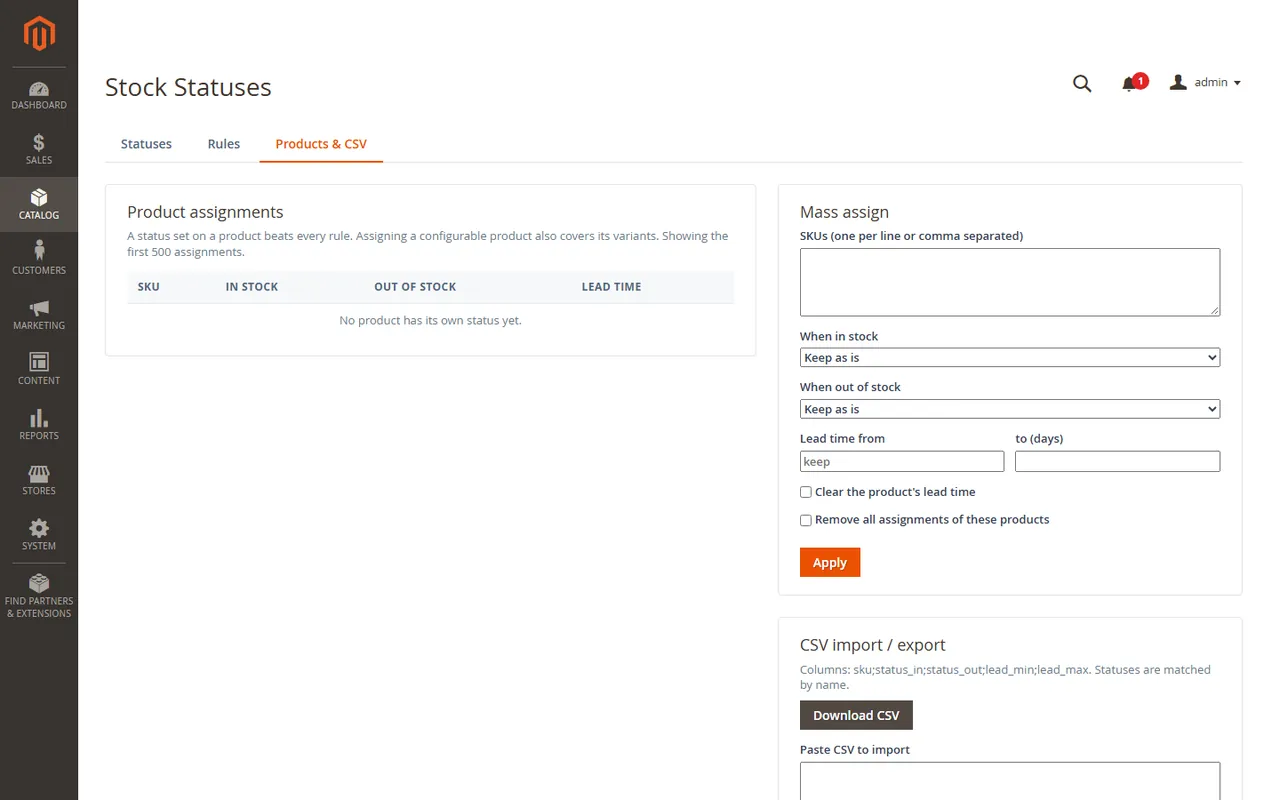
Products & CSV assigns statuses to many products at once: type SKUs (one per line or comma separated), choose the status for "in stock" and for "out of stock", and optionally a lead time. A status set on a configurable product also covers all of its variants. Assignments beat rules.
CSV export and import use the columns sku;status_in;status_out;lead_min;lead_max. Statuses are matched by name, so a file moves between stores. Lines with an unknown status are skipped and reported.
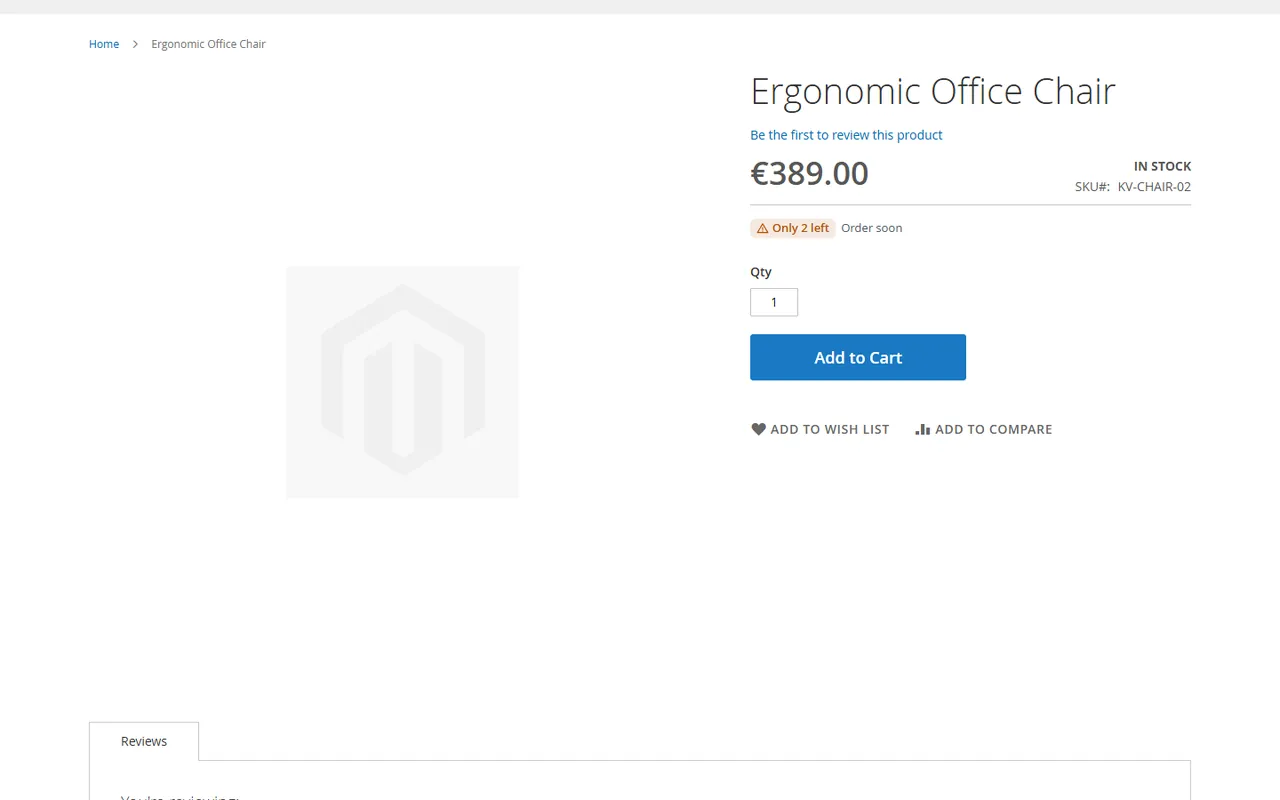
On the product page the status sits under the price. With a lead time it adds the dispatch date.
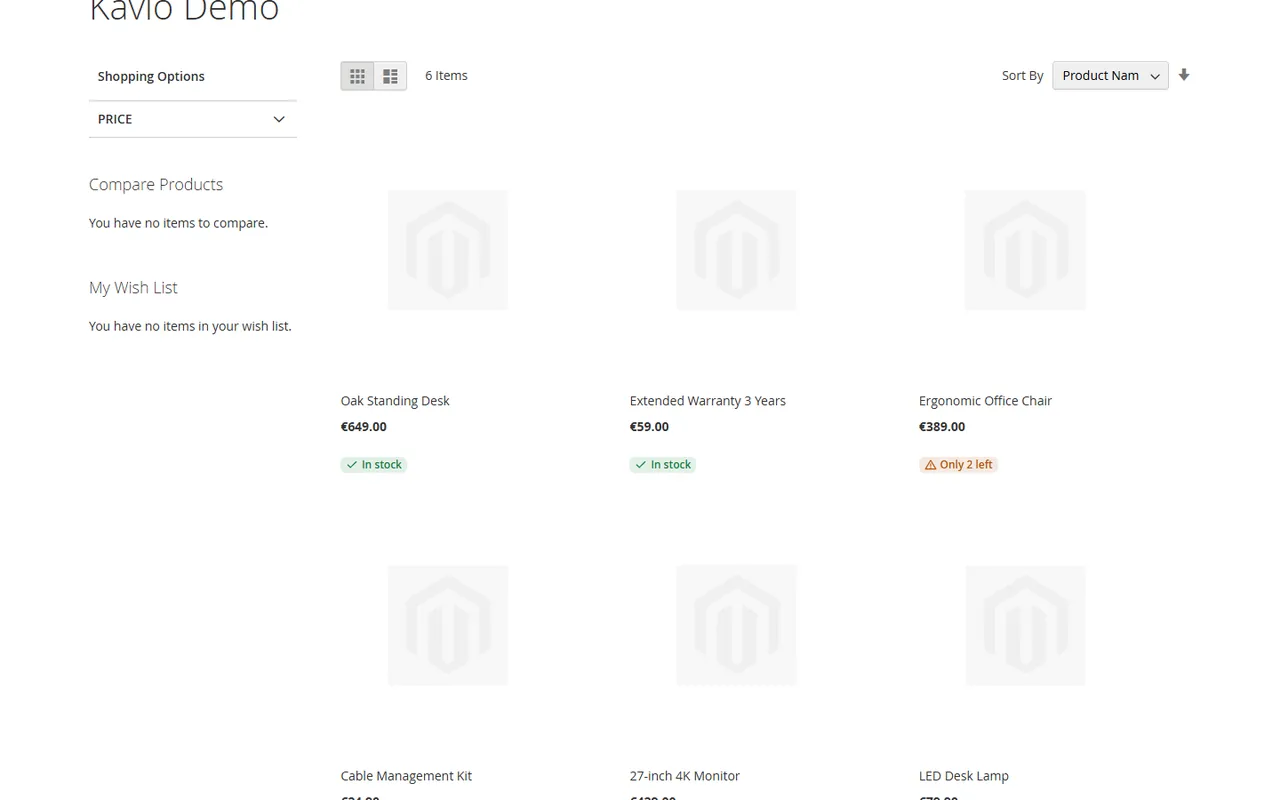
In category and search listings a compact badge shows the label only. With Out-of-stock products last switched on, sold-out products move to the end of every sort order.
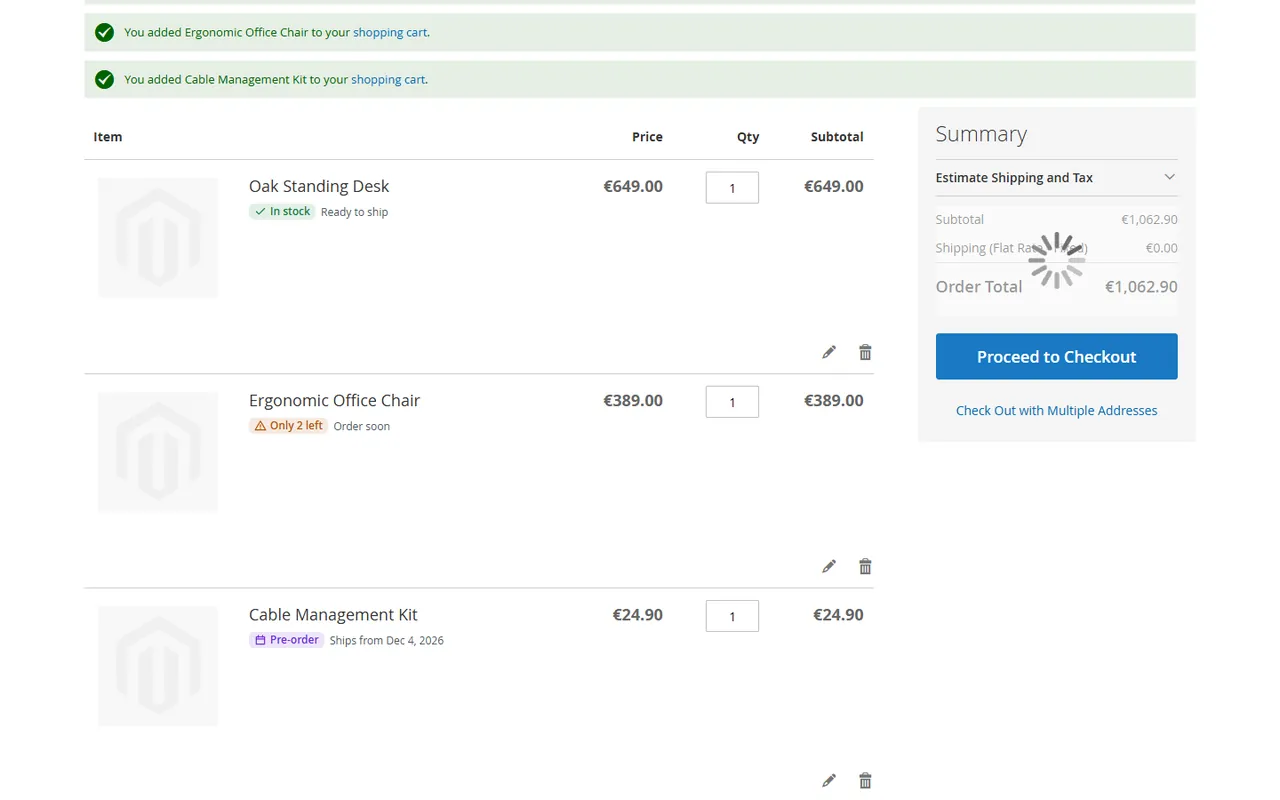
In the shopping cart each line shows its own status.
The module renders plain server-side markup and needs no Knockout or RequireJS on the storefront. Hyva themes that render the product card through the standard getProductDetailsHtml block hook show the listing badge; check the cart item template of your theme for the cart line.
No. It needs a store that runs PHP modules (Magento Open Source, self-hosted or on cloud hosting).
No. The statuses live in their own tables and are worked out when a page is built. Stock, sources and reservations are only read. The two optional product attributes are yours to fill in.
With Multi-Source Inventory the index of the stock that serves the current website (default stock or a custom one); without it the classic stock index. It is the indexed quantity: salable quantity reservations are not subtracted. Configurable products take the sum of their variants and are salable when any variant is. A cart line of a configurable product uses the stock of the variant in the cart.
Magento decides: a product that is salable without quantity (backorders allowed) is a backorder, a product that is not salable is out of stock. Pre-order means the release date attribute lies in the future. You can map a different status to each.
From today in the time zone you set, plus the lead time (the upper value of the range), skipping Saturdays, Sundays and your holidays when "Count working days only" is on. An order at or after the cut-off hour counts from the next working day.
The setting needs the stock flag in the search index (Magento_InventoryElasticsearch, part of Multi-Source Inventory), "Display Out of Stock Products" = Yes and a reindex of the catalog search index after you switch the setting on for the first time.
No. The store reads the stored result; the server is asked only from the Admin or once a day by cron after a key was entered.
[email protected], same working day on weekdays.
Buy with confidence
This product was tested on this build. Builds we did not test are not listed.
Updates and support are included in the price. The product keeps working afterwards; renewing is optional.
How licensing worksIf it is not what you expected, tell us within 30 days and we refund the order.
Refund policyPay by card, Apple Pay or Google Pay on Stripe's secure page. Your card number never reaches our server.
Ask a pre-sales questionSold by Kavio Labs Software Limited, registered in England and Wales No. 17532441. About us
More for Magento

XRechnung (UBL and CII) and Peppol BIS Billing 3.0 from Magento invoices and credit memos: Leitweg-ID, buyer VAT ID, EU VAT categories, validated before you send.

Sell by the metre, square metre, kilogram or litre: customers enter 2.35 m, the line total is rounded once and the unit shows in cart, orders and e-mails.

Upload one CSV or XLSX file with the day's tracking numbers: check the plan, then Magento creates every shipment. No e-mail unless you allow it.


